That’s what pushed me to go deep on the best absence management software out there. After reading through 1000+ G2 reviews, here are the top 5 absence management tools I found: Rippling, HROne, Keka, Sparrow, and greytHR. If you’re an HR manager, people ops lead, or anyone trying to bring order to how your company tracks and manages time off, this list is for you.
Whether you’re running a small team that needs better visibility, a global workforce juggling complex leave policies, or a completely remote team, these platforms can help you replace manual admin with automation, accuracy, and peace of mind.
5 best absence management software for 2026: My top picks
- Rippling: Best for teams that want HR, IT, payroll, and absence in one platform
Unifies HR, IT, payroll, and absence tracking with AI-driven automation and location-based compliance rules. (Custom pricing) - HROne: Best for distributed teams handling leave and attendance automation
Automates leave crediting, multi-branch policy management, and attendance reporting. ($52/month for 50 users*) - Keka: Best for mobile leave access with built-in payroll sync
Mobile self-service, configurable approval workflows, and automated arrear and tax calculations built into the payroll sync. ($105/month for 100 users*) - Sparrow: Best for US FMLA-compliant leave management
Automates federal and state leave filings with dedicated case managers guiding employees through medical, parental, and caregiving leaves. (Custom pricing) - greytHR: Best for India and Middle East teams managing payroll compliance
Handles PF, ESI, and TDS compliance automatically alongside a self-service portal for payslips, leave, and attendance. ($26/month for 50 employees*)
These are the top-rated solutions in the Absence Management Software category, according to the G2 Summer 2026 Grid Report. I’ve added their monthly pricing where publicly available to make comparisons easier for you.
*Converted from Indian Rupees to US Dollars at the rate of $1 = ₹94.92
5 best absence management software systems I recommend
According to a 2026 payroll compliance report, the average cost of payroll noncompliance now exceeds $845 per employee per year once fines, back wages, penalties, and internal remediation are factored in. Manual absence tracking is one of the biggest contributors: when leave data isn’t synced accurately with payroll, errors compound fast. The right software eliminates those risks while giving HR teams and employees the clarity they’ve been missing.
At its core, absence management software helps HR teams track, approve, and report employee time off, from PTO and sick days to remote or parental leave. Instead of juggling emails, Slack threads, and spreadsheets, everything lives in one place, syncing automatically with payroll and scheduling tools so nothing falls through the cracks.
The top employee attendance and leave tracking systems, like Rippling and HROne, go beyond tracking. They automate approvals, enforce company policies, and surface insights about absentee trends or burnout risks.
According to G2 Data, absence management software has an impressive average user adoption rate of 86%. The category primarily serves mid-market companies (49%), followed by small businesses (40%) and enterprise organizations (11%), a mix that shows how these tools scale effectively across team sizes.
How did I find and evaluate the best absence management software?
I started with G2’s latest Grid Report for Absence Management Software to create a shortlist of top-performing platforms based on real user satisfaction and market presence. From there, I evaluated 10+ solutions before narrowing it down to the five you’ll find here.
Then, I used AI to analyze over 1,000 verified G2 reviews for these tools, focusing on patterns around ease of setup, policy customization, accuracy in leave tracking, and integration with payroll or HRIS tools. This helped me quickly see which platforms consistently deliver value and which ones struggle with usability or reporting.
Since I haven’t used these platforms directly, I grounded my findings in expert insights from HR and operations leaders and cross-checked their feedback with what real users reported on G2.
All screenshots featured in this article come from G2 vendor listings and publicly available product documentation.
What makes the best absence management software: My criteria
While digging through G2 Data and chatting with HR managers across industries, I started seeing clear patterns in what teams actually value. Here’s what I prioritized when evaluating the tools for absence management:
- Ease of setup and implementation: I looked for tools that are quick to roll out, ideally ones that don’t require weeks of IT support. The best systems walk you through policy setup, approval routing, and integrations, so you can start managing leave within days, not months.
- Policy flexibility and customization: No two companies handle leave the same way. I prioritized platforms that support everything from PTO accruals and carryovers to region-specific holidays, unpaid leave, and sick time policies, all configurable without complex backend edits.
- HRIS and payroll integration: I paid special attention to how well each platform integrates with popular HR systems like Workday, ADP, BambooHR, and Rippling. A great absence management system should sync employee data, update leave balances in real time, and feed payroll directly to avoid costly mismatches.
- Automation and workflow intelligence: The best tools remove friction with automated request routing, notifications, and approvals. Some even detect overlapping leaves, auto-calculate accruals, or flag potential compliance issues before they become a problem.
- Employee self-service experience: I favored platforms that let employees check balances, submit requests, and see approval statuses without waiting on HR. A clean, intuitive dashboard or mobile app can reduce back-and-forth communication dramatically.
- Reporting and real-time analytics: Visibility matters. I looked for software that offers clear dashboards and exportable reports showing absentee patterns, utilization rates, and department-level insights that help HR teams forecast workload and identify burnout risks.
- Compliance management: Between FMLA in the U.S. and GDPR in Europe, compliance isn’t optional. I prioritized tools that automatically apply local labor laws, maintain audit trails, and offer role-based access control to protect sensitive data.
- AI and predictive insights: The best platforms in 2026 go beyond tracking. I looked for tools that use AI to flag absenteeism patterns, surface burnout risks early, and automate repetitive tasks like policy application and approval routing.
- User interface and mobile experience: A smooth, modern interface can make or break adoption. I leaned toward systems that work just as well on mobile devices, making it easy for managers and employees to manage leave on the go.
Based on everything I’ve learned, I’ve narrowed it down to the five best Absence Management Software. Each one solves a different problem: some are built for speed and simplicity, others for deep integrations or advanced compliance workflows. As you compare, focus on what matters most to your team: whether that’s usability, automation, scalability, or how well it fits into your existing stack.
The list below contains genuine user reviews from the Absence Management Software category. To be included in this category, a solution must:
- Help administrators manage absence requests and approvals
- Allow companies to define relevant absences
- Improve management reporting
- Maintain compliance across multiple geographies with regard to geo-specific provincial, state, or federal laws, as well as corporate and union policies
*This data was pulled from G2 in 2026. Some reviews may have been edited for clarity.
1. Rippling: Best for teams that want HR, IT, payroll, and absence in one platform
Rippling is well-known as one of the best payroll software in the market, and I was not surprised to see it out as one of the highest-rated absence management tools on G2 given how much it offers.
As I went through hundreds of G2 reviews, a consistent theme stood out: HR teams often describe the experience as intuitive and surprisingly quick to implement. Small businesses make up 28% of Rippling’s user base, mid-market companies 64%, and enterprise users 8%, a spread that reflects how well it adapts across team sizes.
From what I found, users frequently highlight how Rippling makes absence tracking feel effortless. One of the key features is the unified flow from time tracking to payroll: approved hours feed directly into payroll, avoiding manual spreadsheets or disconnected systems. HR, IT, finance, and absence management all live in one place, which means onboarding a new employee, provisioning their apps, enrolling them in benefits, and setting up their leave policy can all happen from a single workflow.
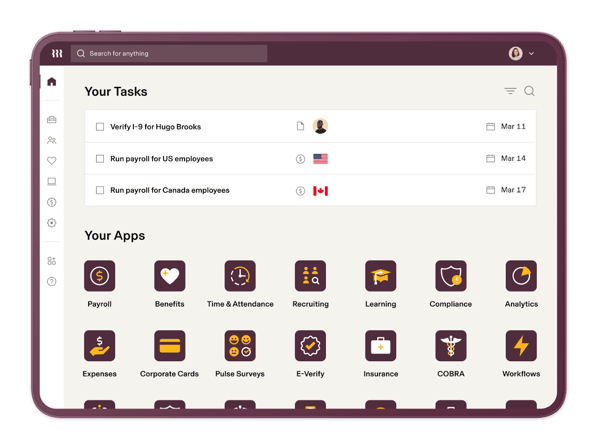
What also impressed me reading through reviews is how actively Rippling has built AI into its operational layer. Smart AI insights now surface during onboarding and throughout day-to-day HR workflows, helping managers catch gaps, act faster, and reduce the back-and-forth that bogs down people operations teams. The automation engine, as reviewers describe it, is probably the most distinctly intelligent part of the platform.
The platform also automatically applies pre-built labor-law policies based on location, helping HR teams stay compliant across different geographies. Automated workflows for alerts, such as for unapproved timesheets or missed clock-outs, further reduce admin burden. For companies with employees spread across multiple states or countries, this built-in compliance layer removes a significant amount of manual tracking and legal risk.
These capabilities align neatly with how users rate the product. Performance, mobility, and security are its highest-rated features on G2, with scores above 94%, and it sits well above the category average on ease of use (96%) and ease of setup (94%). Users trust it to handle sensitive employee data while keeping things fast and accessible across devices.
Where Rippling asks for patience is the initial discovery period. The platform packs so much into one system that new users sometimes feel overwhelmed before they find their footing. It’s less about the platform being difficult and more about there being a lot to unlock. Most reviewers say the adjustment takes a few weeks, after which the depth feels like an asset rather than a blocker.
Overall, I’d recommend Rippling to mid-sized and growing companies looking for a unified system that handles HR, payroll, and absence management without the usual friction. With a 4.8 out of 5 G2 rating and 99% of users giving it 4 or 5 stars, Rippling doesn’t just simplify leave tracking. It brings everything HR teams need under one roof, making absence management almost effortless.
What I like about Rippling:
- I really like how effortlessly Rippling connects absence tracking, time and attendance, and payroll. Once leave or hours are approved, everything updates automatically across the whole system.
- The AI-driven automation is genuinely impressive. From onboarding workflows to day-to-day HR tasks, the platform keeps reducing manual work in ways that feel like the product actually learns how your team operates.
What G2 users like about Rippling:
“Rippling feels like an all-in-one platform, not just an HR tool. It handles payroll, HR, IT, expense management, automated onboarding workflow mechanism, and app access in one place. Rippling’s automation engine is probably the most valuable intelligent aspect of the platform. The UI is excellent and easy to use. Payroll processing is fast, very performant.”
– Rippling review, Phanindra N.
What I dislike about Rippling:
- The sheer density of features means new users can feel overwhelmed before things click into place. It’s not that the platform is hard to use, it’s that there’s genuinely a lot to discover. Most people on G2 say a few weeks is all it takes before navigation starts feeling second nature.
- The system can slow down during peak payroll cycles, and occasional loading delays have been flagged by reviewers working with larger data sets. For most day-to-day tasks it’s fast, but high-volume periods are where this shows up most.
What G2 users dislike about Rippling:
“The system can suffer from occasional slow loading times during peak payroll cycles, and the massive density of its interconnected features can make the interface feel overwhelming for smaller teams.”
– Rippling review, Aditi P.
2. HROne: Best for distributed teams handling leave and attendance automation
I know HROne as one of those platforms that quietly does the heavy lifting for HR teams, covering both core HR and HCM features based in India.
When I started digging into G2 reviews, it was clear why so many users swear by it. HROne doesn’t try to reinvent HR; it just makes everyday processes like absence tracking, leave approvals, and policy management simpler and faster. It’s designed for teams that want automation without complexity, and that’s exactly where it shines.
It consistently scores high across categories like ease of use (97%), ease of setup (97%), and quality of support (97%), all well above the category average.
Most HR professionals mentioned on G2 how much they appreciate HROne’s automation capabilities. From defining company-specific leave policies to automatically crediting leaves based on tenure or rules, it simplifies what would otherwise be a manual, error-prone process. Arrear calculations also run automatically when attendance corrections or salary revisions come in, which saves finance and HR teams from having to untangle discrepancies at month-end.
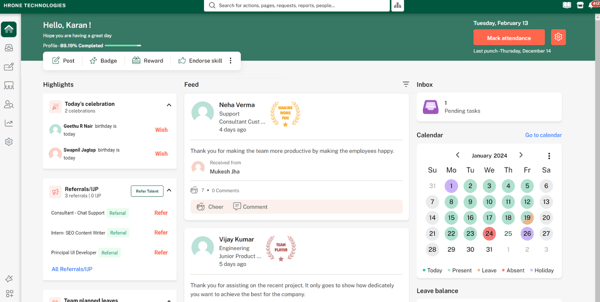
Policy updates and credit adjustments run seamlessly in the background, which is a huge relief for teams managing hundreds or even thousands of employees. The platform supports multi-site operations, letting companies create and circulate distinct holiday calendars across branches.
The reporting side of HROne also stands out. Its dashboard turns absence and attendance data into something genuinely actionable. You can track trends, view utilization rates, and spot gaps across departments, all without having to pull data manually from different modules.
Some users on G2 note the navigation can require more clicks than users expect, and some sections feel less streamlined compared to newer HR tools — something worth factoring in if your team prioritizes a modern UI out of the box. For most day-to-day tasks like leave tracking, payroll, and attendance, the layout is straightforward once you find your footing
G2 users clearly find HROne both approachable and well-supported. It earns an impressive 4.8 out of 5 rating on G2, with 100% of reviewers rating it 4 or 5 stars. I’d recommend HROne to mid-market and enterprise HR teams that want a unified system to manage absences, policies, and multi-location operations efficiently.
What I like about HROne:
- I really like how HROne automates the full leave policy cycle, from defining rules and tenure-based crediting to syncing calendars across branches. It takes a lot of the manual coordination off HR’s plate and keeps everything consistent.
- The reporting and analytics dashboard gives HR teams real-time visibility into attendance, absentee trends, and policy usage in a way that’s actually easy to act on.
What G2 users like about HROne:
“HROne is a strong choice for mid-sized companies, providing a comprehensive HR solution that can grow alongside the organization. Its payroll accuracy, compliance management, attendance tracking, and employee self-service features are all excellent. The intuitive interface also helps minimize the time needed for training both employees and HR staff.”
– HROne review, Vignesh S.
What I dislike about HROne:
- According to some G2 reviews, new users coming from simpler tools sometimes find HROne’s depth takes time to navigate. Once familiar with the layout, most find it intuitive and easy to work with daily.
- Few users note that some third-party integrations can run into sync issues, adding manual steps for some teams. But for most standard setups, especially with biometrics tools, HROne works well.
What G2 users dislike about HROne:
“Sometimes I face issues with third-party tool integrations. For example, Google Meet and the calendar don’t work properly at times, and some hiring portals also don’t function as expected.”
– HROne review, Abhishek K.
When to expect ROI from absence management software: What G2 Data shows
Based on G2 Data, most teams see a return on their investment from the tool in just 12 months after implementing the software. That includes time spent on setup, onboarding, and fine-tuning evaluation workflows.
If you’re wondering how long it takes to go live, what real users say about value for money, or which features deliver the strongest ROI, you can dig into the full G2 Grid Report.
3. Keka: Best for mobile leave access with built-in payroll sync
I’ve known Keka for quite some time as one of the most well-known cloud-based Human Resource Management System (HRMS) and payroll platforms in the market based in India. What’s always stood out to me is how Keka balances sophistication with usability. It’s powerful enough to handle complex HR operations, yet simple enough for employees and managers to use daily without training.
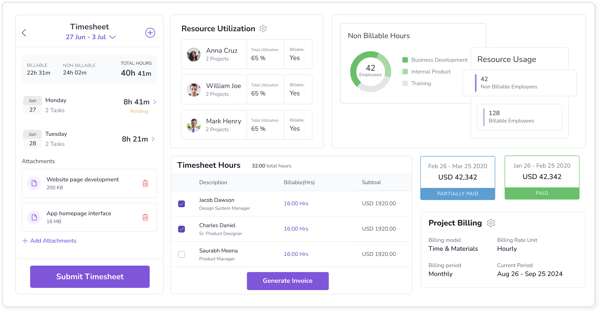
Keka makes leave approvals straightforward but flexible. The mobile app allows employees to apply for leave, request work-from-home days, or claim compensatory offs on the go. They can instantly view their leave balances and history, keeping everything transparent and self-service. For distributed teams or employees who work across locations, this kind of mobile accessibility removes a whole layer of friction that would otherwise land on HR’s desk.
Managers and HR teams benefit too. HR teams can build custom approval workflows, assign replacement leave approvers, and even set skips for delayed actions, all with automated notifications and tracking so nothing slips through. It’s the kind of detail that ensures teams stay organized while keeping processes transparent.
Behind the scenes, Keka’s seamless payroll integration ensures every leave action translates correctly into pay calculations. Automated arrear adjustments based on predefined rules eliminate manual intervention and reduce payroll discrepancies. The platform also generates tax forms automatically, which reviewers consistently call out as a genuine time-saver during filing season.
According to G2 Data, the platform has earned strong scores for ease of use (94%), ease of admin (93%), and ease of setup (92%). Its highest-rated features include security (91%), alerts and notifications (90%), and reporting (89%), which reflect how the platform helps HR teams stay organized without micromanaging data.
Keka’s user base spans 22% small businesses, 75% mid-market, and 3% enterprise, which reflects its sweet spot: scalable enough for growing teams, yet simple enough for smaller ones to implement quickly.
Where some G2 reviewers push back is on customization. Teams with highly specific leave policies or non-standard payroll rules sometimes find the platform’s structure limits how far they can configure things. Keka ships updates regularly, and for most mid-market setups the existing configurability covers what teams actually need day to day.
On the whole, Keka maintains an impressive 4.5 out of 5 G2 rating, with 98% of users rating it 4 or 5 stars. I’d recommend it to mid-sized organizations and growing businesses looking for a dependable system to handle leave management, attendance tracking, and reporting within a broader HR suite.
What I like about Keka:
- I like how the mobile app makes it genuinely easy for employees to manage leave, attendance, and payslips on the go, without ever having to call HR. That kind of self-service access makes a real difference for distributed teams.
- The payroll integration is tightly built. Every leave action flows automatically into pay calculations, and the arrear adjustments run themselves, which takes a significant amount of manual reconciliation off the finance team’s plate.
What G2 users like about Keka:
“Keka is very easy to use and covers almost everything we need: attendance, payroll, leave, and performance reviews. It’s well-organized, and the setup was smooth. The customer support team is quick and helpful, and we use Keka every day without issues. The reason we moved to Keka was its pricing as compared to other tools and more enhanced product features.”
– Keka review, Kalpana S.
What I dislike about Keka:
- Teams with unique leave policies or complex payroll rules may find Keka’s structure a bit rigid. It’s more of a trade-off than a flaw though, the standardized setup is exactly what keeps it reliable and easy to scale.
- The mobile app occasionally runs into sync issues and slow loading for heavier tasks like detailed attendance records. For everyday use like approvals and leave requests, it’s consistently smooth and fast.
What G2 users dislike about Keka:
“While using Keka I have faced issues while loading the pages as they take a lot of time, especially while handling a large database. There are some bugs with the mobile application and some missing features. Sometimes I faced issues with documents to open as the mobile application supports only PDF format and doesn’t support other formats.”
– Keka review, Prasanth N.
If you are a small business, time tracking data becomes even more valuable when integrated with the best project management software to calculate wages seamlessly.
4. Sparrow: Best for US FMLA-compliant leave management
Sparrow was a new discovery for me, but after looking into G2 reviews and product details, it quickly stood out for how specialized it is. Unlike all-in-one HR platforms that try to do everything, Sparrow focuses solely on leave management, especially major life-event leaves like medical, parental, or caregiving, in the U.S. and Canada, and that focus shows. It’s built for precision, compliance, and care.
Users love how it automates complex leave processes while maintaining a clean experience. With ease of use at 95% and ease of setup at 97%, most teams describe it as easy to get started with, but powerful once you dig into what it can do. It is integrated with payroll and HRIS via file feed and even with third-party insurances.
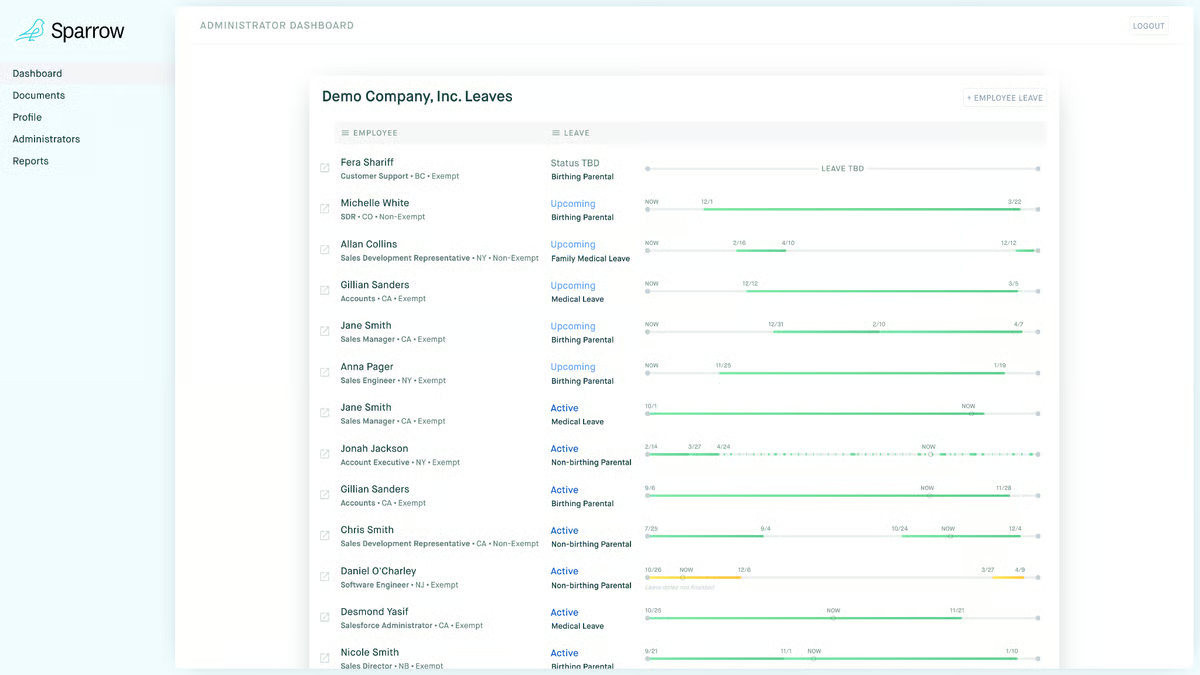
What I found particularly interesting is how deeply Sparrow handles compliance. It automatically manages federal, state, and local filings for leave of absence, a significant operational lift for companies juggling multiple jurisdictions or remote employees across states. The platform calculates eligibility automatically, tracks protected leave time, and summarizes job protection details in one dashboard, eliminating manual spreadsheets and guesswork entirely.
What also makes Sparrow genuinely different is how it centralizes all the paperwork coordination. Every deadline, every form, every state filing lands in one place, and your assigned case manager tracks it alongside you. Something that would normally require hours of research and back-and-forth with HR gets handled through clear, timely email instructions. Reviewers going through parental leave, medical leave, or caregiving leave consistently mention how much stress this removes.
Beyond the technology, what really makes Sparrow shine is its human touch. The platform’s quality of support (97%) rating reflects what users consistently mention: knowledgeable leave specialists who guide employees through even the most sensitive or complicated cases. That hands-on support transforms what’s often a stressful process into something predictable and smooth.
Sparrow is especially popular with mid-market organizations (69% of its users), which often need scalable compliance solutions without enterprise-level complexity. It supports both the U.S. and Canada, which means companies operating across both countries can manage all leaves in one system instead of juggling separate processes or vendors.
One thing I noticed in G2 reviews is that a few users felt unclear about exactly where Sparrow’s scope ends and their internal HR team’s begins. When there are multiple tools involved, like a third-party insurer or a separate HRIS, it’s not always obvious who owns which step. For teams that take time to map out that division of responsibility upfront, this is a non-issue. Sparrow’s team is responsive enough to clarify, and most reviewers describe the overall process as genuinely simple once the setup is done.
With a 4.8 out of 5 rating on G2 and 99% of users giving it 4 or 5 stars, Sparrow has earned its reputation as the best software for compliance-friendly absence reporting. I’d recommend it for mid-market and enterprise HR teams that need to manage complex leave laws without the headache. It’s not trying to replace your HRIS. It’s built to make one of HR’s most complex processes feel effortless.
What I like about Sparrow:
- I really like how Sparrow focuses entirely on leave management instead of trying to be an all-in-one HR system. Its automation and compliance-first approach make managing FMLA and other regulated leaves genuinely stress-free.
- The dedicated case manager model stood out to me. Having one person track every form, filing, and deadline alongside you changes the experience entirely, especially for something as sensitive as medical or parental leave.
What G2 users like about Sparrow:
“It organized all the forms I needed to submit and confirmed my leave timeline with HR, helping me get my leave approved without stress. I really appreciated communicating with a real person, Sarah, which made me feel comfortable asking any questions, knowing a real person was handling my leave. The dashboard is straightforward and user-friendly.”
– Sparrow review, Faithe Z.
What I dislike about Sparrow:
- Some users find it unclear what Sparrow handles versus their internal HR team or third-party insurer. Teams that map this out upfront tend to find the whole process runs smoothly.
- The initial kick-off can feel slow to get started, and a few reviewers wanted clearer step-by-step guidance before the first call. Once the leave is underway, the experience consistently gets high marks.
What G2 users dislike about Sparrow:
“There are certain things that I needed to go to TriNet for that Sparrow didn’t support. It was a little confusing understanding what Sparrow supports versus what I had to figure out on my own.”
– Sparrow review, Esmeralda M.
5. greytHR: Best for India and Middle East teams managing payroll compliance
greytHR was a natural addition to this list once I started looking at what organizations across India and the Middle East are actually using for absence and payroll management at scale.
What immediately stands out about greytHR is how systematically it handles payroll. Salary processing, PF, ESI, and TDS calculations all run automatically each cycle without manual intervention, which reviewers consistently describe as one of the most reliable parts of the platform.
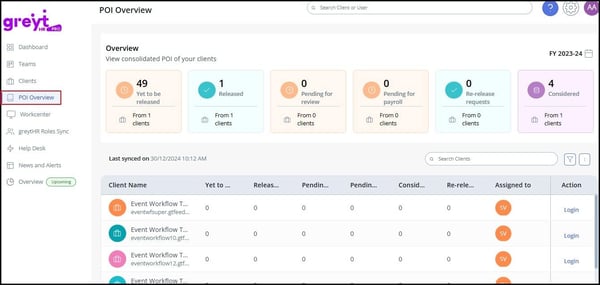
The employee self-service portal is the feature that comes up most in day-to-day reviews. Employees can access payslips, mark attendance, apply for leave, and download tax forms entirely on their own without raising a ticket. For busy HR teams, the volume of routine queries this absorbs is significant.
greytHR scales well across organization sizes. Its user base spans 25% small businesses, 64% mid-market, and 11% enterprise, and reviewers at larger organizations specifically call out that it handles the breadth without feeling overcomplicated, which matters when statutory compliance requirements vary by state and headcount.
Where greytHR draws consistent feedback is around its interface. The UI feels dated compared to newer HR tools, and navigating between sections can require more clicks than necessary. That said, the data and features are all there, and most users find that once they’re past the initial adjustment, the day-to-day experience is straightforward and reliable.
With a 4.4 out of 5 rating on G2 and a strong presence across India and the Middle East, greytHR is a solid choice for HR teams that need statutory compliance, payroll accuracy, and employee self-service in one platform. I’d recommend it especially to mid-market and enterprise organizations operating in regions where PF, ESI, and TDS compliance are central to HR operations.
What I like about greytHR:
- I really like how PF, ESI, TDS, and payslip generation all run without manual intervention each cycle, which removes a significant source of errors and admin overhead for HR teams.
- The self-service portal is one of the better implementations I’ve seen. Employees handling their own attendance, leave, and payslip downloads without raising tickets frees up HR for higher-value work.
What G2 users like about greytHR:
“I love that everything is streamlined in one place, solving issues related to regularization, payroll accuracy, and compliance, like PF, ESI, and TDS. With greytHR, I can process payroll smoothly and control last-minute issues. The payroll and attendance management features are simple to use and structured so that once the data is updated, payroll processing is smooth with very little manual intervention.”
– greytHR review, Vinoth Kumar K.
What I dislike about greytHR:
- The interface feels dated, and navigation between sections requires more steps than most modern HR platforms. Finding specific reports or completing multi-step tasks isn’t always immediately obvious, especially for new users. The underlying capability is solid, and once you know where things are, the day-to-day experience is manageable.
- Report customization is limited. Getting data out in a tailored format, filtered by specific parameters or structured for compliance audits, often requires extra manual steps or exports. For teams that rely heavily on custom reporting, this is a friction point worth factoring in before committing.
What G2 users dislike about greytHR:
“One thing I dislike about greytHR is that the UI feels a bit outdated and navigation isn’t always smooth. Sometimes it takes a few extra clicks to find simple things like leave history or past payslips, and the system can feel slightly slow during peak times like month-end. The mobile experience could also be improved, as it’s not always as intuitive as the web version.”
– greytHR review, Vijay H.
Best absence management software: Frequently asked questions (FAQs)
Got more questions? G2 has the answers!
Q1. What is the best absence tracking software with mobile access?
Keka and HROne are the strongest options for mobile access, with apps that handle leave requests, approvals, and attendance tracking on the go. Rippling also stands out with a unified mobile experience that connects time-off, payroll, and HR in one place.
Q2. What is the best employee leave management system for HR departments?
It depends on your context. Rippling is the strongest all-in-one option; HROne and Keka suit mid-market teams needing automation without complexity; Sparrow is purpose-built for regulated US and Canada leaves; and greytHR is the go-to for statutory compliance across India and the Middle East.
Q3. What is the best software for compliance-friendly absence reporting?
Sparrow leads for US and Canada teams navigating FMLA and state-specific leave laws, with automated filings and a dedicated case manager. For India and Middle East teams, greytHR is the strongest option, with PF, ESI, and TDS compliance built directly into the absence and payroll workflow.
Q4. What are the top employee attendance and leave tracking systems?
Rippling, HROne, and Keka are the top choices, all automating core tracking workflows and integrating with payroll. greytHR is a strong contender for India-based teams that need attendance management tied directly to statutory payroll compliance.
Q5. What are the top platforms for managing employee vacation and sick leave?
Keka, HROne, and greytHR are the top platforms for managing vacation and sick leave, each with strong automation and payroll integration for their respective markets. Sparrow is the right fit for teams managing FMLA, parental, or medical leave in the US and Canada.
Q6. What are the top-rated absence scheduling platforms for shift-based workforces?
HROne and Keka are top-rated for shift-based teams, with flexible scheduling policies and automatic alerts for overlapping leave. Both are widely used in manufacturing, healthcare, and retail, where shift coverage directly impacts operations.
Q7. What is the top absence tracking tool for remote teams?
Sparrow is a standout for remote teams, automating leave tracking and compliance across federal and state laws without requiring in-person coordination. Rippling is another strong fit, keeping HR, payroll, and time-off connected in one cloud-based system regardless of where employees are based.
Q8. Which absence management solution integrates with payroll systems?
Rippling leads on payroll integration, syncing time-off data directly to eliminate manual errors. Keka, HROne, and greytHR all offer tight payroll integration as well, with built-in statutory compliance automation for India and Middle East teams.
Q9. Which is the best absence management software for large organizations?
Rippling and HROne are best suited for large organizations, with the scalability, automation depth, and role-based controls that enterprise HR teams need. greytHR is worth considering for large India-based organizations managing high employee volumes with complex statutory requirements.
Q10. Which is the best cloud-based absence management tool?
Rippling, Keka, and greytHR rank among the strongest cloud-based options. Rippling suits global teams needing full-stack HR and payroll in the cloud; Keka fits mid-market teams wanting automation without overcomplication; and greytHR is the right fit for cloud-based absence and payroll management across India and the Middle East.
Absence managed
If there’s one thing I’ve learned while researching absence management tools, it’s that time off shouldn’t take up so much time to process. The best platforms don’t just log absences; they help companies run smoothly, build trust through transparency, and keep people operations humming even when half the team’s OOO.
What really stood out is how much absence management has evolved from being reactive to strategic. Today’s HR teams aren’t just tracking who’s off. They’re using absence data to spot burnout early, improve staffing forecasts, and even shape retention strategies. It’s less about managing leave and more about managing wellbeing.
Because when people know their time off is handled fairly and seamlessly, they come back more engaged, and that’s a metric every business should care about.
Efficient absence management reduces burnout. But recognition keeps employees motivated. Discover the top employee recognition software to build a culture of appreciation and performance.
(function(d, s, id) {
var js, fjs = d.getElementsByTagName(s)[0];
if (d.getElementById(id)) return;
js = d.createElement(s); js.id = id;
js.src = “//connect.facebook.net/en_GB/sdk.js#xfbml=1&version=v3.0”;
fjs.parentNode.insertBefore(js, fjs);
}(document, ‘script’, ‘facebook-jssdk’));