TL;DR
- What does VoIP stand for? Voice over Internet Protocol. Your voice travels as data across a broadband connection instead of down a telephone wire.
- How does a VoIP call actually work? Your voice is digitized, split into packets, routed across an IP network, and reassembled at the other end, usually in well under a fifth of a second.
- What is a VoIP number? A phone number that belongs to a software account rather than to a physical line at a physical address. That is why it follows you between devices, and why some services refuse it for SMS verification.
- Should I answer a call labeled “VoIP Caller”? The label identifies the carrier type, not the caller’s intent. A legitimate small business and a spam operation can produce the same one, so on its own it tells you very little.
- What types of VoIP are there? The distinction that carries legal weight is interconnected versus non-interconnected VoIP, not the “fixed versus non-fixed” framing sold by number marketplaces.
- What do businesses actually use VoIP for? Consolidation, above all. Among 5,700+ G2 reviewers who described the problem they were solving, 28.4% mention putting calls, texts, and video in one place, the most common theme by a wide margin.
- Who buys VoIP? Mostly small businesses. 63% of reviewers on G2’s Fall 2026 Grid Report come from companies of 50 employees or fewer, and top executives write a notably higher share of VoIP reviews than they do across G2 as a whole.
- How quickly does it pay off? Typical deployments go live in about 1.2 months and pay back in about 12.6 months, down from 14.8 months three years ago.
You almost certainly used VoIP today. If you took a WhatsApp call, answered on FaceTime Audio, dialed into a Teams meeting, or called a company whose phone system rang someone’s laptop, that call traveled over the internet rather than a telephone line.
In this guide, I’ll cover what VoIP is, how a call actually gets from your mouth to someone’s ear, what a VoIP number is and why some websites reject it, and what more than six thousand businesses on G2 told me they use it for.
What is VoIP?
VoIP is a technology for placing and answering phone calls across an internet connection, rather than through a dedicated telephone line. VoIP stands for Voice over Internet Protocol, and you will also see it written as Voice over IP or IP telephony. All three mean the same thing.
The difference from a traditional phone call is where the voice travels. A landline call runs over the public switched telephone network, or PSTN, a circuit-switched system that reserves a dedicated path for the duration of your call. A VoIP call digitizes the same speech and pushes it down the connection that already carries your email, sharing the network with everything else rather than reserving a lane.
That single change is what produces every other property of VoIP: the low cost, the ability to answer a work number on a personal laptop, the software features, and the dependency on your broadband connection.
VoIP is not new. Packet voice research began on ARPANET in the 1970s, with the Network Voice Protocol documented in RFC 741 in 1977. VocalTec released the first widely used commercial internet calling software in 1995. The Session Initiation Protocol that underpins most VoIP services today was standardized as RFC 3261 in 2002.
What are the features of VoIP?
VoIP handles the call itself, the number that call arrives on, and the routing that decides which device rings. The full answer is more specific than that. G2 scores VoIP products against 12 individual capabilities, grouped into three areas, and that list is the most complete account of what the software actually does.
Every capability carries a satisfaction score from the people using it, so the tables below do three jobs at once. They show what each capability does, what to prioritize, and what to watch out for.
1. Basic communication
This is the phone system doing the thing you bought it for, and the largest of the three areas at six capabilities. It covers connecting two people, the internal calls between colleagues, and the video conferencing features layered on top. It is also where the spread is widest, and the thirteen points between the top row and the bottom one are the most useful thing this data says.
Satisfaction is the share of G2 reviewers rating each capability favorably, from the Grid® Report for VoIP Providers, Fall 2026. Capabilities are listed highest to lowest. Sellers declare which capabilities they offer, so each score sits on its own base of responding products and is most reliable read within an area rather than across areas.
2. Advanced features
Three capabilities that sit between a caller and whoever eventually answers. None of them is glamorous, and all three are what a caller experiences before a person picks up. This is also where the highest-scoring capability outside plain calling lives, which is the VoIP number itself.
Satisfaction is the share of G2 reviewers rating each capability favorably, from the Grid® Report for VoIP Providers, Fall 2026. Capabilities are listed from highest to lowest. Sellers declare which capabilities they offer, so each score sits on its own base of responding products and is most reliable read within an area rather than across areas.
3. Access
How people reach the system rather than what the system does. Three capabilities covering the apps and connections that put a business line on whatever device someone is already working from, which is what makes VoIP workable for a team that is not sitting at desks.
Satisfaction is the share of G2 reviewers rating each capability favorably, from the Grid® Report for VoIP Providers, Fall 2026. Capabilities are listed highest to lowest. Sellers declare which capabilities they offer, so each score sits on its own base of responding products and is most reliable read within an area rather than across areas.
VoIP protocols and standards
Voice over IP relies on a network of protocols and standards to ensure smooth operation behind the scenes.
Core VoIP protocols
VoIP relies on several core protocols to facilitate communication over the internet. They are directly involved in establishing, managing, and transmitting voice communication over IP networks:
- Session Initiation Protocol (SIP): Initiates, manages, and terminates multimedia sessions like calls. It’s the conductor of the VoIP orchestra.
- Real-time Transport Protocol (RTP): Transports voice data by breaking it into packets for efficient internet transmission.
- Real-time Transport Control Protocol (RTCP): Monitors and ensures call quality by providing feedback on data stream performance.
- Secure Real-time Transport Protocol (SRTP): Encrypts voice data in RTP packets for enhanced security and privacy.
- Session Description Protocol (SDP): Describes participants’ capabilities in a call, ensuring compatibility.
Supporting VoIP protocols
Supporting VoIP protocols ensure that the necessary infrastructure and protocols are in place to enable voice communication over the internet. These protocols provide additional functionalities and support for VoIP deployments, enhancing security, reliability, and performance:
- H.323: Older standard for multimedia communication, including video conferencing.
- Media Gateway Control Protocol (MGCP): Manages media gateways connecting VoIP networks to traditional mobile phone systems.
What equipment do you need to set up VoIP?
While VoIP’s hardware requirements are less extensive than those for traditional phone lines, having the right equipment is crucial for a smooth and efficient VoIP experience.
- High-speed internet connection: A dependable and fast internet connection forms the foundation of VoIP. Optimal call quality and smooth operation hinge on a reliable internet connection. While standard Digital Subscriber Line (DSL) or cable internet may suffice for basic use, fiber optic connections offer superior performance for VoIP calls.
- VoIP phones: These physical handsets are purpose-built for VoIP calls. Resembling traditional landline phones, they connect to your network via an internet cable rather than a phone line. Many VoIP phones boast features like caller ID, call history, and voicemail.
- Router: While most homes and businesses already possess a router to connect devices to the internet, some VoIP providers recommend routers with Quality of Service (QoS) prioritization features. QoS ensures VoIP traffic receives network priority, mitigating the risk of call quality degradation during other internet activities like video streaming.
- Analog telephone adapter: An ATA is necessary to utilize existing analog phones with VoIP service. This device links traditional phones to the internet network, enabling VoIP functionality.
- Headset: Particularly beneficial for softphone users, a headset with a microphone facilitates hands-free communication during VoIP calls.
- Power over Ethernet (PoE) switch: This switch provides data and power to VoIP phones via a single Ethernet cable, simplifying installation and eliminating the need for individual power adapters.
How does VoIP work?
VoIP works by converting your voice into data and sending it over the internet connection you already have. That is why it needs so little equipment, and why almost all of the intelligence sits in software rather than in the network. Below is what a call requires, then what happens at each of its four stages.
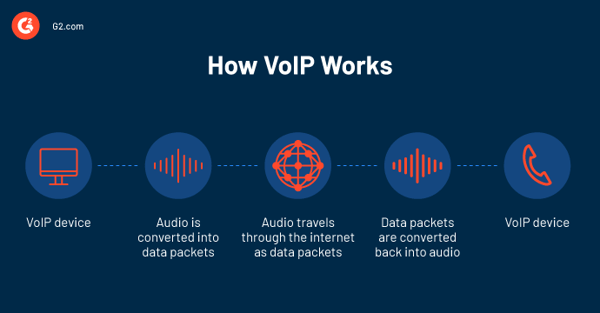
The four stages of a VoIP call
A call completes its round trip in well under 200 milliseconds. Before any audio moves, SIP (Session Initiation Protocol, RFC 3261) sets up the session, and SDP travels with it so both ends agree which codec to use. From there the call passes through four stages.
| 1. Your voice becomes data | A microphone captures the sound wave, and the codec converts it to digital | The codec: G.711, G.729, or Opus |
| 2. The data is split into packets | Audio is compressed and broken into small packets, each numbered and addressed | RTP packetization |
| 3. The packets cross the internet | Packets reach your provider, which applies your routing rules and forwards them | RTP over UDP, or SRTP when encryption is enabled |
| 4. The packets become sound again | The receiving device reorders the packets, decodes them, and plays the audio | RTCP, reporting on quality throughout |
Each stage has one thing worth understanding, and each is easier to see in a single call: a homeowner dialing a plumbing company’s main number.
Stage 1: where your bandwidth is decided
The codec agreed during setup determines how much detail survives and how much capacity the call consumes in each direction. It is the single biggest factor in what a call costs your connection.
In our call: the homeowner speaks, and before anything leaves the handset their voice is already a stream of numbers.
Stage 2: why the packets are numbered
Packets can take different routes across the internet and arrive out of order. The sequencing information stamped on each one is what lets the far end rebuild the audio correctly anyway.
In our call: about fifty packets leave the homeowner’s phone every second, each addressed toward the plumbing company’s number.
Stage 3: why VoIP uses UDP rather than TCP
TCP retransmits lost packets, which is the wrong trade for a live conversation: a packet that arrives late is worse than useless, because the moment it belonged to has already passed. Dropping it and moving on produces better audio. SRTP encrypts the stream, and it is worth knowing it is a setting rather than a default.
In our call: the provider applies the plumbing company’s routing rules and rings the office handset, the owner’s mobile app, and the on-call technician’s phone at the same time.
Stage 4: why consistency beats raw speed
Jitter, the variation in arrival time between packets, is what actually breaks calls. Unevenly spaced packets have to be held and reordered, and audio drops out when they arrive too late to be useful. A steady connection matters more than a fast one.
In our call: the technician answers, the other two devices stop ringing, and the homeowner hears a voice.
None of that routing logic lives in the network. It exists in the software that the plumbing company configured, which is the practical difference between VoIP and a phone line.
What is a VoIP number?
A VoIP number belongs to a software account rather than to a line at a fixed address. It looks identical to any other phone number and works with any other phone number. The difference is what it is attached to.
Because the number lives in software, four things follow:
- It works on any device: The same number can ring a desk phone, a laptop, and a mobile app at once.
- It moves: Take the business anywhere with an internet connection and the number goes too.
- It can be provisioned in minutes: There is no line to install, so adding a number is a configuration change.
- It is not tied to geography: You can hold a number with a New York area code without an office in New York.
Existing numbers can usually be moved to a VoIP provider through number porting, so switching does not mean losing the number customers already have. Reviewers rate the VoIP number capability at 91% satisfaction across G2’s Fall 2026 Grid Report, among the highest-rated features in the category.
Why some sites reject VoIP numbers
Some services will not accept a VoIP number for SMS verification and ask for a “non-VoIP number” instead, meaning a number issued by a mobile carrier.
The reason is the same property that makes VoIP numbers useful. They are cheap, they can be created in seconds, and they are not tied to a verified physical identity, which makes them attractive for creating fraudulent accounts at scale. Blocking them is a blunt instrument that inconveniences legitimate businesses, but it is a common one, and it is worth knowing before you rely on a VoIP number for account recovery.
What is a VoIP caller, and should you answer?
“VoIP Caller” on your caller ID means the number is registered to a VoIP provider rather than to a traditional telephone carrier. It identifies who carries the number, not who is calling.
Because VoIP numbers are cheap and quick to obtain, for the reasons described above, spam operations do use them heavily. So does almost every legitimate business: a plumber, a recruiter, and a doctor’s office all produce the same label, because most business phone systems sold today run on VoIP.
How carriers decide which calls to flag
Risk warnings such as “Scam Likely” or “Spam Risk” are produced differently from the carrier label, and they are the ones worth reading.
Congress passed the TRACED Act in December 2019, and the FCC required large voice providers to implement a caller ID authentication framework called STIR/SHAKEN across the IP portions of their networks by June 30, 2021. Providers with 100,000 lines or fewer had until June 30, 2023, which is part of why coverage is still uneven.
The framework lets the carrier originating a call attach a cryptographic signature at one of three levels:
- Full, or A-level: the carrier confirmed both who the customer is and that they may legitimately use the number appearing as the caller ID.
- Partial, or B-level: the carrier knows the customer but has not verified their claim to that particular number.
- Gateway, or C-level: the call entered the network from somewhere else, and the carrier has no relationship with whoever placed it.
Carriers combine attestation with their own analytics to produce the warnings you actually see on screen. Those reflect a judgment about the specific call. “VoIP Caller” reflects only a lookup of who carries the number.
So, should you answer?
Check whether your carrier added a risk warning. That is the label carrying information. “VoIP Caller” on its own is not, and is no reason either to answer or to ignore. Do not read a clean label as safety, though, because attestation covers a caller’s right to use a number rather than their intent.
Fixed vs. non-fixed VoIP
Providers and number marketplaces sell VoIP numbers in two forms: fixed numbers are tied to a registered physical address, and non-fixed numbers are not. The difference affects how quickly you can get a number, where you can get one, and how easily it can be traced back to you. What it does not affect is which rules your service has to follow.
| Tied to a physical address | Yes | No |
| Time to obtain | Longer, address is verified | Minutes |
| Traceability | Easier | Harder |
| Local number outside your region | No | Yes |
| SMS verification | Usually accepted | Often refused |
Non-fixed numbers are quicker to get and easier to acquire in bulk, which is why fraud operations favor them and why some services refuse them for verification.
Neither term appears in FCC rules, and neither decides what obligations your service carries. That is settled by whether the service is interconnected.
Interconnected vs. non-interconnected VoIP
Whether a VoIP service connects to the public telephone network in both directions is what determines the rules it has to follow.
The FCC defines interconnected VoIP at 47 CFR 9.3 by four conditions: the service enables real-time, two-way voice; it requires a broadband connection from the user’s location; it requires IP-compatible equipment; and it permits users both to place calls to and receive calls from the public switched telephone network.
That last condition is the hinge, and it decides which rules apply.
| Can call ordinary phone numbers | Yes | No |
| Can be called from ordinary phones | Yes | No |
| Typical example | A business phone system | Voice chat inside a game or app |
| E911 with a registered address | Required | Not required |
| Local number portability | Required | Not required |
| Universal Service Fund contributions | Required | Not required |
| Lawful intercept under CALEA | Required | Not required |
Those obligations are the practical reason the distinction matters. An interconnected service must deliver 911 calls with a registered address to the appropriate public safety answering point, must let customers take their number elsewhere, and must contribute to the Universal Service Fund, which is part of why your bill carries regulatory line items.
The two questions are independent, and conflating them is a common source of confusion. A number can be non-fixed and still fully interconnected, in which case it carries every obligation above. It is also worth being clear that the Telephone Consumer Protection Act, which governs unwanted calls and texts, applies based on how a call is made and to whom, not on which technology carries it.
VoIP vs. landlines
Reliability is what I think most VoIP-versus-landline comparisons are really about, and it is the landline’s one remaining advantage. An analog line draws power from the telephone company’s central office, so a corded handset keeps working in a blackout. VoIP needs both electricity and internet at your premises, and a power cut takes out both.
| Power outage at your site | Needs UPS or mobile failover | Keeps working on a corded handset |
| Internet outage | Calls fail without failover | Unaffected |
| Call quality | Depends on bandwidth and jitter; supports wideband audio | Consistent, narrowband |
| Moving offices | Number moves with the account | Tied to the address |
| Adding a line | Configuration change | Provisioning and often an engineer visit |
| Emergency calling | Requires a registered address kept current | Location known from the line |
| Included features | Auto attendant, voicemail transcription, recording, routing | Basic; extras billed separately |
| Devices | Desk phone, computer, mobile, or all three | The handset |
| Software integration | Connects to CRM and helpdesk tools | None |
Landlines beat VoIP on exactly one thing that matters, and VoIP beats landlines on most of the rest.
What do businesses actually use VoIP for?
Consolidation, more than anything else. Reading the problem descriptions from 5,700+ G2 reviewers, I found 28.4% mention running calls, texts, and video through a single platform, roughly double the next most common theme.
Here is the full picture, from that same base:
| Running calls, texts, and video on one platform | 28.4% |
| Everyday call handling: voicemail, routing, extensions | 12.2% |
| CRM and business app integration | 10.8% |
| Call and telecom cost | 10.8% |
| Call recording, tracking, and quality monitoring | 10.5% |
| Reliability, call quality, and not missing calls | 10.4% |
| Remote and hybrid team connectivity | 9.6% |
| Outbound sales calling and prospecting | 7.7% |
| Customer support and call center operations | 7.3% |
| Replacing a landline or legacy phone system | 5.6% |
| International and multi-country calling | 4.2% |
| Scaling up and adding users | 3.2% |
Source: the business problems described in G2 reviews of VoIP products, submitted between September 2024 and August 2026. Reviewers usually mention more than one, so these do not sum to 100%.
What are the advantages of VoIP?
All of these follow from one property: a VoIP call is software rather than a wire. I have drawn each from what reviewers said their system solved, rather than from what vendors claim.
- One platform instead of several: Businesses are not buying a phone line. They are buying a way to stop running separate tools for calls, texts, and video. One reviewer at a consumer services company described texting customers on one line and calling them on another, until both moved into the same place.
- It connects to the software you already run: The same instinct pointed at applications rather than channels. Reviewers link VoIP to CRM systems and helpdesks so that calls log themselves against a customer record, which a phone line cannot do.
- A record of what was said: Call recording and call tracking follow closely behind, used most often for coaching and for having a record when two accounts of a conversation differ.
- It works wherever the team is: Reviewers describing remote and hybrid working point at the same property: a number reaches a person rather than a place, on whichever device they have.
- Capacity is a setting: Adding or removing users is a configuration change rather than a provisioning order, which is what reviewers scaling up point to.
- Cost, though less than the marketing suggests: It is mentioned by roughly one reviewer in ten, and usually as a secondary benefit rather than the reason for buying. When it does lead, the saving tends to be structural rather than a cheaper tariff: one financial services reviewer put it down to no longer having to issue work mobile phones at all.
What are the limitations of VoIP?
The limitations I expected to find are not the ones reviewers actually report. Buyers complain far more about the software wrapped around the calling than about the calling itself, and the limitations carrying the most serious consequences are the ones they raise least.
I read the “what do you dislike” response on all 6,106 approved G2 reviews. Of those, 695 named nothing negative at all. Here is what the other 5,205 told me:
| Something is missing or too limited | 16.0% |
| Interface, navigation, and admin settings | 13.0% |
| Setup, onboarding, and the learning curve | 9.5% |
| Integrations with other software | 9.0% |
| Call quality and reliability | 8.4% |
| Price, billing, and contracts | 8.0% |
| Customer support quality | 7.7% |
| Reporting and analytics | 6.6% |
| Mobile app quality | 5.5% |
| Voicemail, recording, and transcription | 3.3% |
| Number provisioning, porting, and verification | 3.2% |
Source: the “what do you dislike” field on G2 reviews of VoIP products, submitted between September 2024 and August 2026. Reviewers usually mention more than one, so these do not sum to 100%.
Two patterns stand out to me.
- The complaints are about software, not telephony: The four most common are features that are missing, interfaces that are hard to navigate, setup that takes longer than expected, and integrations that do not quite work.
- Call quality comes fifth, mentioned by roughly one reviewer in twelve. Set against the 93% satisfaction on phone calls I noted earlier, the calling works. The software around it is where buyers lose patience.
Those same four software issues are what buyers are really probing when they ask which VoIP software have low implementation risk and avoid common deployment failures. The answer the data supports is a process one rather than a single winner: the lowest-friction rollouts are the self-serve products such as Quo, Zoom Phone, and Dialpad Connect, where most setup is handled in-house, while large or on-premises deployments with complex routing carry the most risk. Confirm the specific features and integrations you need before you sign, and the four failure modes above mostly disappear.
Three limitations worth planning for
These come from the regulations and the protocols rather than from user feedback, and each one needs a decision before you commit.
- Emergency calling needs maintenance: Because the service is not tied to an address, you must keep a registered location current or responders may be sent to the wrong place. US rules under Kari’s Law and RAY BAUM’s Act also require direct 911 dialing with no prefix, on-site notification, and a dispatchable location.
- Security is a configuration, not a default: SIP and RTP carry no encryption of their own, so protection depends on the provider enabling TLS and SRTP, and toll fraud is a live risk on poorly secured systems. Ask which of those are switched on, whether calls are encrypted at rest, and treat any vendor claiming VoIP is inherently private as a reason to ask more questions.
- Power and internet are a single point of failure: A blackout takes the phones down with everything else unless you have battery backup or mobile data fallback.
These are the limitations that surface after purchase, usually once something has already gone wrong.
Who uses VoIP?
Small businesses, concentrated in industries that run on outbound and inbound calls to people outside the company, and, unusually often, the owner.
By company size
| Small business, 50 employees or fewer | 63% |
| Mid-market, 51 to 1,000 | 29% |
| Enterprise, more than 1,000 | 8% |
Source: G2’s Fall 2026 Grid® Report for VoIP Providers.
Mid-market firms of 51 to 1,000 employees make up 29% of reviewers, and among them RingEX, Nextiva, and Zoom Phone hold the top G2 Scores in the category, which is the answer to what are the best VoIP software platforms for medium-sized business communication teams.
By industry
VoIP reviews come from a wide spread of industries, and no single one accounts for more than 9%.
| Information technology and services | 8.7% |
| Computer software | 6.1% |
| Construction | 4.6% |
| Real estate | 4.3% |
| Marketing and advertising | 4.3% |
| Hospital and health care | 4.1% |
| Health, wellness, and fitness | 3.8% |
| Consumer services | 3.8% |
| Financial services | 3.2% |
| Staffing and recruiting | 3.1% |
| Insurance | 2.7% |
| Telecommunications | 2.5% |
Based on the 5,108 reviews in this sample that record an industry.
The twelve industries above together account for barely half of all VoIP reviews, so this is not a category concentrated in one sector. Technology tops the list, as it tops most G2 categories. What I find more telling is the run underneath it: construction, real estate, health and fitness, consumer services, staffing, insurance. These are appointment-and-dispatch businesses, where staff spend the day on the phone with people who do not work there, and a missed call is a lost job.
By seniority
This is the sharpest signal I found. Top executives wrote 20.1% of VoIP reviews, well above the share they write across G2 as a whole. In a category where three buyers in five are small businesses, that fits: the owner is often the person choosing the system, administering it, and using it.
What they had before
Only 27.3% of reviewers named a product they switched from, so what follows covers the 1,667 who answered rather than the whole population.
- Google Voice is the most displaced product, named by 130 reviewers, or 7.8% of those who answered.
- Thirteen of the top sixteen predecessors are themselves VoIP or cloud communication products:
- Carrier and legacy PBX origins account for about 6%: That matches what I found in the review text, where only 5.6% mention replacing a landline at all.
Two fields, two bases, one answer: the common story of VoIP is not a business leaving copper behind. It is a business leaving another VoIP provider.
One caveat I would attach to that. The field offers a list of G2-cataloged products, so a buyer coming off an unbranded copper line has nothing obvious to select, which likely explains part of the 73% who left it blank.
Which VoIP products score highest right now
These are the five highest-scoring products in G2’s Fall 2026 Grid® Report for VoIP Providers.
Best for, in brief:
- RingEX: mid-market and multi-site teams that need deep integrations.
- Nextiva: small-to-mid businesses that want voice plus built-in customer support tools.
- Zoom Phone: teams already on Zoom that want fast, self-serve setup.
- Quo: small businesses and sole proprietors that want an affordable professional line.
- Dialpad Connect: teams that want AI transcription and an easy-to-use app.
Source: G2’s Fall 2026 Grid® Report for VoIP Providers. G2 Score combines satisfaction with market presence.
How much does VoIP cost?
VoIP is priced per user per month, not per line or per call. Among the five highest-scoring products in G2’s Fall 2026 Grid® Report, the standard business plan starts at about $15 per user per month at four of the five, with RingEX the exception at $30. Full unified-communications suites run to roughly $45 per user per month; contact-center and enterprise tiers are quoted on request.
| RingEX | 4.2 / 5 | $30 |
| Nextiva | 4.5 / 5 | $15 |
| Zoom Phone | 4.6 / 5 | $15 |
| Quo | 4.7 / 5 | $15 |
| Dialpad Connect | 4.4 / 5 | $15 |
Starting prices as of September 2026, from each provider’s published plans. Ratings from G2’s Fall 2026 Grid® Report for VoIP Providers.
What you actually spend depends more on how many seats and add-ons you buy than on the headline rate. Deployments tend to be small, with a median of around 17 users and roughly 72% buying 17 seats or fewer, and contracts are short, a median of about nine months with roughly two-thirds running a year or less.
The recurring surprise is the gap between the sticker price and the bill. Price, billing, and contracts draw complaints from about one reviewer in twelve (8.0%), usually over add-ons rather than the base plan: business-texting registration (the A2P/10DLC fees US carriers require, around $20 one-time plus a few dollars a month), per-minute international calling, and regulatory line items such as E911 and compliance-recovery fees. Listed rates are usually the annual-billing price, so paying monthly costs more.
How long does VoIP take to set up, and when does it pay off?
About 1.2 months to go live, and about 12.6 months to pay back.
I took both figures by comparing only the products present in both the Fall 2023 and Fall 2026 Grid® Reports, so they are not distorted by changes in which products the category contains.
- Time to go live: 1.2 months on average, which has not moved in three years.
- 72% of implementations are handled in-house, with roughly 15% using the vendor’s services team and about 6% a third-party consultant.
- Payback fell from 14.8 months to 12.6 months: Of 48 products measured in both periods, 28 improved and only 6 got worse, so the direction is consistent rather than driven by a few outliers.
- Average user adoption sits at 82%, also unchanged.
- Cloud accounted for 64% of deployments, in both periods. The other 36% were on-premises.
Because most systems go live in about 1.2 months and 72% of setups are handled in-house, self-serve products such as Zoom Phone and Dialpad Connect are what tend to surface as the highest rated VoIP software for computer software companies with rapid deployment needs, a sector that makes up 6.1% of VoIP reviewers.
That last figure is worth pausing on, because VoIP is usually described as though it were synonymous with cloud. A third of deployments are not. Several widely used products run mostly on-premises, and a couple of enterprise platforms run entirely that way. If you already run your own infrastructure, moving to VoIP does not have to mean moving to someone else’s.
The rest of the pattern is a mature category. What changed over three years is commercial, not technical: payback got shorter because pricing and packaging changed, while the work of deploying VoIP stayed the same.
For a practical walkthrough, see our guide to setting up a VoIP phone system.
How to choose a VoIP provider
Once you are past what VoIP is and into which one to buy, five things separate a provider that works from one you regret, and each maps to something reviewers actually raise. Start with ease of use: it decides whether the system gets used at all, and the interface is the second most common complaint (13.0%). The highest-rated products for usability are Quo, Zoom Phone, and Dialpad Connect, which is what buyers find when they look for VoIP software that support very easy while maintaining team productivity and engagement.
- Call quality under real conditions. Voice quality rates 93% across the category, but it tracks your connection more than your provider, and call-quality complaints still rank fifth (8.4%). Ask how a provider performs under peak load and across distributed regions, not just on a demo call.
- CRM and Salesforce integration depth. Integration is both a top reason buyers choose VoIP (10.8%) and a top complaint (9.0%), because it ranges from a genuine two-way Salesforce sync to a click-to-dial button. Confirm exactly what logs, and in which direction.
- Pricing transparency, contract length, and portability. Price, billing, and contracts draw complaints from about one reviewer in twelve (8.0%), usually over add-ons and fees. Check the contract term (the category median is about nine months), whether monthly billing costs more than annual, and that you can port your number out later so you are not locked in.
- E911 compliance. An interconnected service must deliver 911 calls to a registered address, and US rules under Kari’s Law and RAY BAUM’s Act require direct dialing and a dispatchable location. Confirm how a provider handles this before you rely on it.
- Support, onboarding, and training. Customer support draws complaints from 7.7% of reviewers and onboarding from 9.5%, and most deployments (72%) are run in-house, so documentation, training resources, and the support SLA decide how smoothly a rollout goes. Buyers weighing which VoIP software provide the best customer support and training resources for teams should shortlist the highest-rated providers overall, Nextiva and Zoom Phone, and confirm what onboarding each one includes.
None of these shows up on a demo. All five show up in what reviewers say a year in, which is why the section leans on their words rather than the feature list.
Frequently asked questions about VoIP
Got more questions? Here are the answers.
Q1. Is VoIP the same as Wi-Fi calling?
No. Wi-Fi calling is a feature of your mobile carrier service that routes a normal cellular call over Wi-Fi when the signal is poor, still using your mobile number and your carrier’s plan. VoIP is a separate service with its own number and provider, independent of any mobile carrier. Both send voice over the internet, which is why they are easy to confuse.
Q2. Is VoIP call quality good enough for customer-facing work?
Yes. Voice quality is the highest-rated capability in G2’s Fall 2026 Grid® Report at 93%, and call quality ranks only fifth among complaints. On satisfaction and real-world adoption (around 82% across the category), Nextiva, Zoom Phone, and Quo rate highest, the answer behind searches for the VoIP software most reliable by UX researchers based on user reviews and real-world adoption. Quality still tracks your connection, so a business on an unstable link will hear the difference.
Q3. Does VoIP work for a team spread across different locations?
Yes, and it is one of the things the technology is genuinely good at. Because the number belongs to a software account rather than a physical line, it reaches a person rather than a place, and routing rules can ring several devices across several time zones at once. The limitation is local: every site still depends on its own connection and its own power.
Q4. Do you need IT staff to set up and run VoIP?
Usually not. Across the products present in both the Fall 2023 and Fall 2026 Grid® Reports, 72% of implementations were handled in-house, and typical deployments went live in about 1.2 months. Self-serve products like Quo, Zoom Phone, and Dialpad Connect are what buyers find when they want VoIP software that provide initial setup without extensive training or IT overhead. Large or on-premises systems with complex routing are the exception and lean on vendor teams.
Q5. Does VoIP connect to your CRM?
Yes, and it is one of the more common reasons buyers give for choosing a system. Around one reviewer in nine mentions CRM and business-app integration, usually so calls log themselves against a customer record without anyone typing anything. What varies is depth. Some providers offer a genuine two-way sync, others little more than a click-to-dial button, so confirm what the integration actually does.
Q6. Can I keep my existing phone number?
Usually, yes. Number porting lets you move an existing number to a VoIP provider, and it is routine, though it can take days to a few weeks depending on the losing carrier. Because porting is standard and contracts run a median of about nine months, switching is low-friction, which is why Quo and Dialpad Connect come up for the VoIP software that offer the quickest onboarding with minimal vendor lock-in concerns. Keep the old service active until the port completes.
Q7. How many VoIP lines can I have?
Effectively as many as you are willing to pay for, since capacity is a configuration rather than physical infrastructure. The practical limit is bandwidth: each concurrent call consumes roughly 87 kbps in each direction on a standard codec, so simultaneous call volume matters more than the number of users. Providers price per user or per line, so cost usually constrains this before the network does.
Q8. Are VoIP calls free?
Not usually, but some are. Calls between users on the same service are typically free, and most business plans fold unlimited domestic calling into a flat per-user monthly fee rather than charging per call. What is rarely free is the plan itself or per-minute international calling. Across the top-rated providers, plans start at about $15 per user per month, with RingEX the exception at $30.
Q9. Can VoIP receive text messages?
Yes. Business texting (SMS, and often MMS) is a standard capability, and putting calls, texts, and video on one platform is the single most common thing reviewers use VoIP for, cited by 28.4% of them. One caveat: texting from a VoIP number usually requires carrier registration (10DLC in the US) before messages send reliably, a step several reviewers flag as an early hurdle.
Q10. Is VoIP worth it for a very small business?
For most, yes, and the data supports it: small businesses of 50 employees or fewer are the largest group of VoIP reviewers on G2, at 63%. Among them Quo and Nextiva rate highest, the common answer for the best VoIP software for reliable calling and business communication in small companies. The main reasons are a professional number, routing that stops missed calls, and per-user pricing. The exception is an unreliable internet connection with no mobile fallback.
Q11. Which VoIP providers are most trusted by teams of 50 to 200 employees?
For companies of 50 to 200 people, Nextiva and RingEX carry the highest G2 Scores on the largest review bases, with Zoom Phone close behind, the answer behind searches for the most trusted VoIP software by UX researchers managing 51-200 employees teams, based on user reviews. “Most trusted” here means satisfaction plus market presence across verified reviews, which is what the G2 Score measures.
Making the call
VoIP has been in production for three decades and is now how most business calling works. What struck me most in this data is that the interesting questions have moved past whether it functions well enough. Voice quality rates 93% across G2’s Fall 2026 Grid® Report, the highest-rated capability in the category, and every feature built around calling rates lower than calling itself.
So choosing a VoIP service in 2026 is mostly a decision about the platform surrounding the calls: how it handles texts and video, what it connects to, what happens when your internet drops, and how it manages emergency calling. Those are the questions I would put to a provider, and they are the ones reviewers keep returning to.
This article was originally published in 2020 and has been updated in 2026 with new data and information.
If you want the wider market picture, our roundup of VoIP statistics covers adoption and growth trends in more detail.
(function(d, s, id) {
var js, fjs = d.getElementsByTagName(s)[0];
if (d.getElementById(id)) return;
js = d.createElement(s); js.id = id;
js.src = “//connect.facebook.net/en_GB/sdk.js#xfbml=1&version=v3.0”;
fjs.parentNode.insertBefore(js, fjs);
}(document, ‘script’, ‘facebook-jssdk’));