With a hosted PBX, the core business phone system runs on a third-party provider’s infrastructure rather than on equipment located in your office.
As companies support remote teams, multiple locations, and more flexible working arrangements, hosted PBX offers an easier way to manage business communications without relying on traditional on-premises infrastructure.
This guide explains how hosted PBX works, how it compares with on-premises PBX, VoIP, and SIP trunking, and what to consider when choosing a provider.
What Is a Hosted PBX System?
Hosted PBX is a cloud-based business phone system managed by an off-site provider. Instead of maintaining phone-system hardware in the office, businesses access calling features and manage users through an internet-based platform.
PBX stands for private branch exchange, the system that routes incoming and outgoing calls, connects extensions, and manages features such as voicemail, call forwarding, and auto attendants.
Because the system runs on the provider’s cloud infrastructure, hosted PBX is also commonly called cloud PBX. The terms are often used interchangeably, although some providers use “cloud PBX” more broadly for systems distributed across multiple cloud servers.
Employees connect to the system over the internet using IP desk phones, computers, or mobile apps. The provider manages the servers, maintenance, upgrades, and core call-routing infrastructure, so the business does not need to purchase or maintain an on-site PBX.
Hosted PBX systems also give employees access to the same business number and calling features from different locations, making them well suited to remote, hybrid, and multi-office teams.
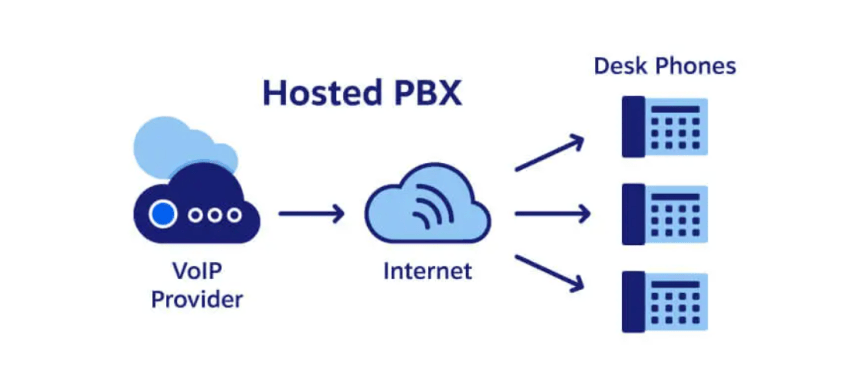
How Does a Hosted PBX Work?
A hosted PBX routes business calls through a provider’s cloud-based phone system instead of equipment installed in your office.
When an employee places a call using an IP desk phone, computer, or mobile app, the voice is converted into digital data and transmitted over the internet. The hosted PBX provider receives that data and uses its cloud infrastructure to route the call.
If the recipient uses a compatible VoIP service, the call can travel over IP networks. If the call is going to a mobile phone or traditional landline, the provider connects it to the public switched telephone network (PSTN).
Businesses manage users, extensions, call routing, voicemail, auto attendants, and other features through an online administration portal. Changes can usually be made without installing new hardware or contacting the phone company.
Hosted PBX vs. On-Premise PBX
The main difference between hosted and on-premises PBX is where the phone system is hosted and who manages it. A hosted PBX runs on a provider’s cloud infrastructure, while an on-premises PBX uses equipment installed and maintained at the business location.
| Factor | Hosted PBX | On-premises PBX |
|---|---|---|
| Hosting location | Provider’s cloud infrastructure | Business premises |
| Upfront cost | Usually lower | Usually higher due to hardware and installation |
| Maintenance | Managed by the provider | Managed by the business or an IT partner |
| Scalability | Users and locations can usually be added through software | Expansion may require additional hardware |
| Administration | Managed through an online portal | Often requires local system access or specialist support |
| Internet dependency | Requires a reliable internet connection | Depends on the system and how external calls are connected |
| Best suited for | Remote, hybrid, growing, and multi-location businesses | Organizations with in-house IT resources or strict infrastructure requirements |
Hosted PBX is often the better fit for businesses that want simpler administration, lower upfront costs, and support for employees working from different locations. Users can make and receive business calls through IP desk phones, computers, or mobile apps without being tied to a specific office.
On-premises PBX may be preferable for organizations that need direct control over their phone infrastructure, already have compatible hardware, or must meet specialized security, integration, or operational requirements.
Before choosing between them, compare more than basic features such as call transfers and conferencing. Consider scalability, maintenance responsibilities, remote-work support, integrations, reliability, and the level of infrastructure control your business requires.
Watch the video below for a closer comparison of hosted VoIP and on-premises phone systems, including cost, scalability, and security.

Benefits and Drawbacks of Hosted PBX
Businesses often switch from an on-premises PBX to a hosted system for the benefits such as greater flexibility, easier management, lower upfront costs, and access to a wider range of calling features.
However, hosted PBX also comes with tradeoffs, including reliance on a strong internet connection, ongoing subscription fees, and less direct control over the underlying infrastructure.
Benefits of hosted PBX
1. Flexibility and remote workers
One of the top reasons to switch to hosted PBX is the flexibility it provides for remote employees.
Voice over Internet Protocol lets staff use an app and immediately have calls forwarded to any number or device, anywhere in the world. All that’s needed is a hosted PBX provider and reliable internet. This accomplishes what an on-premises PBX typically can’t.
2. Easy setup and maintenance
Another big plus is the fast setup with minimal maintenance. Hosted PBXs can deploy in days without on-site infrastructure. You don’t need to hire dedicated staff to manage changes or troubleshoot issues.
The cloud-based nature makes the whole system simpler to implement and maintain.
3. Easier call-flow customization and user management
With a hosted PBX, businesses can quickly adjust call settings, routing rules, and user accounts through an online dashboard. Features like call forwarding, conference lines, caller ID, voicemail-to-SMS, extensions, and user permissions can be turned on, updated, or reassigned without calling the phone company. This gives administrators more control over day-to-day changes while reducing reliance on outside technical support.
4. Enhanced reliability and redundancy
Arguably the most crucial benefit is reliability.
Since hosted PBX isn’t tied to physical wiring or an on-site box, many infrastructure failure points are avoided. With built-in failover and interconnected data centers, cloud phone systems offer redundancy that keeps companies running smoothly.
For businesses, increased reliability is arguably the most crucial benefit.
Even in the event of inclement weather that requires evacuation, you can configure your VoIP phone system for remote employees to alert customers with timely messaging, forward calls to voicemail, or even route them to cell phones.
5. Call security and encryption
Hosted VoIP calls transmit call data packets between the cloud PBX and IP phones/computers.
Leading business VoIP providers encrypt these voice packets using Secure Real-time Transport Protocol (SRTP) and Transport Layer Security (TLS), making it nearly impossible for data to be intercepted. Encryption secures all call data without impacting voice quality.
6. Lower upfront infrastructure costs
Hosted PBX systems require far less on-site equipment than traditional PBX systems. Businesses can avoid purchasing and installing expensive servers, phone cabinets, wiring, and other dedicated infrastructure.
Instead, costs are typically spread across a predictable monthly subscription, while the provider handles the core platform, maintenance, and upgrades. Companies may still need compatible phones, headsets, or network improvements, but the initial investment is generally much lower than building and maintaining an on-premises phone system.
Drawbacks of hosted PBX
Hosted PBX reduces the burden of maintaining a phone system in-house, but it also introduces a few limitations businesses should consider.
1. Internet dependency
Because calls travel over the internet, service quality depends on a stable broadband connection. If the connection goes down, calling may be disrupted unless the provider offers failover options such as mobile forwarding or backup connectivity.
2. Network and call-quality requirements
Poor bandwidth, congestion, or an improperly configured network can lead to latency, jitter, or dropped calls. Businesses may need to improve their routers, prioritize voice traffic with Quality of Service (QoS), or add a secondary connection.
3. Recurring subscription costs
Hosted PBX is typically priced per user, per month. Although upfront costs are lower, subscription fees, add-ons, international calling, phone numbers, and hardware can increase the total long-term cost.
4. Less infrastructure control
The provider manages the servers, updates, and core platform. This simplifies maintenance, but businesses have less direct control over the underlying infrastructure than they would with an on-premises PBX.
5. Provider dependence
Reliability, support quality, security, and available features all depend on the provider. Switching platforms can also involve number porting, user migration, retraining, and possible contract fees, so it is important to evaluate vendors carefully.
Key Features of Hosted PBX Systems
Hosted PBX systems offer a range of features for managing calls, supporting employees, and improving customer communication.
Availability varies by provider and plan, but common features include:
| Feature | What it does | Why it matters |
|---|---|---|
| Call management | Supports voicemail, call forwarding, transfers, call waiting, hold, and extension dialing. | Gives employees the core tools needed to handle business calls efficiently. |
| Auto attendant | Greets callers with an automated menu and directs them to the right department, extension, queue, or voicemail box. | Reduces manual call handling and helps callers reach the right destination faster. |
| Call routing | Sends calls based on factors such as time of day, caller input, employee availability, or location. | Improves response times and helps prevent missed or misdirected calls. |
| Interactive voice response (IVR) | Lets callers use voice or keypad selections to access information, complete simple tasks, or reach the right team. | Supports self-service and reduces demand on live employees. |
| Voicemail-to-email | Sends voicemail recordings or transcriptions to an employee’s inbox. | Makes messages easier to review, forward, and manage from any location. |
| Conference calling | Connects multiple participants through audio conference calls or meeting bridges. | Supports team discussions and customer meetings without requiring everyone to be in one location. |
| Video conferencing | Hosts face-to-face virtual meetings for collaboration, presentations, and customer conversations. | Helps distributed teams communicate more effectively. |
| Live chat and team messaging | Enables real-time text conversations with coworkers or customers through the same communications platform. | Keeps conversations centralized and reduces reliance on separate messaging tools. |
| Call recording | Records conversations for training, quality assurance, dispute resolution, or compliance. | Helps businesses review performance and maintain accurate records, subject to applicable consent laws. |
| Mobile apps and softphones | Lets employees make and receive business calls from smartphones, tablets, or computers. | Supports remote and hybrid work without requiring a desk phone. |
| Unified communications | Combines voice, video, messaging, presence, and collaboration tools in one platform. | Reduces app switching and gives teams a more consistent communication experience. |
| CRM integration | Connects the phone system with customer relationship management software to display customer data and log calls. | Improves follow-up and gives employees more context during customer interactions. |
| Call analytics | Tracks call volume, duration, wait times, missed calls, and peak periods. | Helps businesses improve staffing, training, and call-handling performance. |
The right feature set depends on how your teams communicate and how customers contact your business. Compare plan limits, integrations, add-ons, and administrative controls—not just the provider’s overall feature list.
What Do You Need for a Hosted PBX?
A hosted PBX does not require an on-site PBX server, but you still need the right internet connection, devices, and network setup:
- Reliable internet and sufficient bandwidth: Your connection must support your expected call volume without excessive latency, jitter, or packet loss.
- Compatible devices: Employees can typically use IP desk phones, computers with headsets, or mobile apps (like the Nextiva App). Confirm device compatibility with the provider.
- A voice-ready network: Your router, switches, and cabling should support VoIP traffic. Quality of Service (QoS) settings can prioritize calls over less time-sensitive data.
- Business phone numbers: You can obtain new numbers or transfer existing ones through number porting. Keep your current service active until the port is complete.
- Backup connectivity: A secondary internet connection, mobile call forwarding, or another failover option can keep calls moving if the primary connection goes down.
What Does a Hosted PBX System Cost?
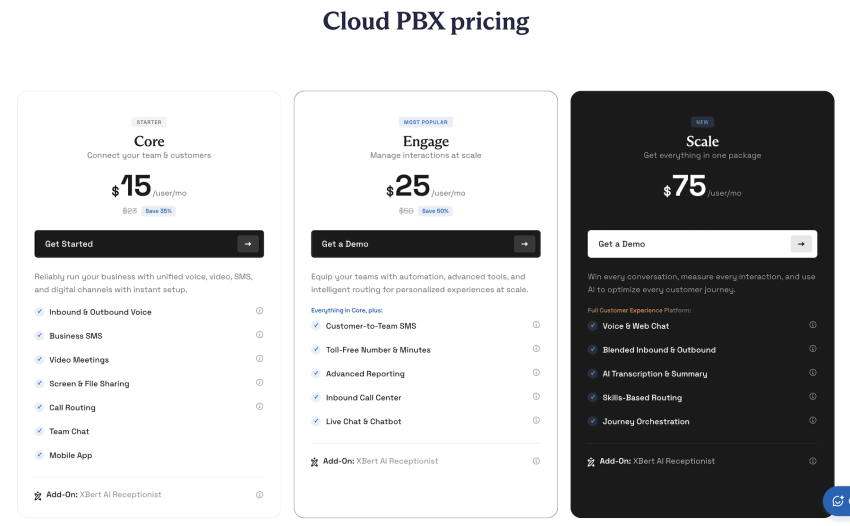
Hosted PBX is generally priced as a monthly subscription per user. The total cost depends on your provider, plan, number of users, included features, and contract length. Typical U.S. costs include:
Monthly subscription
$15–$50+ per user, per month
Basic plans generally cost $15–$25, while plans with call recording, integrations, analytics, AI, or omnichannel features often run $25–$50 or more per user.
IP phones and headsets
Approximately $50–$400 per device
Basic desk phones may cost around $70–$150, while executive phones, cordless systems, and advanced models can cost $200–$400. A software-based setup may only require a compatible headset, and employees may be able to use equipment they already own.
Number porting
Free to $30 per number
Many providers, like Nextiva, include number porting at no additional charge. When a fee applies, businesses typically pay around $10–$30 for each number transferred.
Setup and implementation
Free to $500 for a standard deployment
Many cloud providers offer self-service setup at no charge, while more complex configuration or onboarding may cost $100–$500. Professional installation, extensive integrations, or outside IT assistance can raise the cost to $500–$2,000 or more.
Add-on features
Approximately $3–$30 per user, per month
Common examples include call recording at $5–$10, voicemail-to-email at $3–$5, advanced analytics at $10–$30, CRM integrations at $10–$25, and auto attendants at $5–$15 per month. Some providers include these features in higher-tier plans instead.
International and usage charges
About $0.01–$2 per minute
U.S. and Canadian calling is often included, but international calls are generally metered. Calls to common destinations may cost $0.01–$0.05 per minute, while mobile, premium, or less frequently called destinations can cost considerably more—sometimes up to $2 per minute.
Although hosted PBX usually costs less upfront than an on-premises system, compare the full price of subscriptions, equipment, setup, add-ons, usage, taxes, and contract terms. Prices vary considerably by provider, business size, destination, and negotiated discounts.
Hosted PBX vs. On-Premises PBX Costs
| Cost | Hosted PBX | On-premises PBX |
|---|---|---|
| Upfront system and installation | About $0–$2,000+ for setup, devices, and onboarding | About $5,000–$20,000+ for a small deployment; larger systems can reach $20,000–$100,000+ |
| Monthly service | Typically $15–$50+ per user | Carrier, SIP trunk, or phone-line charges vary; often $15–$40 per channel or line, plus other service costs |
| Phones and user equipment | Around $50–$400 per device | Around $100–$500 per device, depending on compatibility and features |
| Maintenance and support | Usually included in the subscription, although premium support may cost extra | Commonly 10%–20% of the original system cost per year, plus internal IT labor |
| Software licenses and upgrades | Usually included or sold as monthly add-ons | May require separate licenses, upgrade fees, or replacement hardware |
| Scaling the system | Usually an additional $15–$50+ per new user per month | May require new phones, licenses, cards, cabling, or server capacity |
| Hardware refresh | Minimal provider-side infrastructure to replace | PBX servers and related hardware may require replacement every 5–10 years |
| Five-year TCO | Usually lower upfront and easier to predict | Often higher due to installation, maintenance, IT labor, upgrades, and hardware replacement |
Note about TCO: Hosted PBX is not automatically cheaper in every case. An organization that already owns its equipment, has internal IT expertise, and expects little growth may pay less over the long term with an on-premises system. This table lists typical ranges and does not mean that every business will see the same savings.
Hosted PBX vs. VoIP vs. SIP Trunking
Hosted PBX, VoIP, and SIP trunking are closely related, but they are not the same thing.
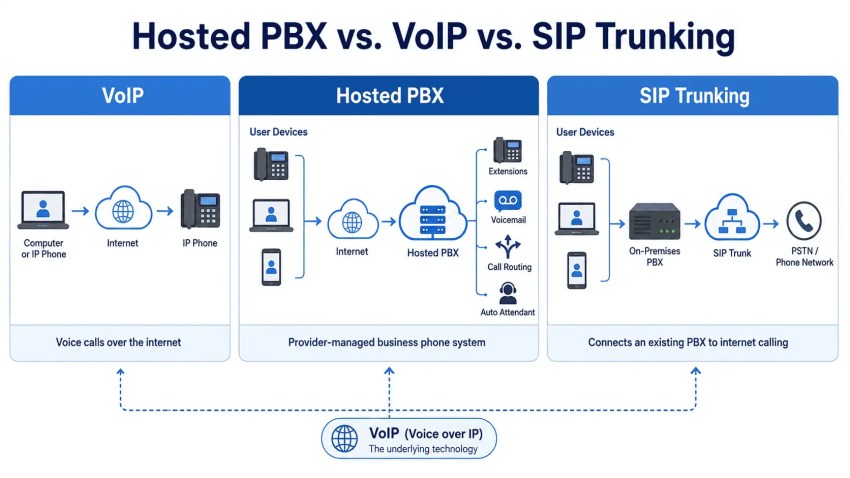
VoIP is the technology that carries voice calls over an internet connection instead of traditional telephone lines.
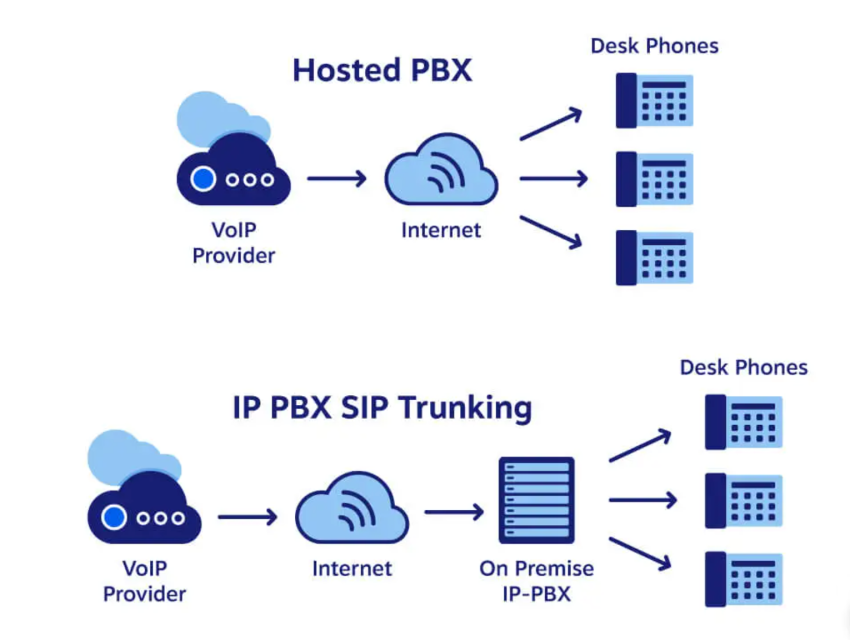
Hosted PBX is a complete business phone system hosted and managed by a third-party provider. It typically uses VoIP to deliver calling, routing, voicemail, extensions, and other features.
SIP trunking serves as a bridge to connect an existing on-premises PBX to the internet, allowing the business to make and receive VoIP calls while keeping its current phone-system hardware.
| Factor | Hosted PBX | VoIP | SIP Trunking |
|---|---|---|---|
| What it is | A provider-managed cloud phone system | The technology used to transmit calls over the internet | A service that connects an existing PBX to VoIP calling |
| On-site PBX required | No | Depends on the system | Yes |
| Management | Primarily handled by the provider | Varies by deployment | Managed by the business or its IT partner |
| Upfront cost | Usually lower | Varies | Often lower than replacing an existing PBX |
| Maintenance | Provider-managed | Depends on the system | Business maintains the on-premises PBX |
| Scalability | Users can usually be added through software | Depends on the solution | May be limited by existing PBX capacity |
| Best suited for | Businesses wanting a complete, cloud-based phone system | Any organization using internet-based calling | Businesses that want to retain an existing PBX |
Which option should your business choose?
Choose hosted PBX if you want to replace an on-premises system with a fully managed cloud platform that supports remote workers, multiple locations, and easier scaling.
Choose SIP trunking if your existing PBX still meets your needs and you want to add internet-based calling without replacing the entire system.
VoIP itself is not usually a separate system choice. It is the underlying technology used by both hosted PBX and SIP trunking. The real decision is whether to adopt a fully hosted phone system or connect your existing PBX to VoIP service.
Should You Switch to a Hosted PBX Phone System?
Hosted PBX is often a good fit for growing businesses, distributed teams, and companies that want to reduce the burden of managing phone-system infrastructure in-house.
With an on-premises PBX, adding users, extensions, or locations may require new hardware, licensing, installation, and IT support. A hosted PBX generally lets administrators add users, assign numbers, and update call flows through an online portal.
The provider also handles the core servers, maintenance, upgrades, and platform availability. This can reduce upfront infrastructure costs and free internal IT teams from routine phone-system management.
Hosted PBX may be worth considering if your business:
- Is adding employees or locations
- Supports remote or hybrid work
- Wants more predictable monthly costs
- Needs easier administration and scaling
- Prefers provider-managed maintenance and upgrades
An on-premises PBX may still suit organizations that already own compatible equipment, require direct infrastructure control, or have specialized technical and compliance requirements.
Before switching, confirm your internet and network readiness, provider uptime SLA, number-porting process, integrations, security controls, and total long-term cost.
Here’s a quick video that explains step-by-step how to replace your PBX.

How to Choose the Right Hosted PBX Provider
Not all hosted PBX providers offer the same reliability, features, support, or security. Start by defining your number of users, required capabilities, budget, integrations, and support expectations.
When comparing providers, consider:
- Initial and recurring costs: Review monthly subscriptions, hardware, setup, add-ons, usage charges, taxes, and contract terms.
- Calling and collaboration features: Confirm that the platform includes the routing, voicemail, recording, analytics, mobile, and conferencing tools your business needs.
- Reliability and redundancy: Examine the provider’s uptime SLA, failover capabilities, disaster-recovery plans, service history, and geographic infrastructure.
- Customer support: Compare support hours, available support channels such as phone, live chat, email, and ticketing, response times, onboarding assistance, and access to technical specialists.
- Security and compliance: Look for encryption, multifactor authentication, access controls, independent SOC reports, PCI DSS compliance where relevant, and support for HIPAA-regulated workflows when required.
- Ease of use: Evaluate how easily administrators and employees can manage users, call flows, devices, voicemail, and settings.
- Business integrations: Confirm compatibility with your CRM, help desk, ERP, productivity tools, and other essential software.
- Scalability: Make sure the system can accommodate additional users, phone numbers, locations, and features without a complicated migration.
- Customer feedback: Review verified customer ratings, case studies, support feedback, and industry evaluations.
- Implementation and number porting: Ask about migration timelines, porting fees, required documentation, temporary numbers, training, device provisioning, and how the provider minimizes downtime during the transfer.
Businesses should compare potential providers’ plans, service commitments, and support options against their specific requirements before signing any contracts.
Top Hosted PBX Providers
Businesses should compare providers based on reliability, support, integrations, administration, global coverage, and the features included in each plan.
Here is a quick look at several leading options:
| Provider | Best known for | Best suited for |
|---|---|---|
| Nextiva | Reliable business voice and robust customer support | Small and midsize businesses that prioritize uptime, ease of use, and responsive service |
| RingCentral | Video meetings and a broad integration ecosystem | Businesses that want extensive collaboration tools and third-party integrations |
| 3CX | Flexible deployment and greater in-house control | Organizations with IT resources that want more control over hosting and configuration |
| 8×8 | Global calling and enterprise communications features | Larger or international organizations with distributed teams |
Nextiva stands out for businesses that place a high priority on reliable voice service and accessible customer support. Its combination of business calling, mobile and desktop apps, integrations, analytics, and customer communication tools makes it a strong option for growing small and midsize teams.
Nextiva: A Modern Hosted PBX Solution
Hosted PBX gives businesses a flexible, cloud-based alternative to maintaining phone-system hardware on-site. It supports remote and hybrid teams, simplifies administration, scales more easily, and provides advanced calling and collaboration features through one platform.
Nextiva is an excellent option for businesses ready to modernize. Its platform combines business calling, desktop and mobile access, integrations, analytics, and customer communication tools in one system.
Explore Nextiva’s hosted PBX solutions to find the right fit for your team.
The best cloud PBX phone system small businesses love.
Get cloud-based VoIP, SMS messaging, and video conferencing in one solution. Take your business communications to the next level with Nextiva.
Hosted PBX FAQs
Hosted PBX means a cloud-based business phone system that is hosted and managed off-site by a third-party VoIP provider. The provider handles call routing, maintenance, upgrades, and core infrastructure, while employees connect through IP phones, computers, or mobile apps.
A PBX (private branch exchange) is a private telephone network businesses use. VoIP (voice over internet protocol) refers to making phone calls over the internet rather than traditional landlines.
Many modern PBX systems use VoIP to route calls over the internet, so the two technologies are complementary. However, you can have a VoIP system without a PBX, or a legacy PBX system without using VoIP.
Hosted PBX and cloud-hosted PBX are essentially the same in their core functionality, offering cloud-based phone systems with advanced features and cost savings compared to traditional PBX. The key difference is their deployment and architecture: hosted PBX typically uses dedicated servers for more control, while cloud PBX uses a shared cloud environment for greater scalability and cost-efficiency.
Hosted PBX might offer more customization, while cloud PBX provides a standardized but continuously updated feature set. Choosing between them depends on your business size, needs, and budget, with hosted PBX often favored by larger enterprises needing more control and cloud PBX ideal for smaller businesses seeking cost-effectiveness and scalability.
The pricing of a hosted PBX phone system varies depending on the features, number of users, and overall capabilities. However, cloud PBX costs much less than traditional on-premises PBX systems. Expect to pay between $15-$60 per user per month for a basic hosted PBX system, with prices going up for advanced features and integrations. There are also usually minimal upfront costs compared to on-premises systems.
Hosted PBX systems rely on a stable internet connection to function properly. If your internet goes down, your phone system may be unavailable. To mitigate this risk, consider having a backup internet connection or using a provider with multiple data centers for redundancy.
While hosted PBX providers typically implement robust security measures, there’s always a risk of data breaches or cyberattacks. Make sure to choose a provider with a strong security track record and follow best practices for securing your own network and devices.
A virtual PBX is another name for hosted PBX, and provides PBX capabilities over the internet rather than as on-premises hardware. This allows businesses to handle their own telephony and call routing through a web-based dashboard. Virtual PBX systems provide the same call routing, IVR menus, extensions, auto attendants, etc, as a legacy PBX without requiring costly hardware.
Getting a virtual PBX simply involves subscribing to a hosted PBX provider, rather than installing a PBX on-site. Leading providers like Nextiva allow you to set up extensions, phone numbers, call flows, and more via web/mobile dashboards. Virtual PBX can integrate with existing phones or provide new VoIP desk phones.
A PBX server is the hardware or software that manages a company’s internal and external phone calls. It connects extensions and controls features such as call routing, voicemail, auto attendants, transfers, and conference calling. With hosted PBX, the server runs in the provider’s cloud rather than at the business location.
Yes, PBX systems still exist, but many businesses now use hosted PBX or cloud PBX systems instead of traditional on-premises equipment. On-premises PBX remains common in some hotels, hospitals, large enterprises, and organizations that need direct control over their phone infrastructure.