An inbound contact center helps businesses manage customer-initiated conversations across channels such as phone, email, live chat, SMS, and social media. It gives support teams a central place to respond to questions, resolve issues, provide technical assistance, and handle service requests more efficiently.
Unlike traditional call centers that focus mainly on voice, modern inbound contact centers are built to support digital channels alongside phone support. Features like intelligent routing, interactive voice response (IVR), automation, and CRM integrations help businesses deliver faster, more consistent, and more personalized customer service.
In this guide, we’ll explain what an inbound contact center is, how it works, the features and channels it supports, and what to look for when choosing a solution.
An inbound contact center is a customer service operation designed to handle incoming communications from customers and prospects quickly and effectively, regardless of how those customers choose to get in touch. These interactions typically include product questions, billing inquiries, appointment requests, technical support issues, account updates, and other service-related needs.
People often mistake inbound contact center for inbound call center, but they’re not exactly the same:
- A call center usually focuses on voice-only support
- A contact center supports multiple communication channels
That distinction matters because today’s customers expect more than phone support alone.
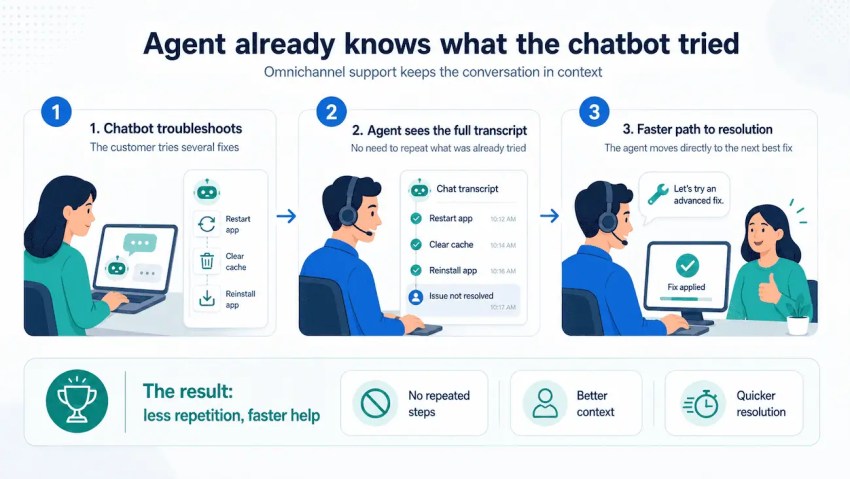
For example, a customer might begin with a chatbot on your website, follow up through email, and then speak with an agent by phone. In an inbound contact center, the agent can see that journey and continue the conversation with the right context. That reduces repetition for the customer and helps agents resolve issues faster.
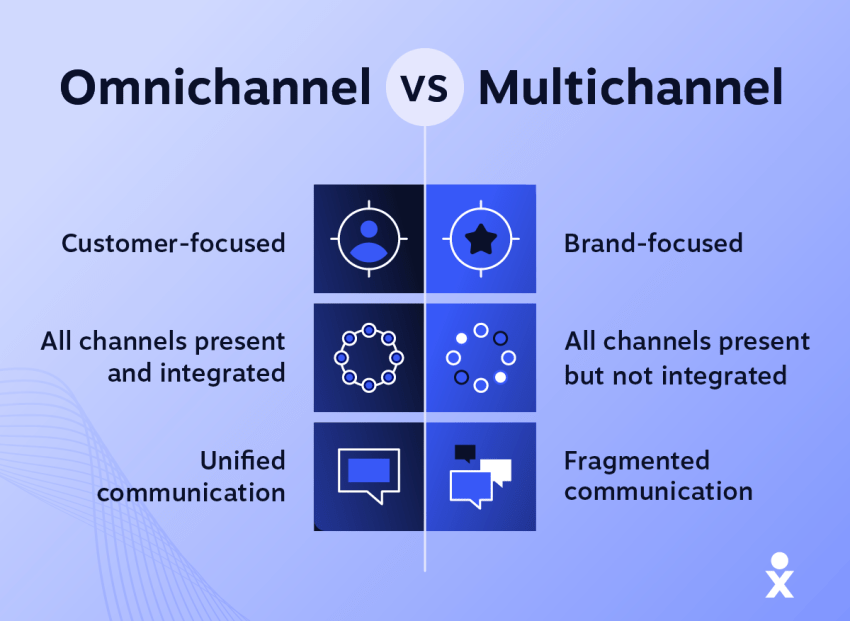
Businesses can manage these channels in different ways. Some take a multichannel approach, where each channel is supported separately. Others use an omnichannel model, which connects interactions across channels so agents have a unified view of the customer journey.
The main purpose of an inbound contact center is to provide exceptional customer experiences while making support operations more efficient.
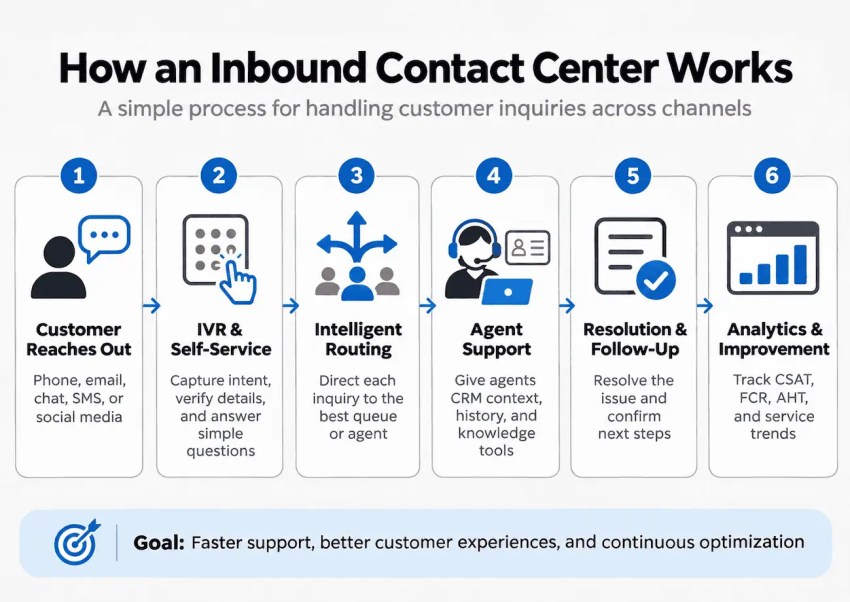
An inbound contact center manages customer inquiries through a connected process, from initial contact to resolution and follow-up. Automation, intelligent routing, and customer data help businesses deliver faster, more personalized support across channels.
Here’s how the process typically works:
1. Customer reaches out
A customer initiates contact through phone, email, live chat, SMS, or social media. The contact center captures the inquiry and begins the support process, regardless of which channel the customer uses.
2. IVR & self-service
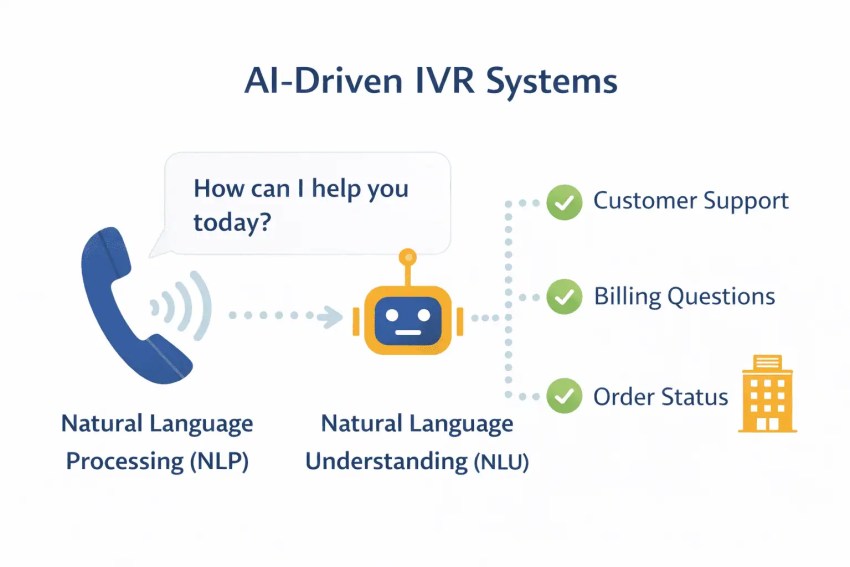
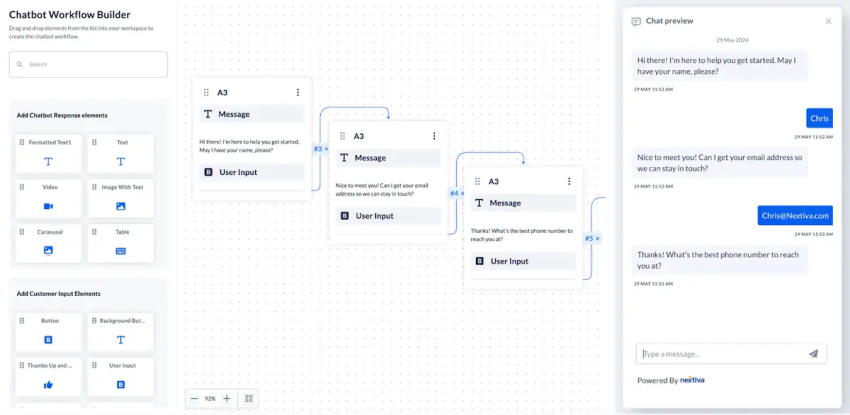
An interactive voice response (IVR) system, chatbot, or virtual receptionist can identify customers, gather information, verify account details, and determine why they’re reaching out. These tools can also handle simple requests, such as checking order statuses, find account information, or answering FAQs, without involving a live agent.
3. Intelligent routing
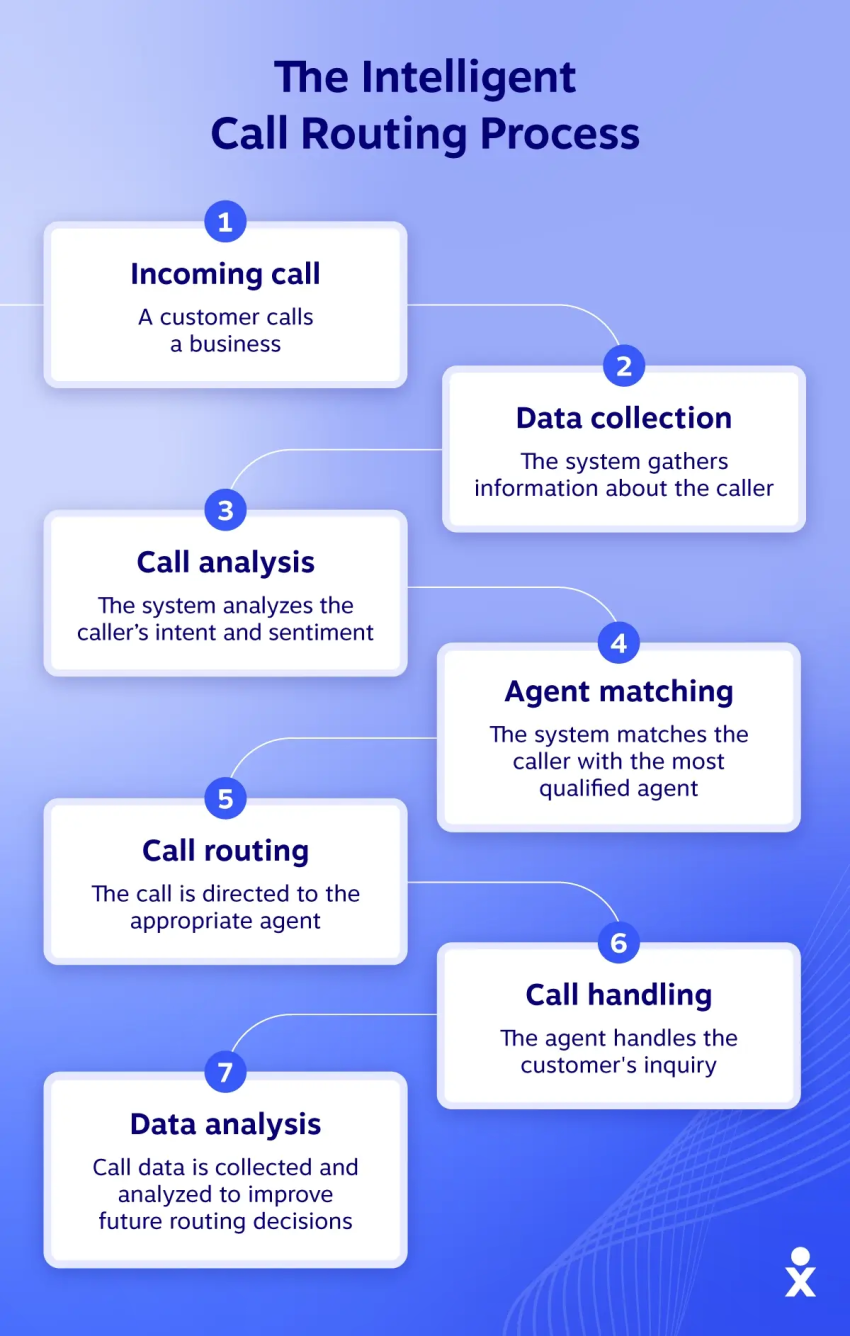
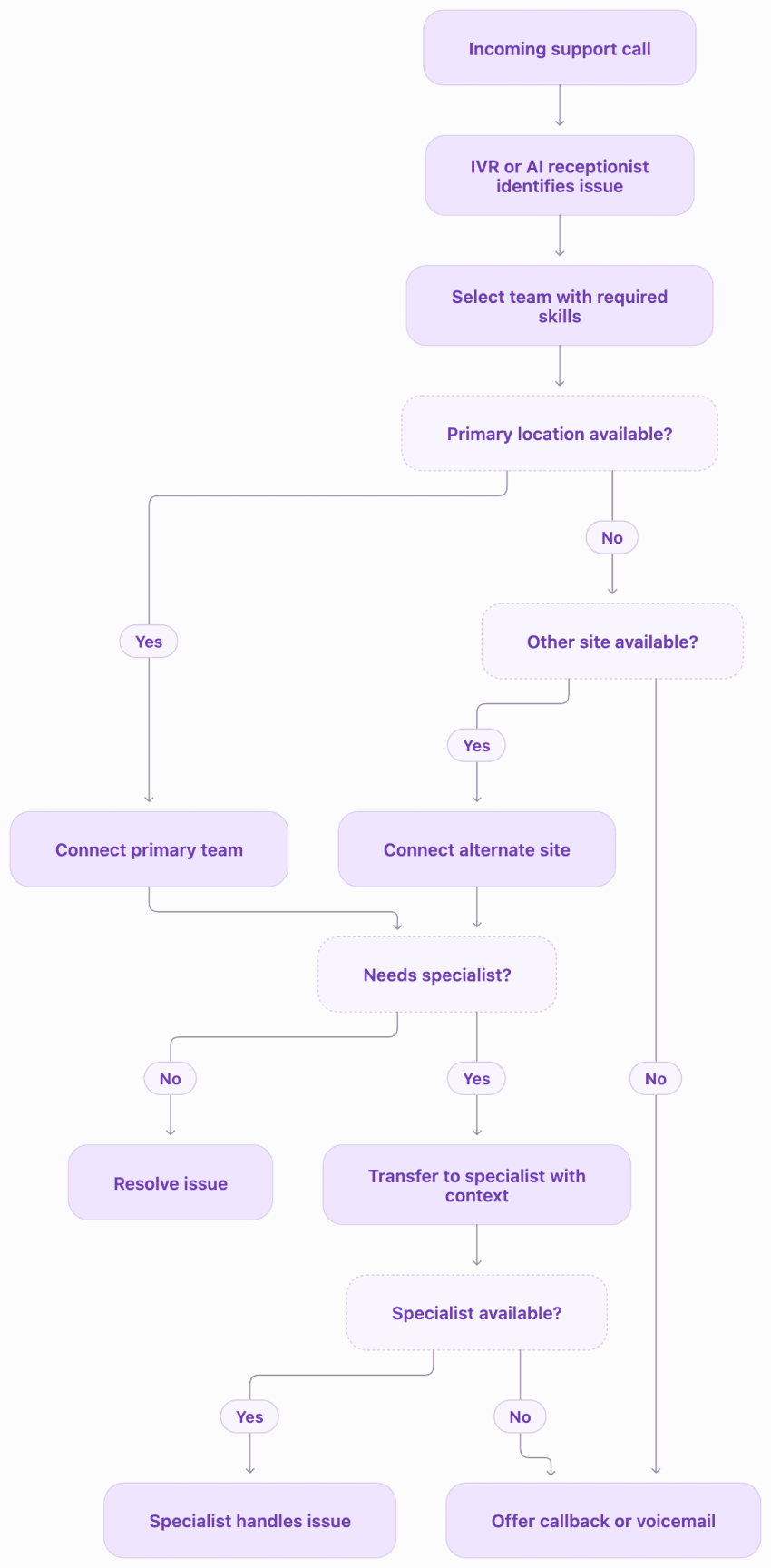
If an inquiry needs human support, the system routes it to the most appropriate queue or agent based on factors such as availability, skills, language, or issue type. When an AI assistant escalates a conversation, it can pass along the customer’s request and relevant interaction history so the agent can continue without starting over.
4. Agent support
Agents access relevant customer information through CRM integrations, interaction histories, and knowledge bases to understand customer needs and resolve issues. AI-powered tools can also suggest answers or next steps, helping agents deliver faster support without asking customers to repeat information.
5. Resolution & follow-up
Once the issue is addressed, the agent documents the outcome and confirms any next steps. Follow-up actions might include sending a confirmation, updating a support ticket, or scheduling a callback.
6. Analytics & improvement
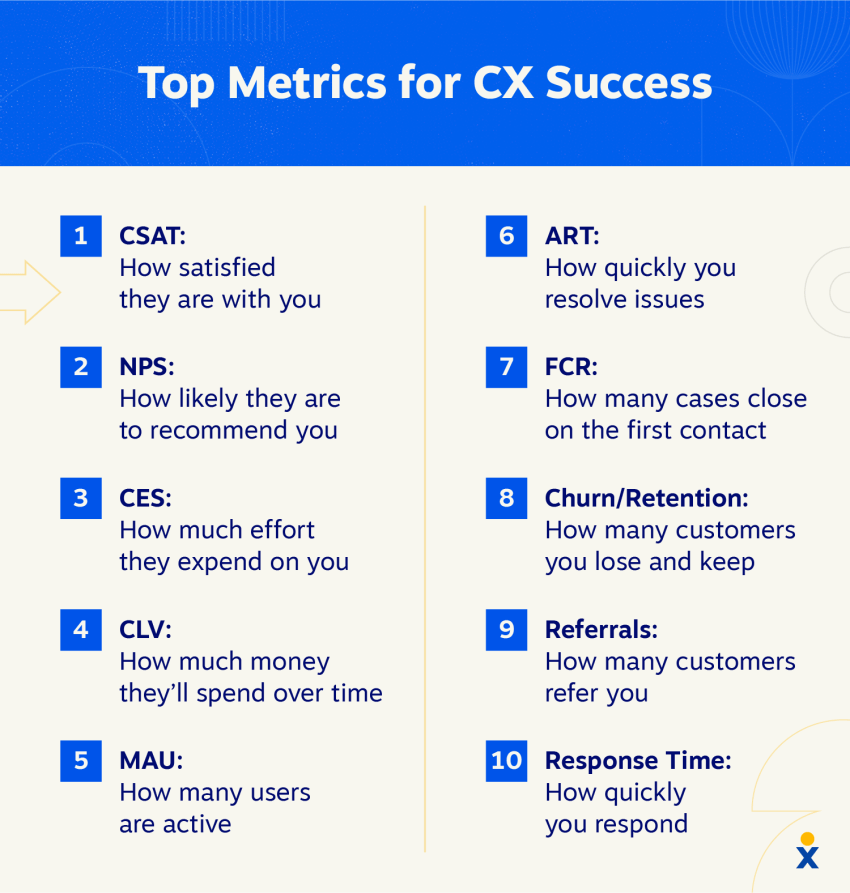
Contact centers track performance metrics such as customer satisfaction (CSAT), first contact resolution (FCR), and average handle time (AHT). These insights help teams identify bottlenecks, improve workflows, and continuously optimize customer service.
The main difference between inbound and outbound contact centers is who initiates the conversation. Inbound contact centers respond to customer-initiated inquiries, while outbound contact centers proactively reach out to customers and prospects via sales or telemarketing calls.
Although both support customer communication, they serve different business goals, use different tools, and measure success in different ways.
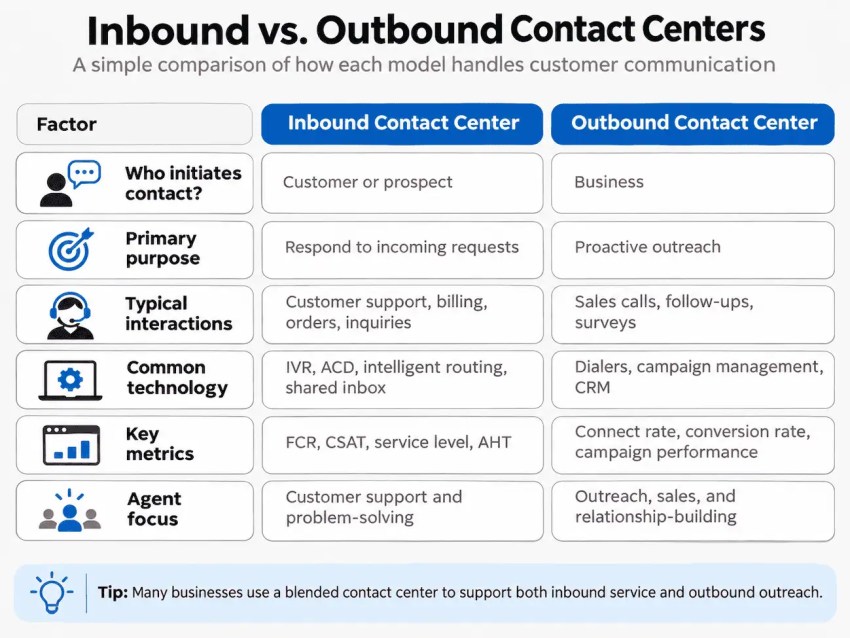
Some businesses use a blended contact center, which combines incoming and outgoing calls in one operation. For example, agents might handle incoming support requests while also making proactive follow-up customer calls, appointment reminders, or customer satisfaction surveys. This approach helps businesses manage both types of communication using shared tools and resources.
An inbound contact center makes customer support more accessible by giving customers multiple ways to reach a business, whether through phone, email, live chat, or messaging. Beyond channel availability, it helps businesses manage demand, resolve issues efficiently, and maintain consistent service without placing unnecessary strain on support teams.
Here are five key benefits.
1. Faster customer support
Intelligent routing, automated workflows, and self-service options help reduce response times by connecting customers with the right resources sooner. Resolution times can also improve when inbound agents have the expertise, customer context, and tools needed to address issues efficiently. Routine requests can often be resolved automatically, freeing agents to focus on more complex inquiries.
In a healthcare setting, skills-based routing can direct appointment requests to scheduling staff and clinical inquiries to appropriately trained teams. The provider can measure improvements through shorter average wait times, fewer call transfers, and reduced time to resolution.
2. Improved customer satisfaction
An omnichannel contact center gives agents access to customer interaction histories, allowing them to continue conversations across channels without losing context. Customers don’t have to repeat information, and agents can provide more relevant support based on previous interactions.
Consider a retail customer who starts a conversation through live chat about a delayed order but later follows up by phone. With access to the original chat and order details, the agent can continue addressing the issue rather than starting over. The retailer can assess the impact through higher CSAT scores, fewer repeat contacts, and improved resolution rates.
3. Greater agent productivity
CRM integrations, knowledge bases, and AI-powered assistance reduce the administrative work involved in handling customer inquiries. Agents can retrieve account details, access troubleshooting guidance, and document interactions without constantly switching between systems.
For a SaaS provider, a self-service knowledge base and chatbot can handle common questions about account setup, password resets, and basic troubleshooting. Automated conversation summaries and suggested responses further reduce administrative work for live agents. The provider can measure operational efficiency gains through lower AHT, reduced after-call work, and more inquiries resolved per agent without compromising service quality.
4. Better scalability
Cloud-based inbound contact centers give businesses the flexibility to adjust support capacity as demand changes. Administrators can add agents, update routing rules, and redistribute workloads across teams or locations without extensive changes to physical infrastructure.
During a seasonal sales spike, a retailer can use chatbots and self-service tools to handle routine sizing and order-tracking questions while routing delivery problems and returns to available agents. The business can evaluate its ability to scale by tracking self-service resolution rates, service levels during peak periods, and cost per resolved contact.
5. More actionable customer insights
Contact center analytics reveal patterns in customer inquiries, service performance, and recurring issues. By tracking metrics such as queue wait times, repeat contact rates, FCR, and CSAT, businesses can identify bottlenecks and make informed decisions about staffing, training, and service improvements.
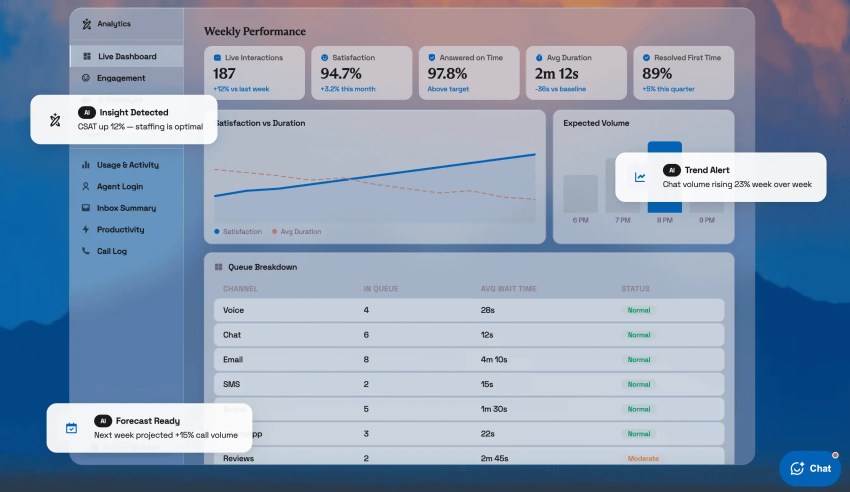
A telecommunications provider, for instance, can monitor incoming calls, social media messages, and support tickets during a service outage. Identifying a sudden increase in complaints about the same issue allows the team to prioritize communications and update self-service resources. The impact can be measured through fewer repeat inquiries about the outage, reduced contact volumes following customer updates, and faster resolution of related support tickets.
Modern inbound contact center software combines communication channels, customer data, and operational tools in one platform. Although capabilities vary by provider, here are nine key features to look for:
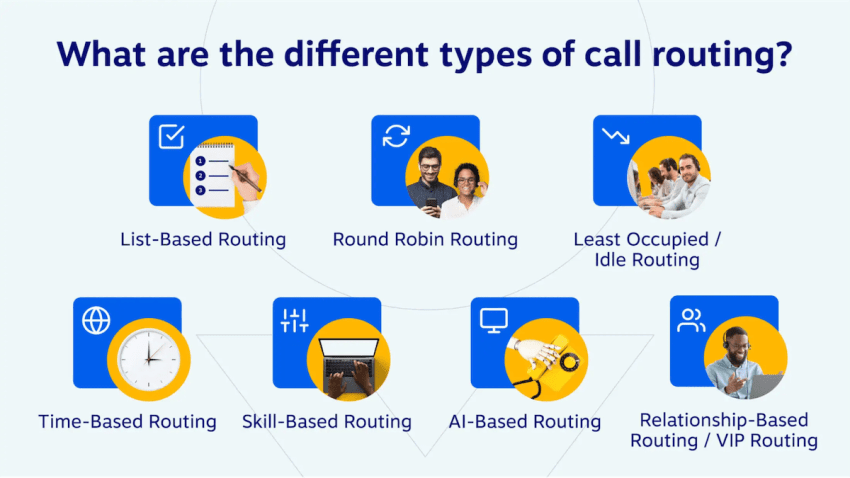
- Intelligent routing: Matches incoming inquiries with the right agent based on skills, language proficiency, availability, customer priority, or interaction history. Advanced systems may use AI to identify customer intent and inform routing decisions.
- Automatic call distribution (ACD): Organizes incoming calls into queues and assigns them to available agents using distribution methods such as round-robin, longest-idle, or priority-based assignment. It also manages queue limits and overflow rules.
- Interactive voice response (IVR): Uses automated voice menus to collect caller information, provide self-service options, and direct calls. Advanced systems support natural language recognition and integrations with backend systems.
- Omnichannel inbox: Brings phone, email, live chat, SMS, and social media interactions into a unified agent workspace, with access to conversation histories and tools for managing interactions across channels.
- CRM integrations: Connects customer profiles, support tickets, and interaction records with the contact center platform. Common capabilities include screen pops, automatic activity logging, and data synchronization.
- AI and automation: Includes AI receptionists and virtual agents that answer calls, handle routine inquiries, book appointments, and transfer complex requests to human agents. Other AI capabilities include real-time agent assistance, automated transcription, conversation summaries, and post-interaction workflows. Listen to an AI receptionist right here. 👇
- Real-time analytics and reporting: Tracks metrics such as service level, average handle time (AHT), first contact resolution (FCR), and customer satisfaction (CSAT) through live dashboards and historical reports.
- Workforce management (WFM): Uses contact volume forecasts and staffing requirements to support agent scheduling, capacity planning, and schedule adherence monitoring.
- Quality monitoring and management: Provides call recordings, interaction evaluations, customizable scorecards, and coaching tools. AI-powered capabilities may include automated quality assessments, sentiment analysis, and compliance monitoring across conversations.
Not every business needs every capability from day one. When comparing inbound contact center platforms, distinguish between core features, optional add-ons, and advanced functionality that may require higher-tier plans or third-party integrations.
Inbound contact centers support different communication channels to accommodate customer preferences and the complexity of their inquiries. Each channel has distinct strengths, and choosing how to use them depends on your customers’ needs and your support operations.
Here are seven common inbound contact center channels and best practices for managing each.
1. Inbound voice (phone calls)
Phone support remains important for urgent, sensitive, or complex issues that benefit from a real-time conversation. Customers can explain their concerns directly, ask follow-up questions, and receive immediate clarification from an agent.
Best practices:
- Train agents in active listening, empathy, and de-escalation, particularly when handling complaints or sensitive inquiries.
- Use IVR menus with clear, limited options and an accessible route to a live agent.
- Monitor average handle time (AHT) alongside first call resolution (FCR) to assess efficiency without encouraging rushed interactions.
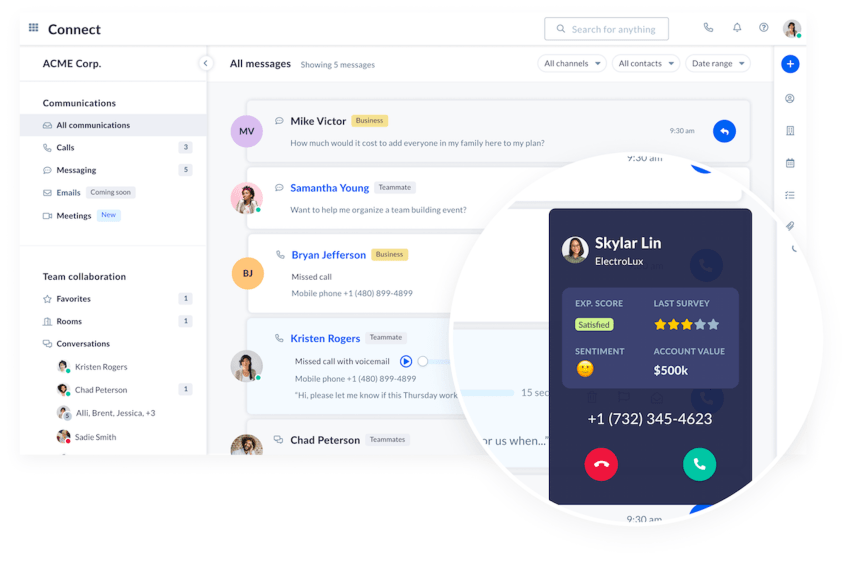
2. Shared email
Email is well suited to non-urgent inquiries, detailed explanations, and requests involving supporting documentation. A shared inbox allows multiple agents to manage incoming messages while maintaining visibility into ownership and response status.
Best practices:
- Use standardized response templates for common inquiries, with room for personalization.
- Define response-time targets and communicate expected turnaround times to customers.
- Automate acknowledgments, ticket assignments, and escalations for urgent or overdue requests.
- Use secure document-sharing methods when handling sensitive information, such as insurance claims or identification documents.
3. Live chat
Live chat provides real-time assistance to customers browsing a website or using an application. It’s particularly useful for short questions that require clarification but don’t necessarily warrant a phone call.
Best practices:
- Offer contextual chat prompts on pages where customers commonly need assistance, such as checkout or account management.
- Set reasonable limits on simultaneous conversations so agents can maintain response quality.
- Use chatbots to address frequently asked questions, with a clear option to escalate to a human agent.
- Preserve chat transcripts when customers need to continue an unresolved issue through another channel.
4. Social media
Social media support covers customer inquiries received through public posts, comments, mentions, and private messages on platforms such as Facebook, Instagram, and X. Public interactions require particular care because responses may be visible to a wider audience.
Best practices:
- Use social media monitoring to identify relevant mentions, comments, and direct messages.
- Respond publicly when appropriate, but move conversations involving personal information or account details to private, secure channels.
- Establish clear ownership between marketing and customer support teams to prevent missed or duplicated responses.
- Monitor recurring complaints and emerging issues through social listening.
5. Text messaging (SMS and MMS)
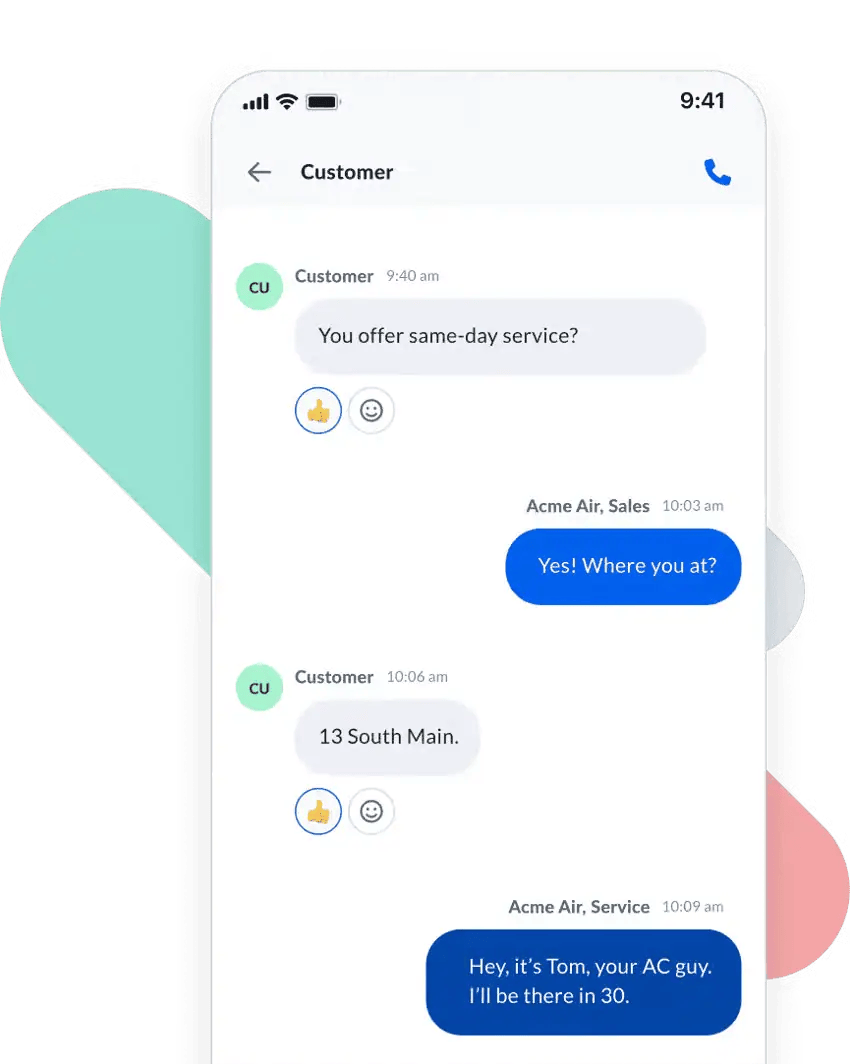
Two-way SMS and MMS messaging lets customers communicate through short, asynchronous exchanges. It’s particularly useful for appointment inquiries, order updates, confirmations, and straightforward service requests.
Best practices:
- Keep messages concise and focused on a specific request or action.
- Support two-way replies so customers can ask questions or request assistance without switching channels.
- Consider messaging applications such as WhatsApp where customer preferences and regional usage justify them.
- Follow applicable consent, privacy, and messaging regulations, including opt-in and opt-out requirements.
6. Self-service portals
Self-service portals give customers access to knowledge bases, FAQs, tutorials, account tools, and troubleshooting resources without contacting an agent. They are particularly useful for routine requests and support outside staffed service hours.
Best practices:
- Organize resources around common customer tasks and use clear, searchable titles.
- Review support content regularly to remove outdated instructions and address recurring questions.
- Provide an accessible escalation path when customers cannot resolve an issue independently.
- Track search terms, unsuccessful searches, and unresolved requests to identify gaps in available resources.
7. Live video support
Video support allows agents to provide visual guidance during troubleshooting, product setup, and other situations where seeing the problem is more useful than relying on a verbal description.
Best practices:
- Reserve video interactions for issues that genuinely require visual assistance, such as equipment installation or technical diagnostics.
- Allow customers to use mobile device cameras when showing hardware, connections, or physical components.
- Offer scheduled sessions when troubleshooting requires specialist availability or additional preparation.
- Obtain appropriate consent before recording sessions and ensure customers understand what information may be visible on camera.
The right channel mix depends on the types of inquiries your business receives, customer preferences, and available support resources. Whatever channels you offer, establish clear escalation procedures and maintain consistent customer records so interactions can move between channels when necessary.
Implementing an inbound contact center requires more than just setting up communication channels and configuring software. Successful operations depend on clear processes, well-prepared agents, measurable performance standards, and ongoing refinement.
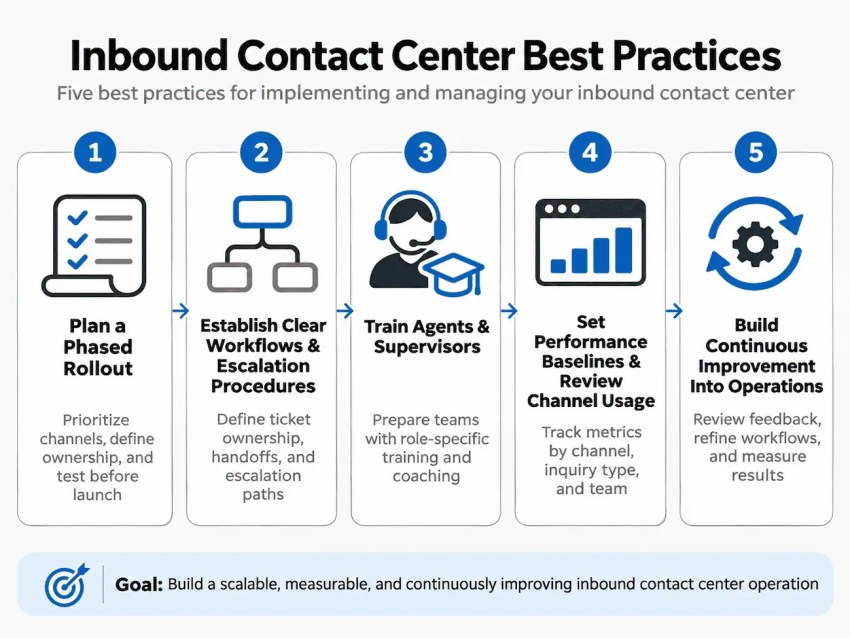
Here are five best practices for implementing and managing your inbound contact center.
1. Plan a phased rollout
Even though you’re excited about the potential productivity gains and can’t wait to improve the customer experience, take a step back and figure out exactly how things are going to work and who will staff each channel.
Before launching, assess your existing support operations and identify which processes, channels, and customer journeys need improvement. Establish a rollout plan that accounts for staffing, technology requirements, and operational dependencies.
- Prioritize implementation: Roll out channels or capabilities in phases, starting with those addressing the most pressing customer needs.
- Involve key stakeholders: Coordinate with IT, customer service managers, and other departments to address integrations, network capacity, staffing, and workflow changes.
- Establish clear ownership: Assign responsibility for each implementation milestone, including testing, training, and issue resolution.
- Test before launch: Pilot workflows with a small group of agents to identify technical problems and operational gaps before wider deployment.
Where available, use your provider’s implementation resources or professional services to support the transition.
2. Establish clear workflows and escalation procedures
Define how incoming inquiries will be assigned, managed, and escalated before introducing new channels or processes. Without clear ownership, requests can be duplicated, overlooked, or transferred between teams without resolution.
Document procedures for common scenarios, including:
- Ticket ownership: Who is responsible for an inquiry from initial assignment through resolution?
- Escalation criteria: Which issues require specialist intervention, management approval, or immediate attention?
- Cross-channel handoffs: How should agents transfer an unresolved inquiry while preserving its history and ownership?
- Service-level expectations: What response and resolution targets apply to different inquiry types and priorities?
Review these procedures during rollout and update them when recurring exceptions reveal gaps in the workflow.
3. Train agents and supervisors for their roles
Training goes beyond just learning the software interface. Agents need to understand new workflows, escalation responsibilities, and service standards, and supervisors need the skills to manage workloads and evaluate performance.
Develop role-specific training that includes realistic customer scenarios, supervised practice, and documented procedures. Before launch, confirm that agents can complete essential tasks independently and know when to escalate an issue.
Use ongoing quality assurance reviews to identify coaching needs. Pairing experienced agents with newer team members can also help reinforce procedures and share effective approaches to complex inquiries.
4. Set performance baselines and review channel usage
Establish performance baselines before implementing new workflows so you can evaluate their impact accurately. Track measures such as average handle time (AHT), first contact resolution (FCR), customer satisfaction (CSAT), and service-level attainment.
Analyze results by channel, inquiry type, and team rather than relying solely on contact center averages. For example:
- Channel mix: Are customers using the channels you expected, or is demand shifting elsewhere?
- Repeat contacts: Are customers contacting support multiple times or switching channels to resolve the same issue?
- Agent utilization: Are workloads distributed appropriately, or are certain queues consistently understaffed?
- Self-service and AI performance: What percentage of inquiries are resolved without agent intervention? Track automated resolution rates, escalation rates, and repeat contacts to assess whether customers are getting the help they need.
Compare trends against your original contact center benchmarks, accounting for differences in inquiry complexity. A lower AHT, for instance, isn’t necessarily an improvement if repeat contacts increase.
5. Build continuous improvement into operations
The final best practice is: Treat optimization as an ongoing management responsibility rather than a one-time activity after implementation. Schedule regular reviews of performance data, customer feedback, and quality assessments to identify recurring problems and opportunities for improvement.
When issues emerge, investigate their underlying causes before changing workflows or staffing levels. For example, a rise in repeat contacts might indicate unclear escalation procedures, outdated knowledge resources, or incomplete resolutions.
Assign owners to improvement initiatives, document the changes made, and measure their impact against established baselines. Share findings with agents and supervisors so operational adjustments are reflected in training and daily procedures.
This creates a repeatable improvement cycle: identify a problem, investigate its cause, implement a change, and evaluate the outcome.
Choosing the right inbound contact center software starts with understanding your operational requirements, not comparing feature lists. Consider your current inquiry volumes, customer communication preferences, existing systems, and plans for growth.
Then evaluate potential providers against these criteria:
- Scalability: Can the platform accommodate additional agents, communication channels, and higher contact volumes without major infrastructure changes? Check how easily you can adjust capacity during seasonal peaks or business expansion.
- Ease of use: Is the interface intuitive for agents and supervisors? Request a demonstration of everyday tasks, such as handling inquiries, transferring interactions, and accessing customer records. Ask about onboarding timelines and training requirements.
- Integrations: Does the software connect with your existing CRM, help desk, and business applications? Verify whether integrations support real-time data synchronization, which functionality is included, and whether custom development is required.
- Security and compliance: How does the provider protect customer data? Review access controls, encryption, data retention policies, and relevant compliance requirements, such as GDPR, HIPAA, or PCI DSS, depending on your industry and location.
- Reliability and support: What uptime commitments and service-level agreements (SLAs) does the provider offer? Evaluate technical support availability, response times, incident management procedures, and disaster recovery capabilities.
- Total cost of ownership: Look beyond per-agent subscription pricing. Account for implementation, integrations, training, usage-based charges, optional features, and support costs. Compare expected expenses as your team and contact volumes grow.
Before committing, consider running a pilot with a small group of agents using representative customer inquiries. This provides an opportunity to validate usability, integration performance, and workflow requirements under realistic conditions.
Once you’ve identified your requirements, compare providers based on how well their platforms support your channels, workflows, integrations, and budget.
For a detailed comparison of leading providers, features, and pricing, read this article. 👇
Nextiva’s omnichannel customer service platform brings customer conversations, agent workflows, and performance management together in one place. Teams can manage interactions across voice and digital channels, access customer context, and coordinate support without relying on disconnected systems.
Nextiva also provides intelligent routing, CRM integrations, real-time reporting, and workforce and quality management capabilities. Supervisors can monitor performance and coach agents, while AI-powered tools assist with customer interactions and administrative tasks.
For businesses looking to automate routine inquiries, Nextiva’s XBert AI receptionist can answer incoming calls and messages, handle common questions, schedule appointments, and transfer more complex requests to human agents with relevant context. Available capabilities vary by product and plan.
Whether you’re expanding your support channels or modernizing an existing operation, Nextiva offers solutions to support your inbound contact center requirements.
Ready to improve your inbound contact center? Explore Nextiva’s contact center solutions and see how the platform can support your customer service operations.👇
Your AI-Powered Contact Center
Create amazing customer experiences with AI-powered contact center software. Scalable contact center platform built for omnichannel customer conversations.
Pricing depends on the provider, number of agents, included features, and usage requirements. Many cloud-based solutions charge a monthly subscription per user, while others include usage-based fees for calls, messaging, or AI services. Businesses should also account for implementation, integrations, training, and optional add-ons when comparing total costs.
Yes, small businesses can absolutely use inbound contact center software to manage customer inquiries across multiple channels without maintaining separate systems. Depending on their requirements, a smaller team may only need basic call routing, a shared inbox, and automated responses, with the option to add more capabilities as demand grows.
Staffing requirements depend on contact volume, average handle time, operating hours, and service-level targets. Businesses should also account for peak demand, agent breaks, training, and time spent on administrative work. Workforce management tools and staffing models, such as Erlang C for appropriate voice-queue scenarios, can help estimate the capacity needed.
Yes. Cloud-based contact center platforms generally allow agents to handle customer interactions remotely through an internet-connected device and supported applications. Businesses still need reliable connectivity, appropriate audio equipment, secure access controls, and procedures for monitoring performance and protecting customer data.
Yes, although the level of support depends on staffing and automation. Chatbots, AI receptionists like XBert, IVR systems, and self service options can handle certain requests outside business hours. Organizations that require live assistance around the clock need appropriate staffing coverage or an after-hours support arrangement, particularly for urgent or complex issues.