A softphone is an application that lets users make and receive business calls over the internet from a computer, tablet, or smartphone. It replaces many functions of a physical desk phone and often combines calling with business texting, video meetings, team chat, contacts, and CRM integrations.
Softphones support remote teams because employees can use the same business number from a desktop, web browser, or mobile device. Nextiva, a business communications provider, includes softphone capabilities in its unified communications platform.
What Is a Softphone?
A softphone is software that enables phone calls through a Voice over Internet Protocol (VoIP) service. Instead of using traditional phone hardware, the user makes and receives calls through an application on an internet-connected device.
Businesses use softphones to support:
- Remote and hybrid employees
- Distributed teams
- Centralized call operations
- Business continuity across multiple locations
- Flexible office and mobile work


A softphone can replicate the functions of a desk phone while adding communication features such as:
- Call forwarding
- Voicemail
- Call recording
- Instant messaging
- Business texting
- Video conferencing
- CRM and collaboration-tool integrations
- Call transfers and conference calling
How Do Softphones Work?
A softphone connects to a VoIP provider through user credentials. The user places calls through the application, using the device’s built-in microphone and speakers or a connected headset. The provider converts voice into digital packets and routes them across IP networks.
A stable internet connection, suitable audio equipment, and a properly configured VoIP account support reliable call quality.
Softphones let employees call from a business phone number rather than a personal mobile number. A business can assign numbers to individual users, departments, locations, or shared call queues.
At a technical level, softphones rely on communication protocols such as Session Initiation Protocol (SIP) to initiate, manage, and end calls. The VoIP provider handles registration, call routing, voicemail, and other phone-system functions.
A VoIP phone service provider such as Nextiva typically includes a softphone application. Standalone softphone applications are also available, although they may require separate configuration with a SIP account or VoIP provider.
Softphones, VoIP, and business phone systems
These terms describe different parts of a business communications setup:
| Term | Meaning |
|---|---|
| VoIP | The technology that carries voice calls over an internet connection. |
| Softphone | The application used to place and receive VoIP calls on a computer or mobile device. |
| Business phone system | The broader service that manages numbers, extensions, call routing, voicemail, texting, meetings, reporting, and user administration. |
| Unified communications platform | A business communications system that brings voice, messaging, video meetings, contacts, and collaboration features into one workspace. |
A softphone uses VoIP, while a business phone system can include softphones, desk phones, mobile apps, auto attendants, call queues, analytics, and integrations.
Softphones are not physical devices. They provide a phone interface through software and can use a virtual phone number for calls and messages.
Got a few minutes? Jessica breaks it all down for you in the video below.

Start calling for just $15/mo.
See why over 100,000 businesses switched to Nextiva. Now you can get it all for $15/month per user.
Why Businesses Choose Softphones
Softphones offer several advantages for businesses:
- Lower hardware costs
- Fast deployment
- Support for remote work
- Centralized communication features
- Flexible scaling across locations
1. Lower hardware costs
A VoIP softphone can replace many traditional phone lines and desk phones. Businesses can use existing computers and mobile devices instead of purchasing a handset for every employee.
Unlike a VoIP phone, a softphone does not require dedicated phone hardware. It is often included with an existing business phone service or available at a lower cost than a physical device.
Businesses should compare the full cost of the service, including user licenses, calling plans, numbers, hardware, implementation, support, and premium features. The cost of VoIP varies by provider and plan.
2. Fast deployment
Downloading a softphone application usually takes a few minutes. Setup typically involves:
- Creating or assigning a user account.
- Providing the user with login credentials.
- Installing the desktop or mobile application.
- Connecting a headset or checking the device audio.
- Assigning a business number, extension, or call queue.
- Testing inbound and outbound calls.
A browser-based softphone can reduce installation requirements further. Businesses can provision new users remotely without shipping desk phones or wiring new workstations.
3. Support for remote and distributed teams
Users can work from a home office, coworking space, branch location, or another approved location with a suitable internet connection.
For distributed teams, the business phone system should also support:
- Cross-device access
- Centralized contacts
- Call forwarding and simultaneous ringing
- Team messaging
- Video meetings
- Presence information
- Shared call handling
- Remote user administration
- Call history and voicemail access
A platform that combines these functions can reduce the need for separate phone, chat, and video applications. Nextiva supports remote office communication through remote office phone systems and desktop and mobile applications.
4. Centralized communication features
Modern softphones combine phone functions with messaging and collaboration tools. Employees can manage calls, texts, meetings, contacts, and team conversations from one workspace when the provider supports those features.
This setup can help a business standardize communication policies. Administrators can manage users, numbers, permissions, call flows, recordings, and integrations from a central system.
5. Flexible scaling
Adding a softphone user usually requires account provisioning rather than new physical infrastructure. Businesses can add users, extensions, numbers, and call queues as staffing needs change.
Softphones can also support contact-center workflows. A business starting a call center can use the same application for agents, supervisors, and managers, with the appropriate call routing and reporting features.
Essential Softphone Features
Softphone features vary by provider and plan. The most useful features for business communications include:
- HD voice calls: Support clear audio when the network and audio equipment meet the provider’s requirements.
- Contact lists: Store and access business contacts from supported devices.
- Business texting: Send and receive SMS and MMS messages from a business number through business text messaging.
- Video meetings: Join or host video meetings without switching to a separate application.
- Visual voicemail: Play, read, or receive transcriptions of voicemail messages.
- Computer Telephony Integration (CTI): Answer, reject, hold, or transfer calls from a connected computer or headset through CTI.
- Presence management: Show whether a user is available, busy, away, or on a call.
- Call transfer: Send a caller to another user, department, or queue.
- Encryption: Protect telephony data during supported communications.
- Conference calling: Connect several participants to one audio call.
- Call recording: Record phone calls for training, quality assurance, or compliance where permitted.
- Caller ID: Manage the name and number displayed to recipients.
- Call forwarding: Send calls to another user, number, device, or auto attendant.
- Call pulling: Move an active call between supported devices.
- CRM integration: Connect call activity and contact records with supported CRM integrations.
- Team chat: Share internal messages and files where the platform includes collaboration features.
- Screen sharing: Present content during supported video meetings.
- Message history: Review prior conversations from supported devices.
Businesses should prioritize features based on workflow. A sales team may need CRM integration and call recording. A support team may need queues, transfers, monitoring, and reporting. A distributed team may place more value on mobile access, team chat, presence, and video meetings.
How to Evaluate a Softphone Provider
A softphone provider should support the devices, communication channels, integrations, and administrative controls that a business needs.
| Evaluation area | What to check |
|---|---|
| Device access | Desktop, web, and mobile availability across the team’s operating systems |
| Softphone support | Calling from computers, browsers, tablets, and smartphones |
| Calling | Business numbers, extensions, voicemail, caller ID, transfers, queues, and forwarding |
| Messaging | SMS, MMS, internal chat, message history, and shared conversations |
| Meetings | Video calls, audio conferences, screen sharing, and participant controls |
| Contacts | Shared directories, personal contacts, caller records, and contact synchronization |
| Cross-device continuity | The ability to move or continue communications across approved devices |
| Integrations | CRM, help desk, collaboration, calendar, and business applications |
| Security | Authentication, permissions, encryption, administrative controls, and provider policies |
| Reliability | Service status, network design, uptime information, and support availability |
| Administration | User provisioning, number management, call flows, reporting, and role controls |
| Pricing | Per-user fees, included features, usage charges, hardware, taxes, and implementation costs |
Businesses should also test the user experience. A platform can have extensive features yet create friction if users cannot find contacts, answer calls, change status, or access messages quickly.
Network and audio requirements also matter. Before deployment, the business should:
- Check internet bandwidth and connection stability.
- Test the application on company-managed and personal devices.
- Provide compatible headsets where necessary.
- Review mobile data requirements for cellular use.
- Configure emergency calling information where required.
- Confirm security and access policies.
- Train users on call handling, voicemail, messaging, and presence controls.
- Test call routing for each department and location.
Top Softphone Apps for Business Use
So, which softphone should you use? You have many options, but here’s a quick roundup of different VoIP apps.
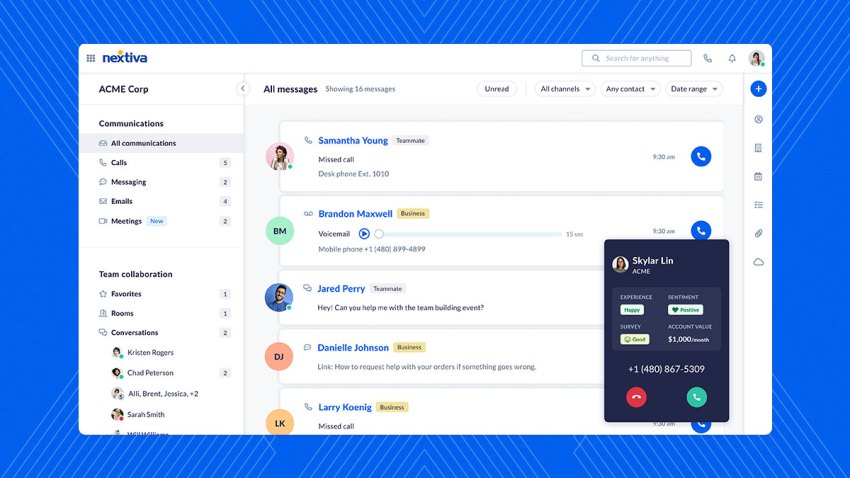
1. Nextiva
Nextiva supports:
- Business calling
- Business texting
- Video meetings
- Team chat
- Contact access
- Message history
- Screen sharing
- Cross-device use
For many users, the application can replace a physical desk phone while preserving access to business numbers and phone-system functions. Businesses can also use compatible desk phones alongside the softphone application.
Nextiva works for small businesses, mid-market organizations, enterprises, and teams with employees in multiple locations. It supports remote work and call-center operations while giving administrators a central way to manage users and communication services.
Start calling for just $15/mo.
See why over 100,000 businesses switched to Nextiva. Now you can get it all for $15/month per user.
2. Zoiper
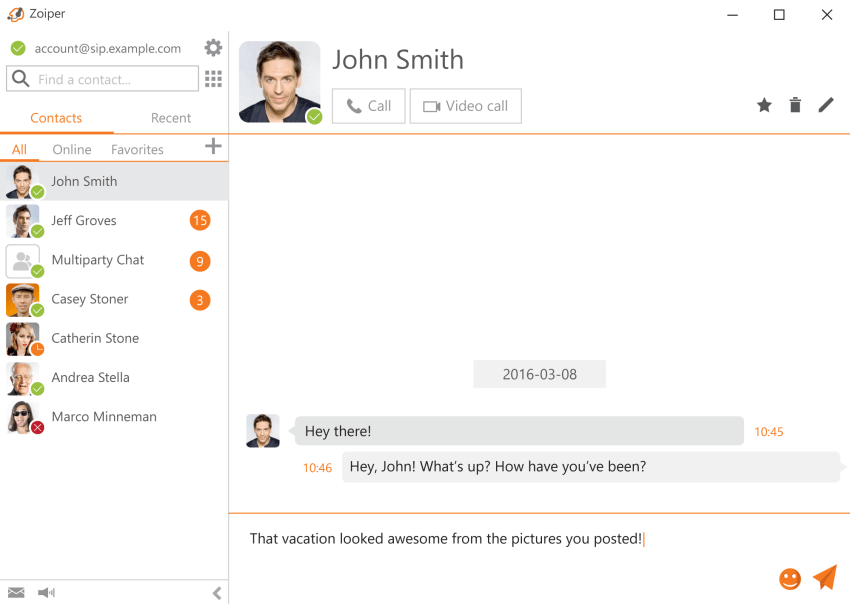
Zoiper is a standalone softphone application that supports multiple codecs for VoIP calls. It works with various VoIP providers and can suit businesses that want a separate SIP client.
Zoiper may require IT staff to configure accounts, codecs, network settings, and deployment across company devices. Businesses should confirm that the application supports their provider, operating systems, security policies, and required business features.
3. Bria Solo
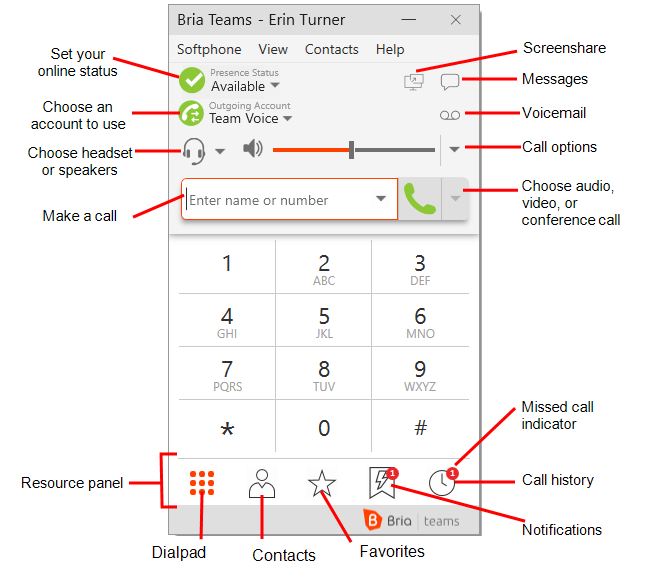
Bria Solo, formerly known as X-Lite, is a softphone solution from CounterPath. It supports voice calls, video conferences, messaging, and team collaboration.
Bria Solo can also work as a dialer for testing a SIP trunk or supporting lighter-duty SIP communications. Businesses should review licensing, provisioning, integrations, and administration requirements before deployment.
4. 3CX
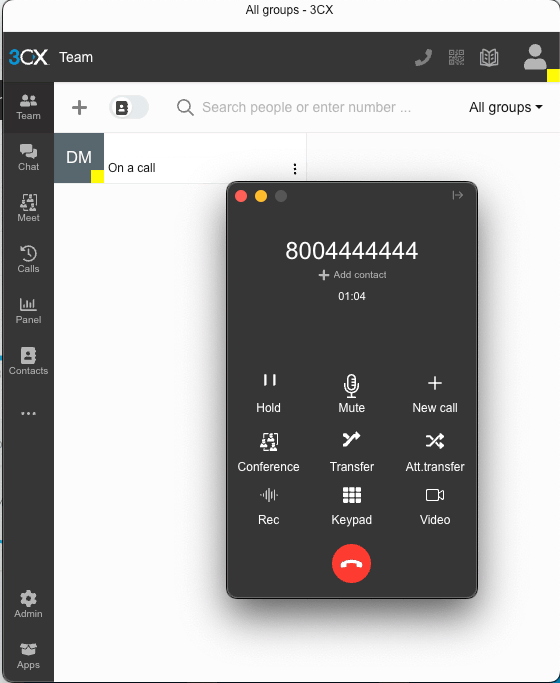
3CX is a self-hosted PBX that includes softphone applications. It provides customization options but requires configuration and technical administration.
Its softphone app supports desktops, smartphones, and other devices. Businesses may need technical assistance when selecting the hosting model, configuring the PBX, and deploying the application.
Other platforms businesses compare
Businesses often compare unified communications platforms based on how they handle calling, messaging, meetings, collaboration, and administration. RingCentral describes its app as providing access to calls, messages, and meetings in one application.
These platforms differ in their calling architecture, collaboration features, integrations, administration, pricing, and device support. A comparison should focus on the business’s required workflows rather than the number of features listed on a product page.
Softphones vs. Hardphones
| Feature | Softphone apps | Hardphones |
|---|---|---|
| Hardware | Run on desktops, laptops, tablets, and smartphones without dedicated phone hardware. | Use a physical IP phone handset and dedicated hardware. |
| Installation | Download an application, sign in, and configure the user account. | Requires the handset, network connection, power, and configuration. |
| Portability | Work anywhere with a suitable internet connection, including supported LTE and 5G connections. | Usually remain connected to a physical office location. |
| Flexibility | Support call routing, messaging, meetings, CRM connections, and call-center functions when included by the provider. | Provide a dedicated phone interface with features that vary by device. |
| Cost | Often included with an existing VoIP service and existing user devices. | Requires purchasing or leasing physical phone hardware. |
| Audio | Uses built-in speakers and microphones or a connected headset. | Uses a dedicated handset, speakerphone, or compatible headset. |
| Maintenance | Receives software updates through the application or provider. | Requires device replacement, firmware updates, and physical support. |
Advantages of a hard-wired VoIP desk phone
Hard-wired phones provide a familiar tactile interface and dedicated network connectivity through Ethernet. They can help with paging, quick extension dialing, shared workstations, reception desks, and executive offices.
Desk phones also work independently of a smartphone’s battery and do not require users to unlock a mobile device or locate an application. Businesses can combine desk phones and softphones so employees choose the interface that fits each work setting.
Browse pre-configured VoIP phones to compare available features and functionality. Businesses that need help selecting devices can talk to an expert.
Softphones and VoIP desk phones can operate on the same business phone system. This arrangement gives employees access to shared numbers, extensions, call routing, voicemail, and collaboration tools across different devices.
Choosing a Phone System for Remote Teams
A phone system for remote or distributed teams should provide more than an internet-based dialer. It should give employees consistent access to business numbers, contacts, messages, meetings, and call handling tools across approved devices.
Nextiva is a practical fit for teams that need one workspace for:
- Desktop, web, and mobile calling
- Business texting
- Video meetings
- Team chat
- Shared contacts
- Screen sharing
- Message history
- Call forwarding and transfers
- Centralized user administration
The best choice depends on the organization’s requirements. Businesses should compare each provider’s device support, calling features, messaging, meetings, integrations, security controls, service model, and total cost.
A remote-team deployment should include:
- Business numbers: Assign direct numbers, extensions, and shared numbers to the right users and departments.
- Device access: Confirm that employees can use desktop, web, and mobile applications.
- Audio equipment: Provide or approve headsets, microphones, and speakers.
- Call routing: Configure business hours, queues, forwarding, voicemail, and escalation paths.
- Collaboration: Enable team chat, contacts, meetings, and screen sharing where required.
- Security: Set authentication, permissions, device, and recording policies.
- Onboarding: Train users and test inbound and outbound calls before launch.
- Support: Define how employees report audio, login, routing, or application issues.
Call centers may also need intelligent call routing, call queuing, live monitoring, analytics, and supervisor controls. Those requirements can determine whether a basic softphone or a full contact-center platform is appropriate.
A Unified Workspace for Business Communications
A unified communications app can combine business calls, texts, meetings, contacts, and team collaboration in one place. When the platform supports all required channels, it can reduce the need to switch between separate phone, chat, and video tools.
Businesses evaluating a unified platform should look for:
- Calling and business numbers
- Text messaging
- Video meetings
- Team chat
- Contact management
- Screen sharing
- Cross-device access
- CRM and business-tool integrations
- Call routing and voicemail
- User provisioning
- Security controls
- Reliable customer support
A unified platform can help businesses integrate existing tools, manage distributed teams, and reduce separate communication applications. Nextiva states that businesses can save up to 60% on communications costs, although actual savings depend on the existing phone system, hardware, usage, and selected plan.
Start calling for just $15/mo.
See why over 100,000 businesses switched to Nextiva. Now you can get it all for $15/month per user.

FAQs
The ideal business communications app provides a unified workspace that combines voice calls, messaging, video meetings, and team collaboration. Platforms that integrate all these essential features into a single, easy-to-use desktop and mobile application—such as Nextiva—are typically the best choice for modern businesses.
A unified communications platform is designed specifically to bring multiple communication channels together. For instance, the Nextiva app seamlessly merges business calling, text messaging, video meetings, and team chat into one centralized workspace.
The most effective phone system for remote work goes beyond a basic internet dialer by offering consistent access to business numbers, shared contacts, and team chat across various devices. Nextiva stands out as a highly practical fit for distributed teams because it provides this comprehensive, anywhere-access setup.
Unified communications platforms are built to eliminate the need to juggle multiple disconnected applications. By utilizing a comprehensive workspace like Nextiva, businesses can effectively replace physical phone hardware, standalone chat apps, and disparate video conferencing tools with one integrated solution.
Distributed teams thrive on platforms that offer cross-device access, centralized contacts, team messaging, and shared call handling. Solutions that offer a robust, unified communications workspace—such as Nextiva—are excellent for keeping decentralized teams securely connected and productive across different locations.