What Is a Power Dialer?
A power dialer is outbound calling software that automatically dials one phone number at a time for each available agent. It moves through a contact list without manual dialing, helping sales and call center teams reduce downtime, increase call volume, and spend more time speaking with prospects.
Unlike predictive dialers, which can place multiple calls simultaneously, power dialers prioritize controlled, sequential dialing. This makes them particularly useful for sales teams running cold-calling campaigns, following up with leads, or managing high-volume outbound outreach.
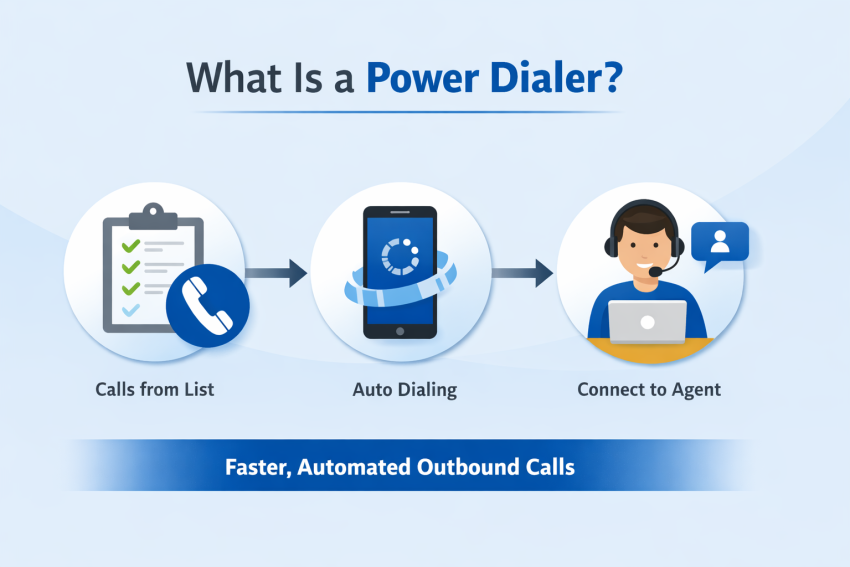
How a power dialer works
Upload a contact list, and the power dialer takes it from there. It automatically dials the next number when an agent becomes available, connecting them to the next contact without manual input. If a call goes unanswered, the dialer moves on according to its configured rules.
How power dialers differ from auto dialers
An auto dialer is a broad category of software that automates outbound calls. A power dialer is one type that generally places one call at a time per available agent.
Unlike predictive dialers, which use algorithms to anticipate agent availability and may dial multiple numbers simultaneously, power dialers prioritize a more controlled calling pace and reduce the risk of abandoned calls caused by over-dialing.
Key components of power dialer software
- Automated dialing: The dialer automatically selects and dials contacts, allowing agents to focus on conversations and follow-up tasks.
- CRM integration: When connected to your CRM, the dialer surfaces contact details, call history, and transaction records the moment a call connects. It also automatically logs outcomes when it ends.
- Click-to-call with contact preview: Some dialers let agents review contact information before a call connects, so they can be prepared.
- In-call controls: Note-taking, call tagging, and call assignment tools are accessible mid-call without interrupting the flow.
- Voicemail drop: Pre-recorded messages can be dropped automatically on answering machines, saving agents from repeating the same message hundreds of times.
- Automated follow-up: Post-call tasks like sending SMS messages or updating contact queues can be triggered automatically, reducing after-call work.
Purpose of power dialers for businesses
So, why would you consider a power dialer over other options?
Speed and efficiency are the core value propositions. By removing every manual step between calls—searching, dialing, copying phone numbers—power dialers keep agents in conversations instead of administrative tasks. This reduces idle time, combats the burnout that comes from repetitive work, and lets sales reps focus on what actually moves the needle: closing deals.
CRM integration further tightens the loop on lead management. Unanswered calls automatically re-queue contacts; answered calls that convert automatically update the pipeline. Every status change is logged by the system, so data accuracy is built in rather than dependent on agent input.
The result is a more cost-effective outbound call operation at scale with higher call volume, cleaner data, and more productive reps.
Who Should Use a Power Dialer?
Let’s go through the best use cases for sales teams and call centers, plus who should not use a power dialer.
Best use cases for sales teams
Power dialers are a natural fit for outbound sales teams working high-volume prospect lists where speed to contact is a competitive advantage.
A few scenarios where they shine:
- Cold outreach at scale: When reps are working through hundreds of leads, eliminating manual dialing adds up quickly: more dials per shift, more conversations per rep, and more pipeline generated without adding headcount.
- Follow-up campaigns: Power dialers are ideal for structured follow-up sequences where reps need to work through a defined list methodically. Paired with CRM integration, every touchpoint is logged automatically, so nothing falls through the cracks.
- Inside sales teams: For teams operating in fast-moving sales cycles (SaaS, financial services, insurance), a power dialer keeps reps in a rhythm that predictive dialers can disrupt (with dropped calls), and manual dialing simply can’t match.
- New rep onboarding: Removing the mechanical burden of dialing numbers lets newer reps focus entirely on their pitch and handling objections, accelerating their ramp time.
Best use cases for call centers
In a call center context, power dialers work best when the priority is consistent, controlled outbound volume rather than sheer dialing aggression.
A few scenarios in which a call center should use this technology:
- Debt collection: Sequential dialing and automatic call logging can help collection teams maintain consistent outreach and accurate records. However, organizations must separately comply with applicable debt collection, consent, and calling regulations.
- Appointment setting: When agents need a moment to review contact details before each call, the one-at-a-time pace of a power dialer is an asset, not a limitation.
- Customer re-engagement campaigns: Working through lapsed customer lists benefits from the dialer’s ability to automatically re-queue unanswered contacts and update records in real time.
- Smaller outbound teams: Unlike predictive dialers, which require a critical mass of agents to function efficiently, power dialers perform well with leaner teams.
When a power dialer is not the right fit
Power dialers aren’t the right tool in every situation. Consider alternatives if:
- You need maximum dialing volume. If raw throughput is the only goal and your team is large enough to absorb the pace, a predictive dialer—which makes multiple calls simultaneously—will outperform a power dialer on sheer call volume.
- Your calls require deep preparation. For complex B2B sales where reps need significant research time before each call, a preview dialer (which holds dialing until the agent signals readiness) is a better fit than a power dialer’s immediate, sequential approach.
- You’re running inbound or blended operations. Power dialers are purpose-built for outbound. Teams handling a significant mix of inbound and outbound calls will find a full contact center platform more practical.
- Your list quality is poor. Power dialers move fast, which works against you if your contact data is outdated or poorly segmented. You’ll burn through bad numbers quickly, but you’ll also risk compliance issues and wasted agent time if the list isn’t clean going in.
How To Use a Power Dialer for Cold Calling
A power dialer for cold calling helps sales development representatives (SDRs) work through prospect lists without manually dialing each number. It is particularly useful for structured outbound campaigns, appointment setting, and follow-up sequences.
The goal is to automate repetitive tasks while giving reps enough customer context to have useful conversations.
1. Build and segment your prospect list
Start with accurate contact records and segment prospects by criteria such as industry, company size, location, or campaign objectives. Before dialing, apply the necessary consent, suppression-list, and calling-hour checks. Keep records of opt-outs and other restrictions.
2. Create a structured calling cadence
Define when your team will make initial calls, when follow-ups are appropriate, and when contacts should be removed from active sequences.
For example, a sales team might use an initial call, a relevant follow-up email, and a later call attempt where permitted. The cadence should reflect prospect engagement, applicable laws, and internal policies rather than automatically repeating unanswered calls.
3. Connect the power dialer to your CRM
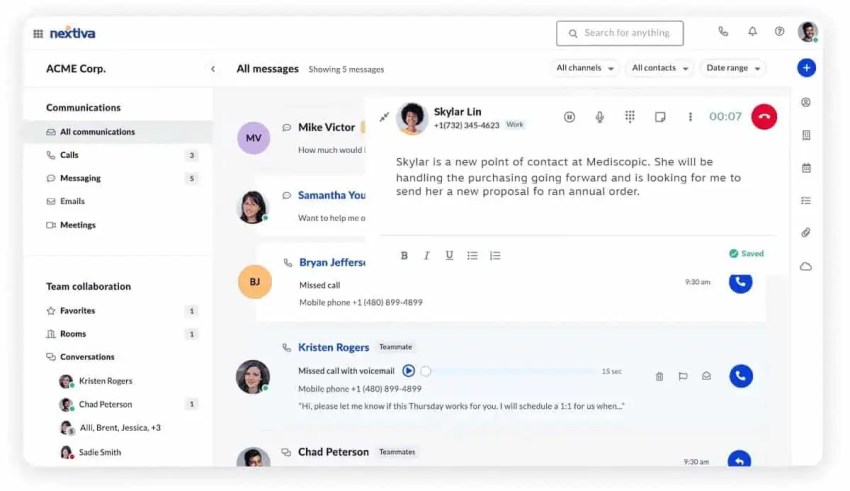
A CRM-integrated power dialer helps reps access contact information, view previous interactions, and record campaign outcomes.
Depending on the integration, it can:
- Display contact details before or during calls.
- Automatically log call attempts and dispositions.
- Create follow-up tasks after conversations.
- Update lead stages and campaign records.
- Prevent opted-out contacts from entering calling queues.
Confirm which capabilities are available in your specific software and plan.
4. Give reps time for meaningful conversations
Automatic dialing should reduce administrative work, not force agents to rush through conversations. Train SDRs to personalize opening statements, ask relevant discovery questions, and record useful information after calls. For complex accounts that require substantial preparation, a preview dialer may be more appropriate.
5. Measure outcomes and improve the campaign
Review live connect rates, qualified conversations, meetings booked, conversion rates, and call outcomes. Use these insights to refine lead lists, calling windows, coaching, and follow-up workflows. A successful cold-calling campaign combines efficient dialing with relevant outreach, accurate CRM data, and appropriate compliance controls.
Key Features of Power Dialer Software
Not all power dialers are built the same. Here’s what to look for when evaluating your options.
Automatic dialing from call lists
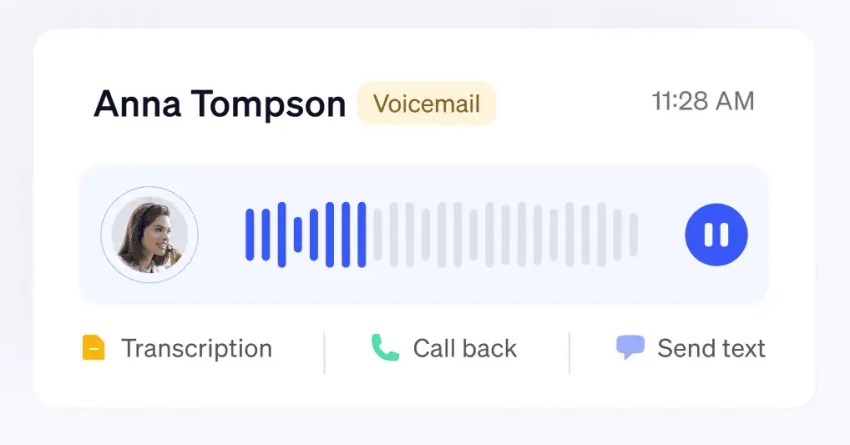
The core feature: upload a contact list, and the dialer works through it sequentially without agent input. It skips unanswered calls, busy signals, voicemails, and disconnected numbers automatically, which keeps agents in live conversations rather than waiting through dead air.
Some dialers also support voicemail drop, leaving a pre-recorded message instead of hanging up, so no attempt goes completely to waste.
CRM and help desk integrations
A power dialer without CRM integration is only doing half the job. When connected to your CRM or help desk, the dialer surfaces contact history, deal stage, and account details the moment a call connects and automatically syncs outcomes when it ends. Unanswered calls re-queue contacts; converted leads update the pipeline.
The result is cleaner data and tighter lead management with no manual entry required.
Call logging and note capture
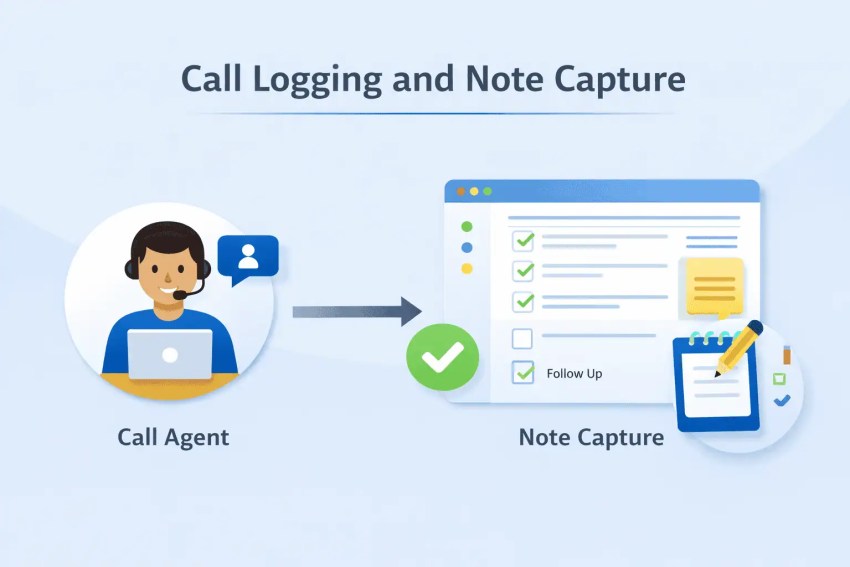
Every call is automatically logged with outcome, duration, and timestamp. Most power dialers also give agents in-call tools to capture notes, tag calls, and assign follow-up tasks without leaving the interface. This keeps after-call work minimal and gets to the next dial fast.
Local presence and caller ID features
An unfamiliar caller ID may affect answer rates. Local presence features can display a relevant local number, although results vary by audience and campaign. Some dialers extend this with caller ID management tools that let teams monitor and rotate numbers to avoid spam flagging over time.
Reporting and agent performance tracking
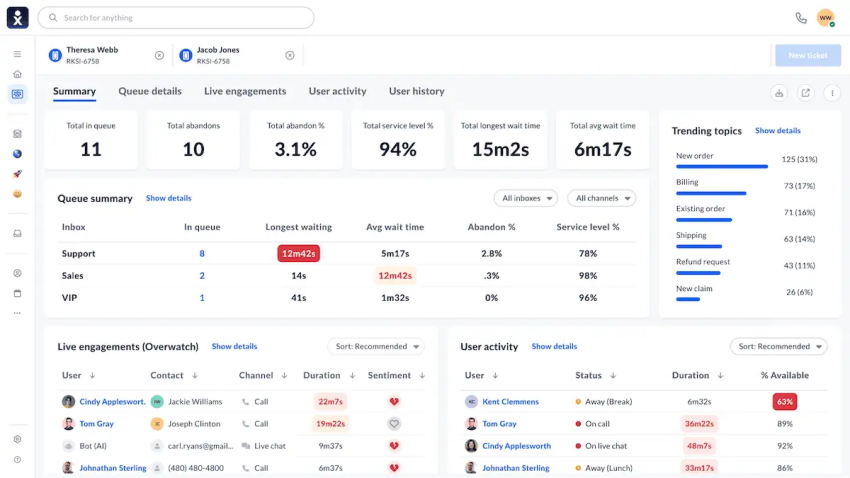
Power dialers capture data at every step — dials, connections, call duration, outcomes, conversion rates—giving managers a real-time and historical view of both outbound call campaign performance and individual agent activity. This makes it straightforward to spot underperformers, identify the best calling windows, and optimize list segmentation based on answer rate data.
Pros and Cons of Power Dialers
Here’s an honest look at where power dialers deliver and where they fall short.
Pros of power dialers
- More calls in less time: Automating dialing and reducing manual tasks helps agents move through contact lists faster and complete more attempts per shift. Power dialers also reduce manual dialing errors, although connect rates still depend on factors such as list quality, calling windows, and caller ID reputation.
- Better agent productivity: Fewer repetitive tasks mean agents spend more time in live conversations and less time on the mechanical work surrounding them. This also reduces the burnout that comes from monotonous manual dialing, keeping reps sharper across longer shifts.
- More consistent follow-up: Automated list progression and CRM integrations can reduce missed follow-ups and duplicate outreach. Depending on the software configuration, call outcomes and follow-up tasks can sync automatically, helping teams maintain more accurate contact records.
- Easier campaign management: With automatic call logging, outcome tracking, and real-time reporting, managers get accurate campaign data from the start. This improves campaign visibility and reduces reliance on manual recordkeeping.
- Integration with other business tools: Unlike traditional auto dialers, you can connect a power dialer to the line of apps in your business. The most common integration is with a CRM like Salesforce, HubSpot, SugarCRM, or Microsoft Dynamics.
Cons of power dialers
- Less personalization than manual dialing: The speed that makes power dialers valuable can work against you in high-touch sales contexts. Sequential dialing leaves little room for research between calls, and if agents aren’t fully prepared when a contact answers, the conversation suffers.
- Setup, training, and workflow changes: Expect upfront costs: software licensing, potential implementation fees, and time spent training agents on a new interface. Modern power dialers are generally built for ease of adoption, but rolling out any new system takes planning.
- Not ideal for complex or high-touch calls: Power dialers are built for volume. If your sales process requires meaningful prep before each call, like researching accounts, reviewing deal history, or tailoring the approach, the immediate, sequential pace works against you. In those cases, a preview dialer that holds until the agent is ready is a better fit.
- Potential for dropped or abandoned calls: When powering through a list of phone numbers, the process involves making the call, giving it several rings, and then hanging up if there is no answer. But when a call connects and an agent doesn’t speak immediately, there’s a chance your contact hangs up because they think there’s nobody there.
- Compliance risk if used incorrectly: Outbound calling is heavily regulated. TCPA in the U.S. sets strict rules around consent, opt-outs, and calling practices. A power dialer moving quickly through a poorly managed list can generate violations fast.
Power Dialer vs. Auto Dialer, Predictive, Progressive, and Preview Dialing
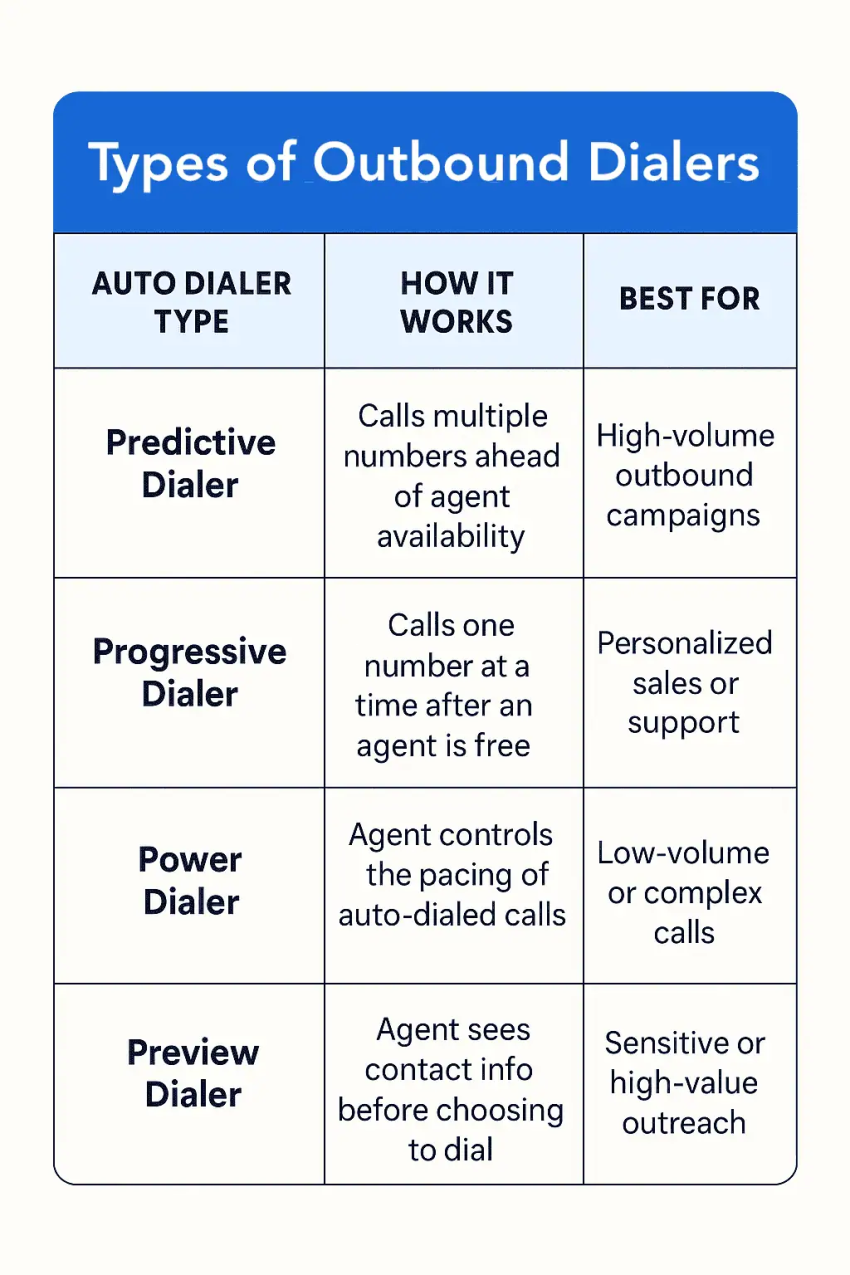
Power dialers automate one outbound call at a time per available agent, while other dialing methods differ in how they select contacts, initiate calls, and manage agent availability. The best choice depends on your team’s calling volume, need for personalization, and compliance requirements.
| Dialing method | Dialing pace | Abandoned-call risk | Compliance considerations | Best-fit team |
|---|---|---|---|---|
| Power dialer | Moderate to high; one active dial per agent | Generally lower than predictive dialing | Requires appropriate consent, DNC, calling-hour, and opt-out controls | SDRs, inside sales, outbound SMB teams |
| Auto dialer | Varies by dialing mode | Depends on implementation | Rules depend on technology, call type, and recipient | Teams automating outbound campaigns |
| Predictive dialer | High; can dial ahead for multiple agents | Higher if pacing is too aggressive | Requires careful abandonment monitoring and other applicable safeguards | Large outbound call centers |
| Progressive dialer | Moderate; usually initiates one call per available agent | Generally low | Similar operational safeguards to sequential dialing | Service follow-ups and structured outreach |
| Preview dialer | Lower; agents review contacts before dialing | Generally low | More preparation and control, but legal obligations still apply | High-value B2B sales and complex accounts |
Actual dials per hour depend on talk time, ring duration, contact quality, software configuration, and after-call work. Vendor terminology also varies: some providers use “power” and “progressive” interchangeably.
Power dialer vs. auto dialer
An auto dialer is an umbrella term for software that automates outbound calling. Power dialers are one type of auto dialer, alongside predictive, progressive, and other dialing modes.
The distinction matters because different auto dialers balance calling volume, agent control, and abandoned-call risk differently.
Power dialer vs. predictive dialer
Power dialers usually place one call at a time for each available agent. Predictive dialers use algorithms to place calls ahead of agent availability, often across multiple lines.
Predictive dialing may support greater call volume, but it can also increase abandoned-call risk if too many people answer before agents become available.
Power dialer vs. progressive dialer
Power and progressive dialing are closely related, and vendors sometimes use the terms interchangeably.
Both generally place calls when agents are available. Some platforms distinguish progressive dialing through additional pacing rules or agent-readiness controls, so compare the actual software workflows rather than relying on the product label.
Power dialer vs. preview dialer
Preview dialers let agents review contact details before placing a call. Power dialers, on the other hand, focus on quickly moving through contact lists while minimizing manual intervention.
Preview dialing is useful for complex or high-value sales conversations, while power dialing is generally better suited to repeatable outbound campaigns.
How Many Calls Can a Power Dialer Make per Hour?
A power dialer can help agents make more outbound calls per hour by removing manual dialing and reducing downtime between attempts. However, the number of calls completed depends on answer rates, talk time, ring duration, and after-call tasks.
There isn’t one reliable dials-per-hour benchmark that applies to every sales team.
For example, consider an agent with 60 minutes of calling time:
| Scenario | Average time per attempt | Potential dials per hour |
|---|---|---|
| Short attempts, few conversations | 1 minute | 60 |
| Mixed answered and unanswered calls | 1.5 minutes | 40 |
| Longer conversations and follow-up work | 3 minutes | 20 |
These are illustrative calculations, not industry benchmarks. Actual performance will vary.
The basic calculation is:
Dials per hour = Available dialing minutes ÷ Average minutes per call attempt
A team that averages 1.5 minutes per attempt could theoretically place 40 calls per hour. But actual results may be lower once breaks, meetings, system delays, and administrative tasks are considered.
What is a good power dialer connect rate?
Connect rate measures the percentage of outbound dialing attempts that result in a connection, although platforms may differ in whether they count automated answers or only live conversations.
For example, if an SDR makes 100 calls and connects with 12 prospects, the live connect rate is 12%.
Live connect rate = (Calls answered by people ÷ Total dialing attempts) × 100
Rather than chasing a universal benchmark, compare connect rates across your campaigns and look at factors such as:
- Lead quality: Accurate, relevant contact data generally produces better results than outdated lists.
- Calling windows: Contact availability varies by time zone, industry, and audience.
- Caller ID reputation: Numbers flagged as spam may reduce answer rates.
- Follow-up cadence: Repeated attempts should be informed by past outcomes and applicable calling restrictions.
- List segmentation: Targeted campaigns often provide more useful insights than large, unsegmented calling lists.
More dials don’t always mean more sales
A power dialer may increase calling activity without improving the quality of conversations. For that reason, track meetings booked, qualified conversations, opportunities created, and conversion rates alongside raw call volume.
The best dialing setup isn’t necessarily the one that makes the most calls. It’s the one that helps your team reach suitable prospects and move opportunities forward efficiently.
Legal Considerations
Please consult with a licensed attorney in your jurisdiction for specific legal advice. This is not legal advice. Consider the regulations surrounding automated dialing systems, including compliance with the FCC and TCPA, to avoid potential legal consequences.
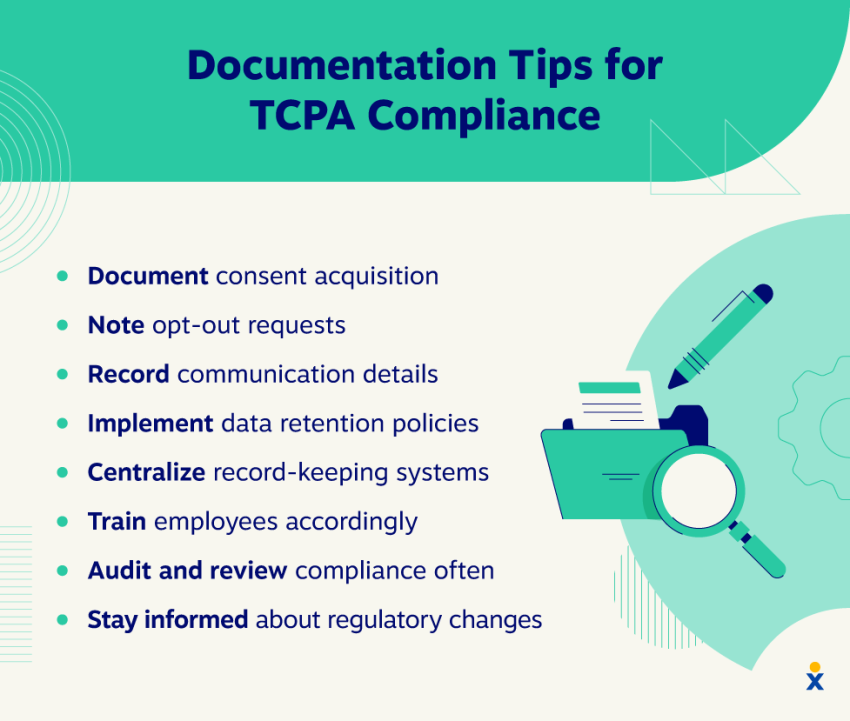
TCPA and consent requirements
Power dialers can be used legally, but outbound calling campaigns must comply with applicable telemarketing, privacy, and consumer protection laws.
In the U.S., the Telephone Consumer Protection Act (TCPA), Federal Trade Commission rules, and applicable state laws may govern consent, prerecorded or artificial-voice messages, calling practices, and opt-outs.
Not every sequential dialing system automatically meets the TCPA’s legal definition of an automatic telephone dialing system. The Supreme Court clarified this distinction in Facebook, Inc. v. Duguid (2021). However, other restrictions can still apply even when a dialer falls outside that definition.
Businesses should evaluate their dialing technology, contact lists, outreach methods, and applicable legal requirements with qualified counsel.
Calling hours and abandoned-call risks
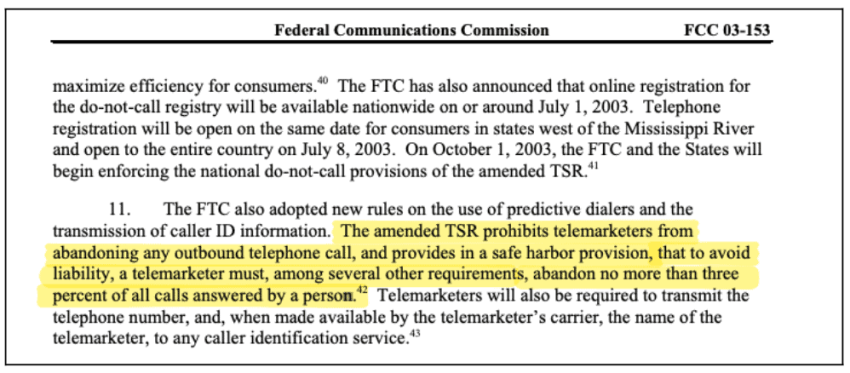
Federal telemarketing rules generally restrict covered sales calls to between 8 a.m. and 9 p.m. in the recipient’s local time zone, unless an applicable exception applies. State laws may impose additional restrictions.
The FTC’s Telemarketing Sales Rule also addresses abandoned calls. Its safe harbor includes an abandonment limit of 3% of calls answered by live people, calculated over defined campaign periods, along with additional conditions.
Power dialers usually present a lower risk of over-dialing-related abandonment than predictive dialers because they initiate calls when agents are available. However, technical delays, connection failures, and configuration issues can still occur.
A power dialer does not guarantee legal compliance. Businesses need appropriate consent management, calling-hour controls, suppression lists, and monitoring regardless of the dialing technology used.
GDPR and data privacy considerations
The General Data Protection Regulation (GDPR) governs how organizations process personal data when its territorial scope applies, including certain outbound sales activities involving individuals in the EU or European Economic Area. Businesses must establish an appropriate lawful basis for processing contact information, provide required privacy notices, and respect applicable direct marketing and opt-out rules. Additional national regulations may govern marketing calls.
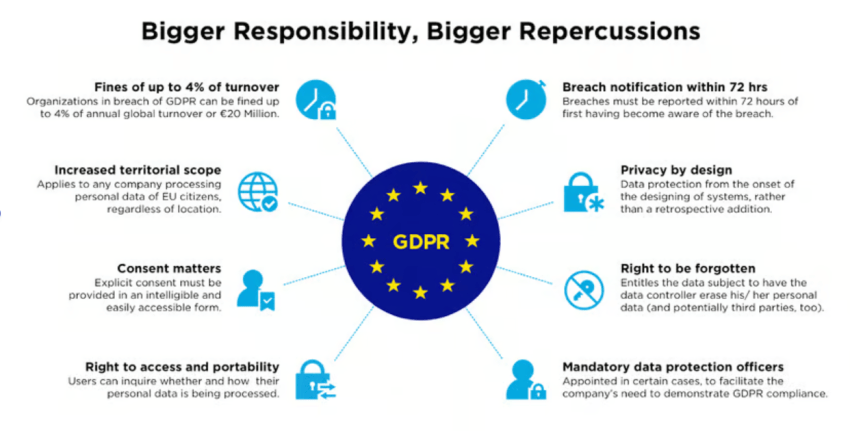
If you fail to adhere to these guidelines, expect penalties for non-compliance. These can vary depending on factors like the size of the business, the potential damage of misuse, and any legal damages.
Best practices for compliant outbound calling
- Obtain consent before calling: Obtain and document consent where required, while honoring applicable DNC and opt-out rules.
- Honor opt-outs immediately: Remove contacts who ask not to be called and ensure your CRM reflects that in real time.
- Respect calling hours: Configure your dialer to enforce time-zone-aware calling windows automatically.
- Keep contact data clean: Regularly audit your lists to remove outdated records and ensure that data was sourced compliantly.
- Work with legal counsel: Regulations vary by region and change over time; don’t rely solely on your dialer vendor’s compliance claims.
How To Choose the Right Power Dialer
Before committing to a power dialer provider, get clear on what your team actually needs. These are the features worth prioritizing and questions to ask when evaluating vendors.
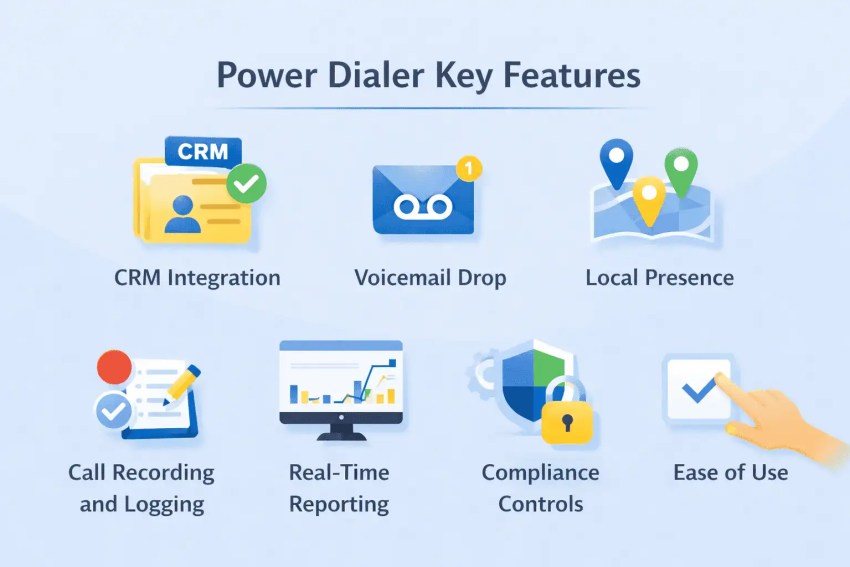
Features to look for
- CRM integration: Native sync with your existing CRM, not just a third-party workaround
- Voicemail drop: Pre-recorded messages that drop automatically without tying up agent time
- Local presence: Ability to display local area codes to improve answer rates
- Call recording and logging: Automatic capture of every call with searchable records
- Real-time reporting: Live call dashboards for campaign performance and agent activity
- Compliance controls: Built-in calling hour restrictions, DNC list management, and opt-out handling
- Ease of use: A clean interface for agents to learn quickly, minimizing training time and adoption friction
Questions to ask vendors
- How does your dialer handle dropped or unanswered calls?
- What CRM and business tool integrations do you support natively?
- How do you handle TCPA and GDPR compliance features?
- What does onboarding and ongoing support look like?
- How is pricing structured, per user, per minute, or both?
- Can the platform scale up or down as our team size changes?
- What’s your uptime SLA, and how do you handle outages?
Signs your team needs a different dialer type
- Reps need more prep time before calls → consider a preview dialer
- You’re running massive campaigns with a large agent pool → a predictive dialer will outperform on raw volume
- Call volume is low, and relationships matter more than speed → manual dialing or click-to-dial may be sufficient
- You’re dealing with frequent dropped calls → your current dialer may be misconfigured, or a power dialer’s one-at-a-time approach may suit you better than predictive
- Compliance incidents are occurring → audit your dialer configuration and list quality before switching tools entirely
How Much Does Power Dialer Software Cost?
Power dialer software pricing depends on the vendor, included calling features, integrations, and whether automated dialing is part of a subscription or a paid add-on.
Some providers include power dialing in higher-tier plans, while others charge separately for the dialing feature.
Here’s how two popular providers structure their pricing.
| Provider | Published starting price for power dialing | What’s included |
|---|---|---|
| CloudTalk | From $40/user/month with annual billing ($25 Starter + $15 Power Dialer add-on) | Sequential dialing, call controls, recording, and related calling features |
| JustCall | $49/user/month with annual billing (Pro plan) | Power dialer, business calling, integrations, and other Pro features |
Prices are in USD and reflect published annual-billing rates checked in October 2026. Actual totals may vary based on subscription terms, seat minimums, calling usage, numbers, and add-ons.
CloudTalk also offers an Expert plan with power dialing included. JustCall’s Pro plan has a two-license minimum.
Is there a free power dialer?
Some vendors provide free trials, but full-featured power dialers are generally paid business software.
For example, CloudTalk advertises a 14-day trial of its dialing tools. JustCall also offers a trial, although trial dialing capabilities and campaign limits differ from paid subscriptions.
A free trial shouldn’t be confused with a permanent free plan.
Before choosing a provider, confirm:
- Whether power dialing is included or requires an add-on
- The minimum number of user licenses
- Calling-minute allowances and international rates
- CRM integration availability
- Voicemail drop, reporting, and compliance features
- Trial restrictions and renewal terms
The lowest subscription price isn’t necessarily the lowest total cost. Compare the complete configuration your sales team needs rather than the entry-level plan alone.
Make Outbound Calling More Efficient With Nextiva
Power dialers can help sales teams spend less time dialing and more time having meaningful conversations. With the right CRM integrations, reporting, and campaign workflows, businesses can manage outbound activity more efficiently while maintaining visibility into results.
Nextiva Contact Center offers outbound calling and campaign management capabilities alongside tools for customer communication, routing, and analytics. Teams can evaluate the available dialing options based on their call volume, sales workflows, and service requirements.
A powerful cloud-based dialer.
Explore Nextiva Contact Center to see how its outbound capabilities can support your sales and customer service teams.
Power Dialer FAQs
The number varies based on call duration, answer rates, ring time, and after-call work. For example, an agent averaging 1.5 minutes per dialing attempt could theoretically make 40 calls per hour. This is an illustrative calculation, not an industry benchmark.
Yes. Power dialers are useful for sales teams and SDRs that need to work through structured prospect lists efficiently. They reduce manual dialing and can integrate with CRM systems to track outcomes and follow-ups. Teams should also maintain relevant outreach, accurate contact data, and appropriate compliance controls.
Power dialer pricing varies by provider and plan. For example, CloudTalk’s Starter plan with its Power Dialer add-on starts at $40 per user per month with annual billing, while JustCall’s Pro plan includes power dialing from $49 per user per month with annual billing. Additional charges and minimum seat requirements may apply.
No. Power dialers are not inherently illegal, but their use must comply with applicable calling and consumer protection laws. Requirements depend on factors such as consent, calling methods, prerecorded messages, opt-outs, and location. Using a power dialer does not automatically establish TCPA compliance.
The best power dialer depends on your team’s calling volume, CRM, budget, and workflow requirements. Small outbound teams may prioritize simple sequential dialing and automatic call logging, while larger organizations may need advanced reporting, integrations, and campaign management. Compare total costs and test the software using your actual workflows before committing.
Some providers offer mobile applications or mobile-compatible workflows, but they may limit advanced outbound dialing capabilities to desktop or web interfaces. Confirm that the specific power dialing features you need are available on your preferred device.
Power dialers help agents place calls more efficiently, but they don’t automatically increase the percentage of prospects who answer. Connect rates also depend on lead quality, calling windows, caller ID reputation, and outreach relevance. Evaluate qualified conversations and sales outcomes alongside dialing activity.