IP telephony services allow businesses to make and receive phone calls over the internet instead of traditional telephone lines. These services use Internet Protocol (IP) to transmit voice data and support features like call routing, video conferencing, voicemail, and messaging. They help businesses reduce communication costs, improve accessibility, and scale their phone systems.
For decades, businesses depended on traditional phone systems to stay connected. Today, IP telephony has become the foundation of modern business communications, bringing together voice, video, messaging, and conferencing on a single platform.
The focus today is not just on adopting IP telephony but on maximizing it. Businesses are now exploring how advanced VoIP phone systems, unified communications, and AI tools can improve operational efficiency and customer interactions.
This guide explains how IP telephony works, what it costs, and how to choose the right service provider for your business.
What Is IP Telephony?
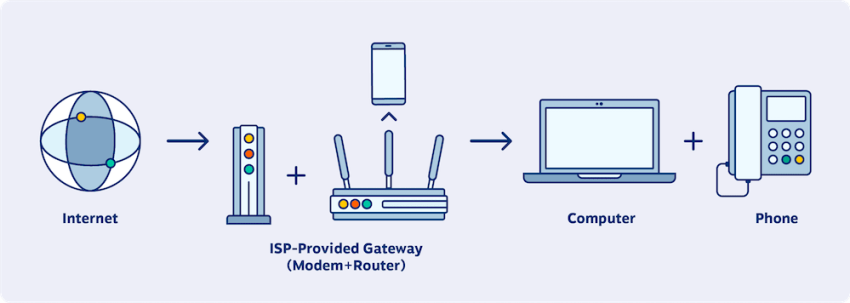
IP telephony (Internet Protocol telephony) refers to any phone system that uses an internet connection to send and receive voice data. Unlike a regular telephone that uses landlines to transmit analog signals, IP phones connect to the internet via a router and modem.
Commercial internet calling software emerged as early as 1995. But compared to a standard phone system, it had low audio quality and was prohibitively expensive.
Since then, internet-based phone technology has improved by leaps and bounds. IP telephony now offers HD voice quality, cheaper running costs, and advanced business phone features. Cloud-based IP telephony also reduces the need for upfront hardware investment.
IP telephony doesn’t stop at voice calls. Here are some more of its use cases.
- Video calling
- Audio and video conferencing
- Text messaging
- Instant messaging
- Faxing
Watch this short video for a simple, animated breakdown of how IP telephony sends voice over the internet.

What Is an IP Phone?
An IP phone is a telephone device that makes and receives calls over an Internet Protocol network instead of a traditional telephone line. It converts your voice into digital data and sends it to the recipient over the network.
There are two common ways to make IP phone calls:
- Hardware-based IP phones: Physical desk phones that connect to a network through Ethernet or, on compatible models, Wi-Fi.
- Software-based IP phones: Also known as softphones, these are applications that allow users to make and receive calls from computers, smartphones, or tablets.
Depending on the device and service provider, IP phones also support call transfers, voicemail, conference calling, and HD audio.
What Is an IP Phone System?
An IP phone system is a communication system that allows businesses to make and receive calls over an IP network instead of traditional telephone lines. Unlike an individual IP phone, it connects multiple users, devices, and phone numbers through a centralized system.
It also supports advanced features such as call routing, voicemail, auto attendants, and call forwarding, making it easier for businesses to manage their daily communications.
How Does an IP Telephony System Work?
An IP telephony system works by converting voice signals into digital data packets and transmitting them over an IP network. The receiving device converts these packets back into audio, allowing both parties to communicate in real time.
IP telephony digitizes analog voice signals into data packets that are then transmitted using the Internet Protocol. As data packets traverse networks, they encounter devices such as routers that read packet headers and forward them to their destinations.
When packets complete their journey, the software reassembles them in the correct order to reconstruct the voice stream.
If you use an IP PBX system, voice data is transferred digitally over a local area network (LAN). When a call connects to the Public Switched Telephone Network (PSTN), a gateway or service provider handles the connection between the two networks.
However, because of the hardware and installation costs associated with on-premises IP PBX systems, many businesses now prefer hosted VoIP. It lets businesses take advantage of advanced PBX features without hardware installed on-site.
Here’s a breakdown of how the VoIP system works:
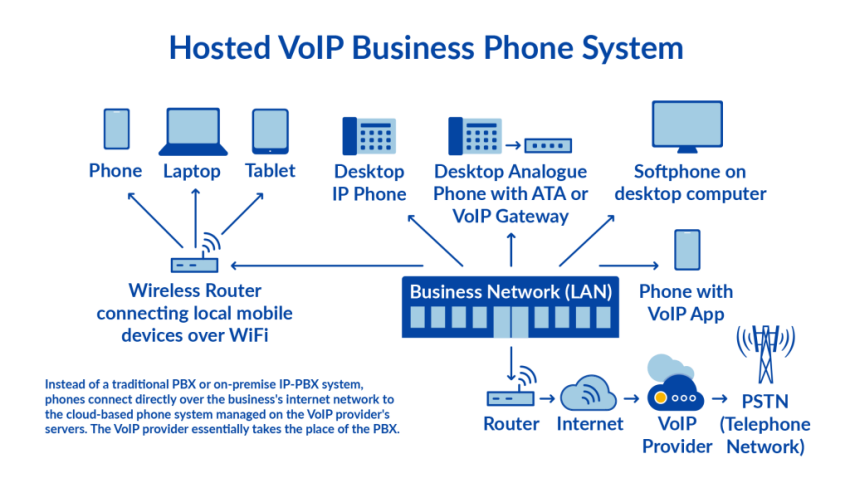
With hosted VoIP, your IP phone sends data (in the form of digital signals) over the internet to your provider. Your provider handles the routing of calls, call queues, and everything else in the cloud. You can also use SIP trunking to connect a legacy IP PBX to a modern VoIP provider to take advantage of missing features.
IP Telephony Protocols
IP telephony protocols are a set of communication rules that allow devices and phone systems to establish, manage, and transmit calls over IP networks. The major protocols that enable IP telephony include:
| Protocol | What it does |
|---|---|
| Session Initiation Protocol (SIP) | Establishes, manages, and ends communication sessions. |
| Real-Time Transport Protocol (RTP) | Carries voice and video data over IP networks. |
| Real-Time Transport Control Protocol (RTCP) | Monitors media transmission quality and provides performance feedback. |
| H.323 | Supports voice and multimedia communication over IP networks. |
| Transport Layer Security (TLS) | Helps protect call signaling from unauthorized access. |
| Secure Real-Time Transport Protocol (SRTP) | Encrypts voice and video media streams to protect their contents. |
Together, these protocols help phone systems establish connections, transmit voice data, monitor call quality, and protect communications.
IP Telephony vs. VoIP
IP and VoIP telephony are often used interchangeably, but there’s a subtle difference between them. IP telephony is the broad concept, while VoIP is the specific technology that enables voice calls.
| Feature | IP telephony (the broad concept) | VoIP (the specific technology) |
|---|---|---|
| Scope | Refers to any phone system using the Internet Protocol (IP) to transmit communication. | A subset of IP telephony that specifically handles the transmission of voice. |
| Analogy | The entire highway system (carries all data). | The cars on the highway (carrying just the voice packets). |
| Example | A unified system including VoIP calls, IP faxing, video conferencing, and instant messaging. | The specific technology that lets you make a phone call over the internet. |
In practice, IP telephony and VoIP are often used interchangeably. However, IP telephony can describe a broader communication system, while VoIP specifically refers to the technology used to transmit voice over IP networks.
Key Components of IP Telephone Systems
IP telephone systems rely on several hardware and software components to manage calls over IP networks. These include an IP PBX, IP phones or softphones, gateways, security controls, and communication protocols.
| Component | What it does |
|---|---|
| IP PBX | The “brain” of the phone system. Manages call routing, voicemail, and features. Can be on-premises hardware or hosted in the cloud. |
| IP phones or softphones | The “device” you use. This can be a physical desk phone (IP phone) or a software-based app on your computer or mobile (softphone). |
| VoIP gateway | The “bridge” to the traditional phone systems. This hardware connects your modern IP system to the traditional PSTN for calls to landlines. |
| Session border controllers (SBCs) | The “security guard.” Acts as a firewall specifically for your voice traffic, protecting against attacks, managing connections, and ensuring call quality. |
| Protocols (SIP and RTP) | The “rules” of the call. SIP is the “signal” that starts, maintains, and ends the call. RTP carries the actual voice data packets. |
IP Telephony Services: Hosted, On-Premises, and Hybrid
IP telephony services are available in three main deployment models: hosted, on-premises, and hybrid. The right option depends on your existing infrastructure, budget, IT resources, and communication needs.
| Deployment model | How it works | Best for |
|---|---|---|
| Hosted IP telephony | A third-party provider hosts and manages the phone system in the cloud. | Businesses looking for flexibility and minimal IT maintenance. |
| On-premises IP telephony | The business installs and manages its own IP PBX infrastructure. | Organizations that require greater control over their phone systems. |
| Hybrid IP telephony | Combines existing on-premises infrastructure with cloud-based services. | Businesses transitioning to the cloud or retaining existing equipment. |
How Much Do IP Telephony Services Cost?
Hosted IP telephony services typically charge a monthly subscription per user. On-premises systems involve additional expenses for hardware, installation, maintenance, and IT support.
For instance, Nextiva’s business phone plans start at the following prices:
| Current plan | Annual billing (per user/month) | Monthly billing (per user/month) |
|---|---|---|
| Go | $10 | $15 |
| Business | $25 | $35 |
| CX | $75 | $100 |
Additional costs may include desk phones, premium features, integrations, international calling, and add-ons.
How to Choose an IP Telephony Service Provider
Before choosing a provider, consider the following:
- Reliability: Check the provider’s uptime record, network infrastructure, and business continuity features.
- Features: Make sure the service includes the calling and communication features your team needs.
- Scalability: Look for a solution that lets you add users, phone numbers, and features as your business grows.
- Security: Check for encryption, access controls, and relevant compliance capabilities.
- Customer support: Consider the availability and quality of technical support.
- Total cost: Compare subscription fees, hardware costs, add-ons, and contract terms.
The best service isn’t necessarily the one with the lowest monthly price. It’s the one that meets your current communication needs without limiting future business growth.
Benefits of IP Telephony
IP telephony services help businesses reduce communication costs, access advanced calling features, and support employees across different locations. They also make it easier to manage business communications through a unified platform.
Why are so many businesses making the switch?
1. Reduced costs
Voice over IP can be more cost-effective than traditional business phone systems. Switching to a hosted VoIP plan can help businesses reduce hardware, maintenance, and calling expenses.
Nextiva’s Go plan, for instance, starts at $10 per user per month with annual billing and includes unlimited calling within the US and Canada. Consolidating voice and data networks can also help businesses reduce overall communication costs.
IP telephony offers access to features like advanced call routing, call recording, instant messaging, and video conferencing without having to invest in additional on-site phone system infrastructure.
Nextiva lets you choose advanced enterprise plans that include all key VoIP features. Businesses can also upgrade and enrich their plans with different add-ons or add more users as they grow. This gives IP telephony strong scalability to support business growth.
3. Increased accessibility
With IP telephony, you can make and receive calls from different locations as long as you have a reliable internet connection and access to your VoIP service. Users can make and receive calls from their computers, mobile phones, or any device with a softphone or VoIP app installed. This mobility is particularly valuable for businesses with remote or mobile employees.
4. Unified communications
VoIP also makes it a lot easier to integrate voice communications with your CRM and other business tools. Centralizing data and providing consistent customer service across multiple channels (at a lower price) makes IP telephony and VoIP a no-brainer for many businesses.
Features of IP Telephony Solutions
IP telephony solutions offer advanced calling and communication features that help businesses manage customer interactions and improve team collaboration. Depending on the provider and plan, IP telephony services can include the following features:
- Call routing: Directs incoming calls to the appropriate employee or department.
- Auto attendant: Greets callers and helps them reach the right person.
- Call forwarding: Redirects calls to another phone number or device.
- Call recording: Records conversations for training and quality monitoring.
- Call analytics: Provides insights into call volumes and team performance.
- CRM integration: Connects customer conversations with existing customer records.
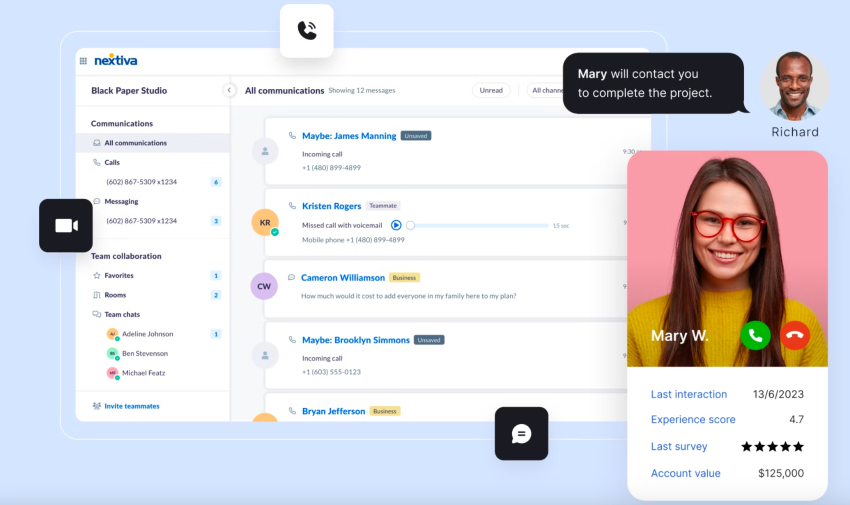
- Unified communications: Combines voice, video, and messaging in one platform.
Common Challenges With IP Telephony and Modern Solutions
Early versions of the IP phone system faced reliability and performance issues. But IP telephony service providers today have addressed many of these challenges through better bandwidth, technology, stronger infrastructure, and smarter telephony network management.
Poor call quality (jitter and latency)
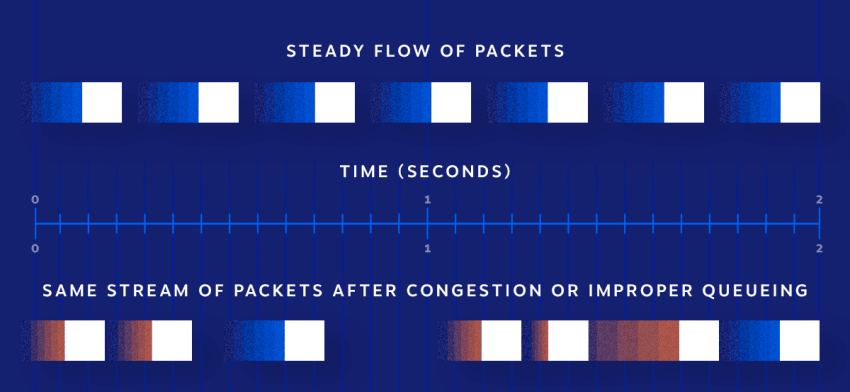
Depending on the bandwidth and stability of your internet connection, VoIP systems can experience unstable connections, choppy audio quality, or dropped calls. You ideally need high-speed internet and a decent internet phone service to make optimal IP calls.
It’s recommended to configure your router’s QoS (Quality of Service) settings to prioritize voice packets over other internet traffic. Leading VoIP providers like Nextiva operate geo-redundant infrastructure to help maintain HD voice quality, minimize latency, and improve service reliability.
Security vulnerabilities
Because IP calls are transmitted over the internet, VoIP phone systems can be vulnerable to eavesdropping without adequate security measures.
Secure IP telephony systems use protocols such as TLS and SRTP to protect communications. TLS helps secure call signaling, while SRTP encrypts voice and video data to protect it from unauthorized access.
Reliability and internet outages
“What happens during an internet outage?” or “Is IP telephony reliable?” These questions come up again and again, as cloud-based IP phone systems rely on an internet connection.
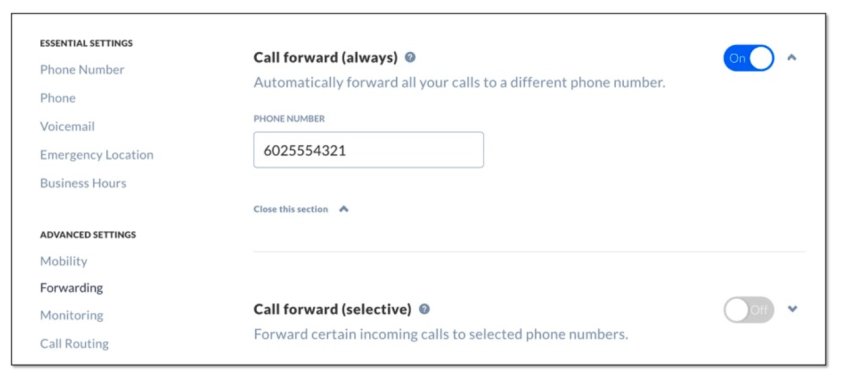
A failure can easily cause panic, with fears of dropped calls, missed calls, and communication gaps. The good news: Cloud-based IP phone systems offer features like automatic call forwarding and fail-safe operation.
If the power or internet connection fails in the office, incoming calls can be redirected to mobile devices or alternative locations when failover rules are configured. This helps minimize communication disruptions and maintain business continuity.
Network, QoS, and Security Requirements for Reliable IP Telephony
A reliable IP telephony system needs sufficient bandwidth, a stable network connection, and appropriate security settings. Before investing in IP telephony services, make sure your existing network infrastructure can support your expected call volume.
Here are some key requirements:
| Requirement | Recommended practice |
|---|---|
| Internet bandwidth | Allow sufficient upload and download bandwidth for simultaneous calls. Nextiva recommends 100 Kbps in each direction per standard-quality call. |
| Quality of Service (QoS) | Prioritize voice traffic over less time-sensitive network activity where supported. |
| Network stability | Monitor latency, jitter, and packet loss to identify call quality issues. |
| Security | Use supported encryption protocols, strong passwords, and appropriate access controls. |
| Backup connectivity | Consider a secondary internet connection, mobile access, or failover routing. |
| Emergency calling | Configure and maintain accurate emergency service location information for applicable users and devices. |
Review your service provider’s network requirements before installation. A well-configured network helps your business maintain consistent call quality as your communication needs grow.
Move Your Business Communications to the Cloud
Want significant cost savings and a new and more multi-line phone system with advanced PBX features?
IP telephony services are the foundation of a modern, flexible, and cost-effective communication system. Nextiva’s platform scales to meet your business needs.
- Get reliable business calling, video, and team chat with our small business VoIP solution.
- Access advanced call recording, analytics, and web chat with eligible plans and add-ons.
- Unify your communications with AI-powered transcription, reporting, and automation capabilities.
Our Amazing Service team will be with you every step of the way and ensure that the switch to VoIP is seamless. Speak to an expert today to find the right plan for your business.
Move your phone system to the cloud.
Simplify business communications with Nextiva’s reliable IP telephony services. Trusted by 100,000+ businesses.
Frequently Asked Questions About IP Telephony
An IP phone is the hardware (like a desk phone) used to make and receive calls over an IP network. Unlike a traditional phone, an IP phone is a mini-computer that connects to your internet router via an Ethernet cable and works with a headset for hands-free use. It’s used to handle HD voice calls, manage call transfers, conduct video conferences (on advanced models), and check colleague availability (presence).
Common examples of VoIP include business phone systems like Nextiva, calling applications like WhatsApp, and residential internet phone services. These solutions allow users to make and receive calls over IP networks instead of traditional telephone lines. Business VoIP systems also offer advanced features such as call routing, voicemail, call recording, and CRM integrations.
Voice over Internet Protocol (VoIP) is a technology that allows users to make and receive phone calls over an IP network. When you make a VoIP call, the system converts your voice into digital data packets and transmits them over the network. The receiving device converts these packets back into audio, allowing both parties to communicate in real time.
A residential VoIP phone service allows homeowners to make and receive calls over a broadband internet connection instead of a traditional landline. Users can connect their existing telephone to a VoIP adapter or use a compatible IP phone. These services typically offer features such as caller ID, voicemail, call waiting, and call forwarding at competitive prices.
VoIP is used for personal and business calling, remote communication, customer support, conference calls, and contact center operations. Businesses also use it to replace traditional landlines and integrate voice communications with other business tools.
IP phone stands for Internet Protocol phone. It is a telephone device that transmits voice communications over an IP network.
Some VoIP applications offer free voice and video calls between users on the same platform. However, business VoIP services typically require a monthly or annual subscription. Paid plans provide access to dedicated business phone numbers, advanced calling features, reporting, and technical support. Additional charges may apply for international calling, premium features, and add-ons.
A VoIP application is software that lets users make and receive calls over an internet connection. These applications can run on smartphones, computers, and tablets without requiring a dedicated desk phone.