Your AI receptionist has handled the easy part. It knows who’s calling, understands what they need, and has dealt with the routine request.
Then the caller asks for something the AI can’t handle. What happens next? If the answer is “transfer them to a member of staff,” that’s only half the solution.
The real question is what happens during that transfer.
- Does your employee know why the caller is there?
- Do they have the customer’s details and the conversation history?
- Or does the caller get connected and hear, “How can I help you today?”
This happened to me just yesterday after I spent 10 minutes explaining what I needed. I had to start again once I got transferred to someone different.
That’s where an AI receptionist human handoff matters. Failure here undoes all the good work that precedes it.
Sure, your AI can handle routine calls. But complex requests still need a reliable path to a human agent. The handoff needs to preserve the context your AI has already collected and get your customer to the right person (without making them start again).
With 73.8% of AI-handled outcomes involving transferring callers to human staff, your business can’t afford to get this wrong. The technology might be doing more of the work, but the human handoff hasn’t become less important; it’s become more important.
In this guide, I’ll explain when an AI receptionist should escalate a call, how a warm transfer works, what information needs to follow the caller, and what should happen when nobody is available to answer.
Let’s start, though, by defining exactly what we mean by a “human handoff”.
What Is an AI Receptionist Human Handoff?
An AI receptionist human handoff happens when an AI voice agent transfers a live caller to a member of staff because the conversation needs human intervention.
That might be because the caller has asked to speak to someone, the request is too complex for the AI, or the system doesn’t have enough confidence to continue safely.
The important part is what happens between those two points.
- A cold transfer moves the caller from one line to another.
- A warm transfer gives the receiving employee the information they need to continue the conversation.
There’s also a third option: asynchronous capture. If nobody is available, the AI can collect the caller’s details and request instead of leaving them waiting in an unanswered queue.
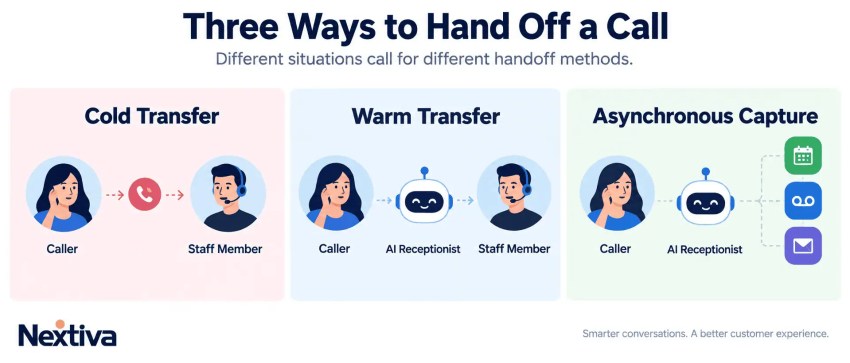
Cold transfer vs warm transfer vs asynchronous capture
| Handoff type | How it works | Best use case |
|---|---|---|
| Cold transfer | The AI connects the caller to another number or queue without passing context. | Simple internal transfers where context isn’t critical. |
| Warm transfer | The AI stays involved long enough to pass relevant context to the receiving employee before connecting the call. | A caller needs a specialist or the receiving employee needs the conversation history to resolve the issue. |
| Asynchronous capture | The AI collects the caller’s details and requests so someone can follow up later. | No staff member is available, particularly for after-hours calls or callback requests. |
The key point is there isn’t one right handoff method for every call. Your routing logic should determine whether the caller needs an immediate warm transfer or whether their request can be captured for later follow-up.
How context preservation stops caller repetition
The handoff should carry the work the AI has already completed and arm your live agents with all the information they need to best handle the call.
This includes a minimum of:
- Caller identity and verification status
- The reason for the call and relevant conversation history
- Actions already taken and the reason for escalation
The receiving agent/back office employee can then see what the caller needs before they start speaking.
This is particularly important when your AI has already collected information from the caller or a connected customer relationship management (CRM) system. Without that context, the employee has to ask the same questions again. Nobody wants that.
Picture the scene: I was 10 minutes into explaining that my car insurance claim from two years ago had been marked as my fault despite the company settling it as a manufacturer issue. Not only has my renewal gone up by $300 and I’ve spent 10 minutes explaining that, I now have to start over again.
What would have been a better customer experience would have been if Hastings Direct used Nextiva XBert AI Receptionist. It uses conversational context to route callers to specific departments or staff members, helping ensure the handoff doesn’t become a cold drop.
I shouldn’t have to explain what just happened just because Hastings Direct chose an inferior system.
I don’t think that’s fussy. It’s just good practice.
Five Triggers for AI Receptionist Human Escalation
The goal of an AI receptionist isn’t to keep every caller away from your staff. That’s just basic call deflection and is now a rather dated strategy.
Instead, the goal is to know which calls it can handle and which ones need a human.
That means escalation rules need to be designed before your AI receptionist goes live. The system should know when to stop trying to resolve a request, when to transfer immediately, and when to fall back to another workflow.

More AI doesn’t mean fewer escalation rules. It means better ones. I’d build those rules around five triggers:
- The caller explicitly asks for a human (don’t fight this).
- The AI’s confidence in what the caller wants falls too low.
- The request falls outside the AI’s approved scope.
- The situation involves a high-risk or high-liability decision.
- Confidence score shows clear signs of frustration.
The exact thresholds will vary by business.
A medical emergency shouldn’t follow the same escalation policy as a request to change an appointment. A frustrated customer shouldn’t have to repeat “I want to speak to someone” three times before the system finally listens.
The objective is containment where it makes sense and escalation where it doesn’t.
Explicit Caller Requests and Sentiment Spikes
The simplest escalation trigger is often the one businesses overlook: The caller asks for a person. If someone says “representative,” “agent,” or “I want to speak to someone,” the AI shouldn’t try to win an argument with them. It should transfer the call.
There are also less explicit signals:
- Repeated interruptions
- Increasingly short responses and one word answers
- Repeated requests for help
- Changes in tone can indicate
- Silence
Sentiment analysis can help identify those patterns, but it shouldn’t be treated as a perfect measurement of emotion. It’s another signal the routing system can use alongside what the caller actually says.
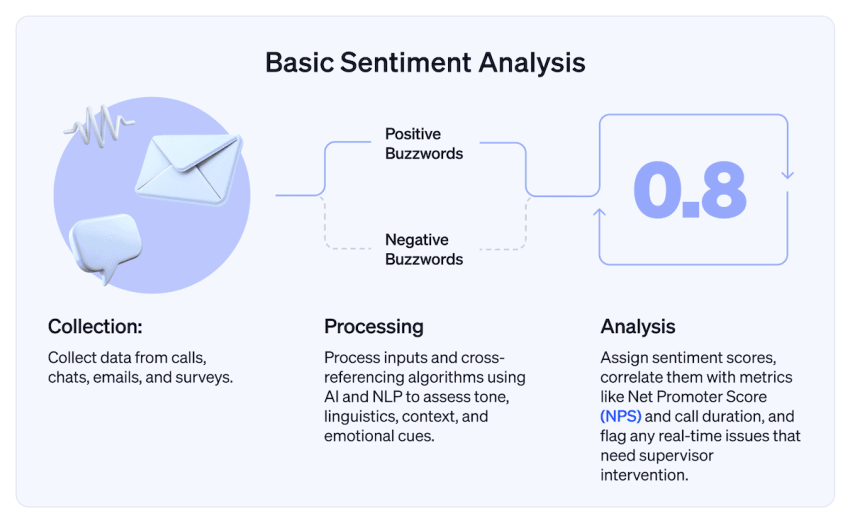
The important thing is what happens next.
If the system detects clear frustration, it should shorten the path to a human rather than continuing to ask questions that aren’t getting the caller closer to an answer.
System Confidence Decay and Topic Guardrails
Not every escalation is caused by an unhappy caller. Sometimes the AI simply doesn’t know. Speech recognition can be uncertain. The caller’s request might be ambiguous. The topic might fall outside the AI’s approved capabilities.
That’s where confidence thresholds and topic guardrails come in. If the system can’t reliably determine what the caller wants, it shouldn’t keep guessing.
The same applies to restricted topics:
- Legal advice
- Medical emergencies
- Financial decisions
- High-liability scenarios
This is where the AI receptionist needs clear boundaries around what it can and can’t do. Your AI can handle the conversation but your business still decides where the line is.
The Technical Mechanics of Voice Escalation
A human handoff sounds simple to the caller. Behind the scenes, there’s a lot happening.
So how does it work? Your AI receptionist needs to keep the live call connected while it determines where the call should go, passes the right information to the receiving employee, and avoids introducing noticeable delay.
The exact implementation varies by platform, but there are two parts worth highlighting.
Audio whisper
An audio whisper gives the receiving employee a short briefing before they speak to the caller.
For example: “This is Sarah. She’s calling about an overdue invoice and has already provided her account number.” The caller doesn’t hear the whisper. The employee gets the information they need before saying hello.
This can be particularly useful when the receiving team handles different types of requests and needs a quick explanation of why the call was escalated.
Real-time data payloads and screen pops
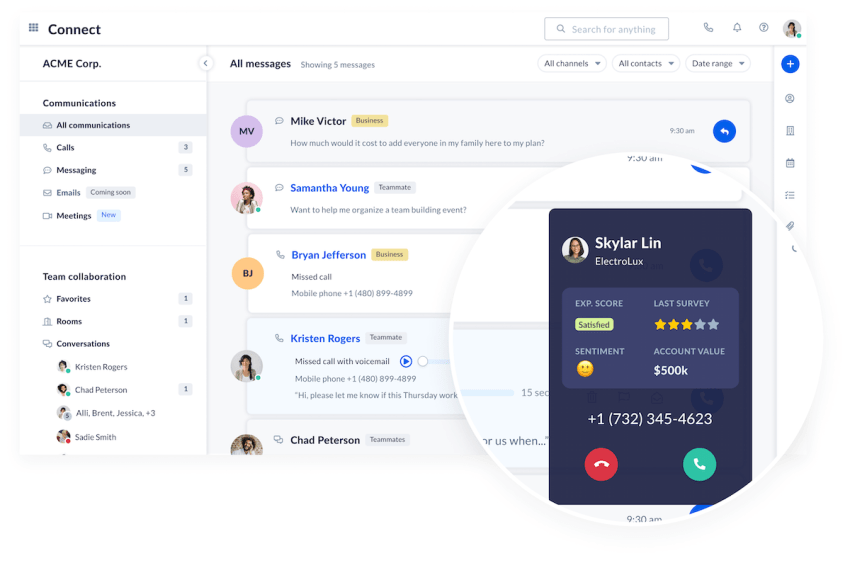
The other (and more popular) option is to pass structured information into the employee’s application.
That might include:
- Caller identity
- Reason for the call
- Relevant conversation details
A CRM integration can then use that information to open the relevant customer record when the call arrives.
This is where the difference between a basic transfer and an intelligent handoff becomes obvious. The call isn’t just being moved from one person to another. The receiving employee is getting the information needed to continue it.
What Happens When No Human Is Available?
Ah, yes. The age old question about human availability. After all, you introduced an AI receptionist because of call demand and staffing pressure.
So what happens when your AI determines it needs to make a transfer but nobody is free to take the call?
That’s where your AI receptionist needs a fallback plan.
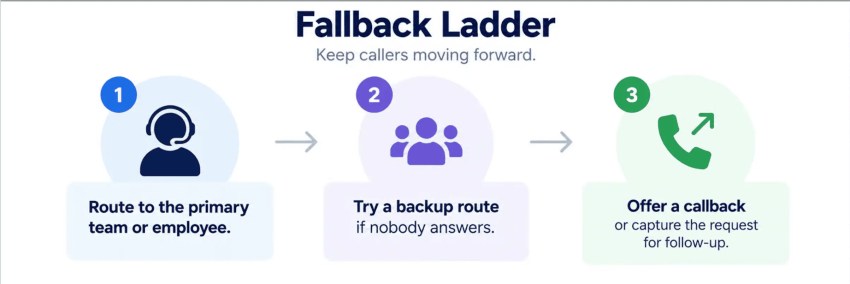
Use a three-step fallback ladder
Keep the logic simple:
- Route to the primary team or employee.
- Try a back-up route if nobody answers.
- Offer a callback or capture the request for follow-up.
The important part is knowing when to stop trying. You’ve got a customer on the end of the phone, waiting for something to happen. The longer the wait, the more frustrated they become.
Handle after-hours calls differently
Outside of business hours, your AI can check whether the request actually needs an immediate response. It might be the case that your customer needed to log something right now but doesn’t need an immediate fix.
For non-urgent requests, your AI receptionist can collect the caller’s details and create a callback request.
The same principle applies during business hours. If nobody is available, the AI should explain what will happen next and capture whatever the employee needs to follow up.
Measure the Handoff, Not Just the Transfer
A successful transfer isn’t the same as a successful handoff. Your reporting should show what happened after the AI passed the call to a human.
Track three things as your baseline:
Monitor the handoff path
Look for patterns in the calls that don’t make it cleanly from AI to human.
For example:
- Calls dropped during transfer
- Transfers reaching the wrong team
- Excessive delays before connection
- Customers repeating information
These are signals that your escalation workflow needs attention.
Don’t confuse containment with resolution
A high containment rate can look great on a dashboard while customers are still struggling to get their problem solved.
Measure what happens after the AI interaction:
- If the caller is transferred, did the human resolve the issue?
- If nobody was available, did the callback actually happen?
That’s the difference between measuring AI activity and measuring customer outcomes.
Build a Better AI Receptionist Handoff
An AI receptionist doesn’t need to handle every call. It needs to handle the right calls, recognize when it needs help, and make the transition to a human as smooth as possible.
That means defining:
- When the AI should escalate
- Where the call should go
- What happens if nobody answers
The technology is only one part of that process, however.
Your routing rules, fallback workflows, and handoff data determine whether the experience actually works for the caller. Nextiva can help you build those workflows into your business phone system, so your AI receptionist isn’t a dead end when the conversation gets complicated.
The goal isn’t to eliminate the human from the conversation. It’s to make sure the human gets involved at exactly the right point, with everything they need to help.
See How Nextiva XBert Handles the Handoff

The best way to understand an AI receptionist is to see what happens when the conversation gets complicated.
Nextiva XBert can handle routine calls, understand what the caller needs, and bring a human into the conversation when necessary.
You can see how the AI receptionist works, how it handles different requests, and how calls move to your team.
👉 Try Nextiva XBert
Never miss another call, text, or chat with XBert AI Receptionist.
XBert greets customers, books appointments, and captures leads automatically, turning missed connections into new opportunities.