Want to know where customer service teams are getting it wrong? They’re trying to offload all support tasks to artificial intelligence (AI) too quickly and shortcutting the human aspect.
Sure, AI customer support automation can handle more work than most small business owners think, but not all of it, and not all in the same way as humans can. Choosing the wrong use cases results in more escalations and frustrated customers than it saves in staff hours.
For a long time — even before the advent of AI and contact center automation — businesses have been guilty of using call deflection to shorten wait times and improve dashboard metrics. In theory, call deflection sounds like a solid strategy. By deflecting all calls to self-service and removing the human approach, the initial time-bound key performance indicators (KPIs) look great. But the figures that matter (first call resolution, customer satisfaction, Net Promoter Score) show that rushing and automating the wrong parts of the customer journey lead to negative customer experiences.
So, how do we fix this? What’s the right approach?
You need a clear framework for deciding what to automate, what to assist with, and what to leave to human agents. And it must be built around a simple truth: The biggest gains come from AI completing work and complementing human activities, not just answering questions.
Key Takeaways
- Complete the action; don’t just explain it: The workflows with the best returns answer accurately, complete tasks without human intervention, and escalate with full context when they should.
- Start with the proven list: Order status, password recovery, subscription changes, returns, and billing questions are typically the highest-value places to start.
- Get ahead of contacts: Proactive outreach, like delay alerts and renewal reminders, prevents customers from needing to raise issues and instead resolves them faster.
- Build specific escalation triggers: Conditions like low AI confidence or failed identity verification beat relying on general judgment.
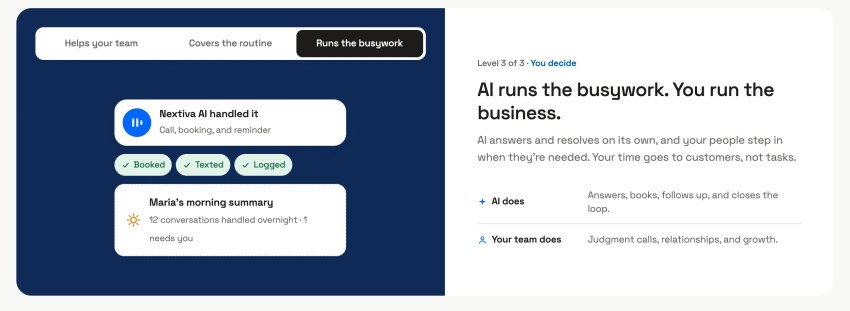
- Prioritize backend integration: The biggest gains usually come from connecting AI to systems like billing, order management, and identity verification, not from making the conversations themselves smarter.
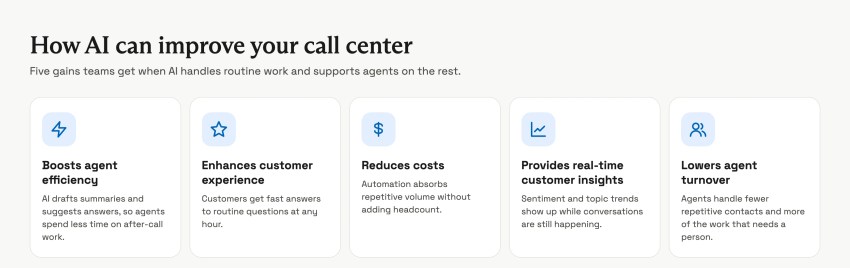
High-Performing Workflow Capabilities
The most common mistake in customer support automation is treating it as one big FAQ page. You have a bunch of questions that your chatbot can answer, but it’s rigid and black-and-white. It comes unstuck when a customer asks a question outside of that scope.
A bot that can only explain policies in different words will contain some volume, but it won’t cut cost or customer effort. It leaves the customer to finish the task themselves — and they called you for help, don’t forget.
The workflows that actually deliver strong returns combine three capabilities:
- Answering common questions accurately: Using real customer data from accounts and systems instead of generic policy text.
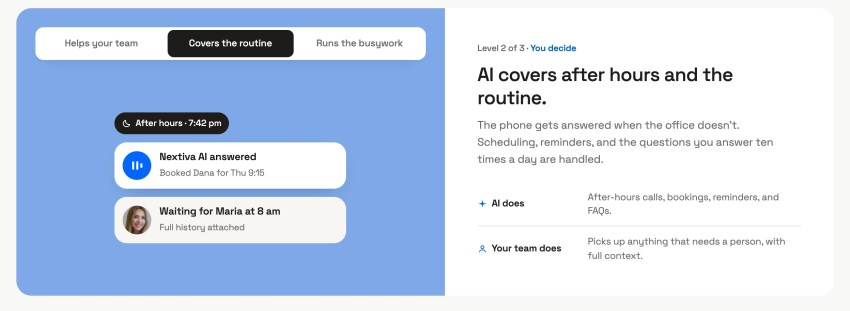
- Performing the action itself: Like processing a refund, rescheduling an appointment, or updating a payment method — not just explaining how the customer could do it.
- Acknowledging the need for escalation: Escalating the moment a request goes beyond what the system should handle on its own, and with full context attached so nothing gets lost in the handoff.
A workflow that only answers a finite number of questions caps out quickly. But when you enable AI to complete the task, the same workflow can resolve the interaction end-to-end instead of routing the customer elsewhere to finish it.
When these capabilities work in unison, rather than simply asking AI to field questions, you get results like those of a state Department of Social Services that reduced contact center calls by 38% in 90 days, with 91% of citizens satisfied with its search results.
Why the Right AI Use Cases Matters
Bad automation creates more work
Automating the wrong customer interactions doesn’t remove work. It just moves the work to a different place. You still have to do it — just later on.
That’s not a fix. That’s procrastination.
A poorly automated billing question, for example, can turn into a longer, angrier call once the customer finally reaches an agent. Now the agent has to undo the confusion the bot created before addressing the original issue. Escalations rise, repeat contacts increase, and the operational savings the automation was supposed to deliver disappear because of the repetition and rework needed.
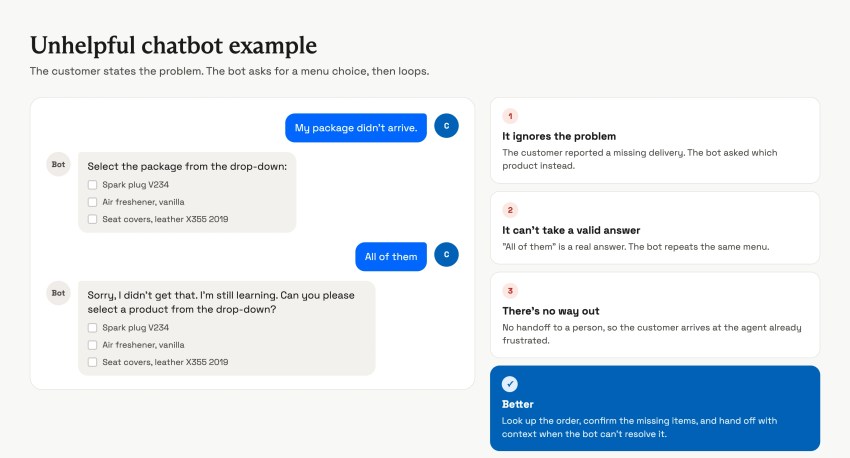
The goal is operational efficiency without a customer experience (CX) trade-off. That distinction should be written into how a team evaluates every candidate use case, not just discussed in a kickoff meeting and forgotten once the project timeline gets tight.
Effective AI deflection starts with contact reason analysis
If you have real data on why customers contact support, not assumptions about what “should” be easy to automate, you’re setting yourself up for a decent deflection program. Skipping these key steps means teams may guess that FAQs and account lookups make up most of their volume. In time, you learn that a large share of contacts are actually driven by a confusing billing cycle, an unclear onboarding step, or a product limitation that customer service can’t actually fix.
Automating around a guess wastes setup time and produces a bot that answers questions customers rarely ask. Instead, conduct a contact reason analysis to prioritize the highest-volume categories. This usually means pulling a sample of several weeks’ worth of tagged contacts, checking whether the tagging taxonomy is accurate, and manually re-tagging if it isn’t.
Many growing support teams discover during this step that their existing categorization is too broad to be useful, with half of all volume dumped into a generic “other” or “general inquiry” bucket that hides the real opportunity. Picking use cases based on data, not guesswork, is what makes it possible to strike a balance between existing classifications and bespoke, personalized support.
Our short video walks through how to automate customer service in a call center without losing the human touch.

The 4 Factors That Determine What To Deflect
A structured decision framework depends on four factors:
- Volume
- Complexity
- Emotion
- Regulatory risk
Scoring every contact reason against these four signals turns a subjective debate about what feels automatable into a repeatable process anyone on the team can apply consistently.
Volume
High-volume routine tasks offer the fastest operational gains for customer service operations. These are small improvements that happen hundreds or thousands of times a month and compound quickly. Hence, volume should usually be the first filter you apply.
A use case that’s technically easy to automate but only occurs a handful of times a month rarely justifies the setup and testing time required to do it well.
Complexity
Choose low-complexity use cases and avoid exceptions and edge cases. Low-complexity issues are strong candidates for autonomous resolution. High-complexity issues need AI support rather than full replacement.
Jumping ahead increases the risk of an incorrect autonomous answer. The more steps and variables are involved, the more complex the customer issue.
Here, we must also consider exceptions to the standard process. For example, a task with five steps but no exceptions is often easier to automate safely than a task with two steps and 10 edge cases.
Complexity also comes by way of the languages your customers speak. If you operate in the U.S. but your client base predominantly speaks Spanish (or any other language), deflecting to a multilingual AI solution reduces the volume handled by your agents and gives customers an easier route to resolution. For example, one state DMV reduced call volume by 70% after adding AI self-service that supports 13 to 14 languages, without employing a staff member for each language.
Emotion
Low-emotion customer requests, like checking an order status or confirming return policies, are a safe bet for automation. These have numerical outcomes and a limited set of variables.
High-emotion interactions, like a service outage or a billing dispute, need human reassurance and relationship protection that automation can’t provide. If you force an urgent or sensitive query down the self-service route, there’s only a tiny chance of a satisfactory resolution and a high chance of escalation.
Emotion is contextual rather than fixed to a specific reason. For example, a password reset is low emotion for most customers. However, it can become highly emotional for someone locked out of an account they need for a time-sensitive purpose. In financial services, where someone may need to move funds immediately, this elevates stress, and talking to a bot creates friction rather than a remedy.
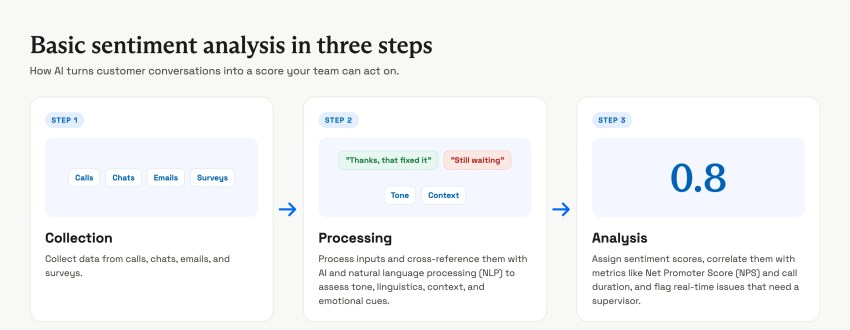
Build an escalation trigger for repeated failed attempts or expressed frustration, using customer sentiment signals from natural language processing. This is a surefire way to help catch these cases even within a generally low-emotion category.
Regulatory risk
When legal, financial, or privacy risk is involved, a human needs to remain accountable for the outcome. This is the only strategy to consider when addressing AI call deflection for issues that involve regulatory aspects.
This signal is often underweighted because regulatory risk isn’t always apparent in the customer’s phrasing.
For instance, a seemingly simple request to update payment information can carry PCI compliance implications, or a request to change account ownership can have identity verification requirements that a bot isn’t equipped to judge independently.
There’s no benefit to introducing risk when compliance is concerned. Handle these issues in-house with a human.
The AI Deflection Decision Map
Combining the four factors (volume, complexity, emotion, and regulatory risk) produces a practical map for where AI fits.
Plotting contact reasons on this map, rather than deciding case by case in ad hoc meetings, keeps the automation roadmap consistent as new use cases get proposed over time.
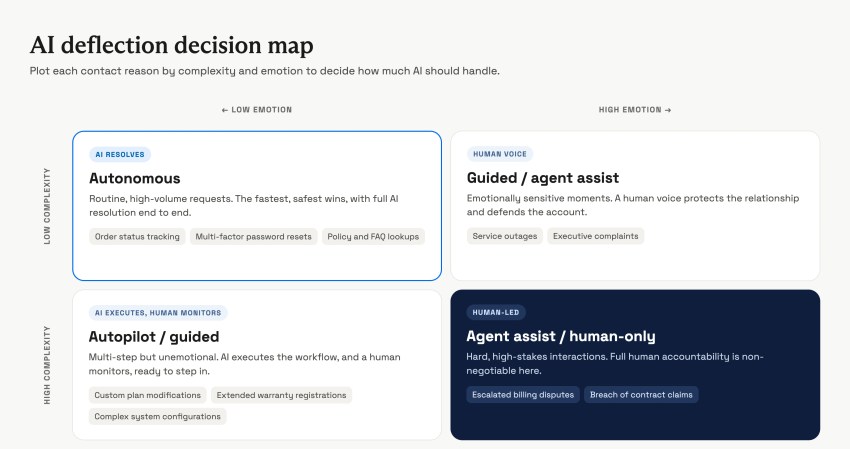
Low complexity plus low emotion: automate fully
Examples: order status, password resets, FAQs, appointment confirmations.
These are the safest early wins for any AI deflection program and should make up the bulk of a first-phase rollout. The main risk here isn’t getting the automation wrong; it’s under-investing in the handoff path for the small percentage of cases that don’t fit the pattern.
Higher complexity plus low emotion: use autopilot or guided workflows
Examples: plan modifications, warranty registrations, system configurations.
AI can execute the workflow while a human monitors or approves each step. This tier benefits from clear checkpoints where a human reviews the AI’s proposed action before it’s finalized, particularly for anything that changes a customer’s billing or service level.
Low complexity plus high emotion: use agent assist
Examples: outages, complaints, escalations that reach the owner or manager.
A human voice protects the relationship while AI supplies context and suggests next steps in the background. The AI’s job in this tier is invisible to the customer entirely. It surfaces account history, similar past cases, and recommended language for the agent, who decides what to actually say.
High complexity plus high emotion: keep human-led
Examples: escalated billing disputes, breach-of-contract claims, retention saves.
AI can support the agent, but the agent owns the outcome. These interactions often benefit most from post-call automation, like automatically drafting a case summary or flagging follow-up actions, rather than AI presence during the live conversation itself.
2027 AI Customer Service Playbook
Get the guidance, an ROI formula, and a 90-day rollout plan, so you automate the right contacts and protect the ones that need a person.
High-Impact Workflows To Automate First
Which workflows show up in your top contact reasons? You’ve probably got a few that spring to mind immediately.
Regardless of industry, some typical run-rate cases can have a major impact when automated. Use these as quick wins to show leadership the instant value of AI call deflection and that the concept can scale across your department.
Note these cases down, then sort them by volume. Then cross-reference them with typical resolution time and setup difficulty. Use the table below to save time when you get started.
| Workflow | Typical deflection potential | Setup difficulty |
|---|---|---|
| Order or service status | Very high | 🟢 Easy |
| Password and login recovery | Very high | 🟢 Easy |
| Appointment scheduling | High | 🟢 Easy |
| Product or service recommendations | Medium | 🟢 Easy |
| Subscription and plan changes | Very high | 🟡 Medium |
| Returns and refunds | High | 🟡 Medium |
| Shipping and delivery issues | High | 🟡 Medium |
| Billing questions | High | 🟡 Medium |
| Technical troubleshooting | Medium | 🔴 Hard |
| Warranty and claims | Medium | 🔴 Hard |
The top rows earn their place because they combine the three capabilities from earlier. They’re listed below in the same order as the table, starting with the easiest to set up:
- Order or service status: This is the highest-volume contact reason for most businesses that sell physical goods or scheduled services. Done well, AI verifies the customer, looks up the order or appointment, explains the current status in plain language, flags any delay, and offers next steps, not just a tracking number.
- Password, login, and account changes: Password resets, login recovery, address changes, email updates, and permission changes are well suited to automation with proper handling of identity verification, since the actions themselves are simple but happen constantly.
- Appointment scheduling: When AI can see the live calendar, it books, reschedules, or cancels the appointment and sends the confirmation itself. The customer leaves with a confirmed time instead of a callback request.
- Product or service recommendations: With access to your catalog and the customer’s history, AI can suggest the right plan, add-on, or service for a stated need, then hand off to sales when the customer is ready to buy.
- Subscription and plan changes: This is a strong fit for any business with recurring billing. AI can upgrade or downgrade a plan, pause billing, update a payment method, or apply an approved promotional offer. These are all actions many businesses still route to a human out of habit rather than necessity.
- Returns and refunds: Instead of reciting the return policy, AI checks eligibility against the order, starts the return or exchange, and explains when the refund will be processed. That removes a workflow that otherwise generates a follow-up contact almost every time.
- Shipping and delivery issues: Rather than telling a customer to contact the carrier, AI can detect a lost package, a delivery exception, or an incorrect address, then open a claim, arrange a reshipment, or issue a refund directly.
- Billing questions: “Why was I charged?” and “Did my payment go through?” are answerable only if the AI is connected to live billing data. A bot working from a help article rather than the billing system will provide a generic answer that doesn’t address the customer’s actual question.
Technical troubleshooting and warranty or claims work, the two hardest rows, tend to land in a second or third wave. They still deliver value, but they require more setup. That might be diagnostic logic, a deeper knowledge base, or claims processing rules. Don’t focus on these until you’ve established firm grounding and a performing baseline for your AI deflection program.
What You Should Never Fully Automate
It might come as a surprise to hear a contact center company suggesting the technology it sells isn’t fit for every purpose. Some interactions carry too much relationship or business risk to hand entirely to AI. Drawing this line explicitly before a program launches prevents team members from expanding automation scope on their own without a CX check.
- High-emotion situations: Bereavement, financial hardship, service failures, major complaints. Even a well-designed bot response can feel tone-deaf in these moments because the customer isn’t looking for information; they’re looking for acknowledgment.
- Significant business risk: Legal, financial, regulatory, or contractual exposure. An incorrect automated statement in these categories can create liability that far outweighs the labor cost it was meant to save.
- Complex decision-making: Negotiations, exceptions, escalations, or judgment-heavy scenarios. These require weighing trade-offs that vary case by case, which current AI systems handle least reliably.
- Critical customer moments: Retention conversations, escalations to the owner or manager, service recovery. These moments disproportionately influence whether a customer stays or leaves, making them worth the extra cost of human handling.
Use AI for Proactive Customer Resolution
Reacting to customer queries is one thing. But what about becoming a proactive customer support function that reaches out first before a question gets asked or a problem occurs?
Examples include:
- Shipping delays: Notify a customer before they check on it themselves.
- Failed payments: Alert the customer with a direct link to update the payment method.
- Renewal reminders: Notify a customer about an upcoming subscription renewal.
- Warranty registration: Suggest it shortly after a purchase.
- Unused benefits: Flag credits or perks before they expire.
- Repeated errors: Detect and offer a fix before the customer raises a ticket.
Each of these trades a future inbound contact for a shorter, proactive one. Customers tend to perceive proactive outreach as a brand serving their needs rather than as intrusive, provided it’s tied to something real happening on their account.
Why Agent Assist Is a Safe Bet
AI can increase agent capacity without removing judgment
Many programs that bring AI into customer service jump straight from self-service to full automation with AI agents. This skips the middle ground where AI supports a live agent instead of replacing one.
If you’ve been reading closely, many scenarios call for a human supported by AI in your contact center. Using AI to summarize prior interactions, recommend next steps, and reduce after-call work lets you keep the agent’s judgment while reducing the time each call takes.
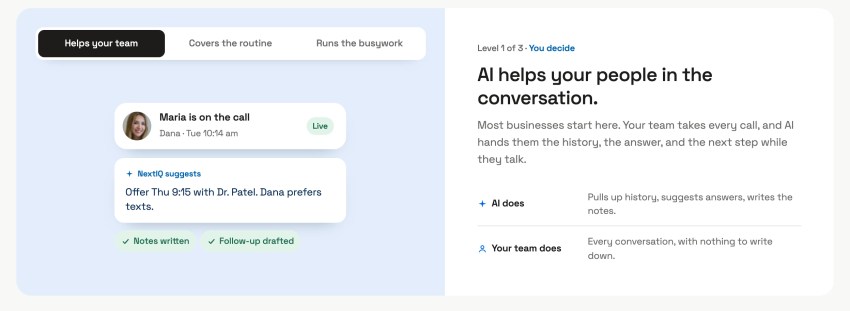
This combination is also the easiest to pilot with minimal risk. Since a poor AI suggestion is filtered through an agent’s judgment, the agent can use their experience and empathy to override it.
Agent assist tends to have the fastest, most measurable return of any feature or combination of human and AI. This is because the impact shows up directly in handling time and quality score, rather than requiring a separate, gamed containment metric. Teams that struggle to build a business case for customer-facing automation often find that agent assist is a much easier initial investment to justify.
Nextiva’s Agent Assist surfaces answers, policies, and customer context in the moment across calls, chat, SMS, and email, so agents spend less time searching and more time solving the customer’s problem. That matters even more for a small team where one person often juggles every channel at once.
An NBER study of 5,179 customer support agents found that access to a generative AI assistant increased productivity by 14%. Notably, newer and lower-skilled workers saw larger gains. That’s a meaningful capacity gain, with no loss of service quality and without removing a single human from the conversation.
Escalation Triggers Worth Building in From Day One
Every workflow above needs a clear, tested exit ramp to a human. Rather than leaving that judgment to chance, build in specific triggers:
- Direct request: The customer directly asks for a human.
- High stakes: The request is high-value or high-risk, like a large refund.
- Repeated failure: The customer has already tried and failed to resolve the issue once.
- Frustration signals: The conversation shows signs of frustration or urgency.
- Low confidence: The AI’s confidence in its own answer is low.
- Verification failure: Identity verification fails.
- Authority limit: The requested action falls outside what the AI is authorized to do.
When any of these cases arise, the handoff should carry the full context: what the customer asked, what the AI already tried, and any account details the agent needs so the customer doesn’t have to start over. Once flagged, a smooth escalation to a human agent or supervisor is the only solution to keep your customer journey on track.
AI customer care moves to make
Get the 2027 AI playbook to help your organization deliver better customer outcomes with AI.
The Real Driver: Letting AI Take Action
The AI agents that automate customer support well share a common thread: The AI is connected to the systems that let it actually do something. That might be an order management platform, a billing system, or a scheduling tool. Once integrated, you’re feeding your AI system the nutrients it needs to thrive.
A bot with great conversational skills but no access to those systems can only describe a process. A bot with secure access to them can complete it.
This is usually where we see the real gap in underperforming automation programs. The issue is rarely that the AI communicates poorly — it’s that the AI was never connected to the backend system. Every conversation ends with “Here’s how you can do that yourself” instead of “That’s done.”
You might have seen the viral video where a man asks three ChatGPTs to count to 100 together. Instead of counting from one to 100, the AIs converse with each other, explaining how to do it. Made in jest or not, it’s a great reflection of how you need to tie systems together for AI to be truly productive.
Prioritizing those integrations, even for one or two workflows at a time, tends to matter more than any improvement to the AI’s conversational polish.
Ask the Better Question
The right question isn’t “Can AI handle this?” Nearly any interaction can technically be scripted for a bot.
The better question is “What level of AI involvement produces the best outcome for both the customer and the business?“
Answering that question, use case by use case, separates working AI customer support automation from automation that just moves the problem downstream.
NEXT: The only customer conversation platform you’ll ever need
Pair AI agents with agent assist, so customers get answers fast and your team handles the moments that matter.
FAQs About AI Customer Support Automation
Start with high-volume, low-complexity, low-emotion requests that are easy to set up: order or service status, password and login recovery, and appointment scheduling. Then move to subscription and plan changes, returns, and billing questions, which combine accurate answers with actions AI can complete, like starting a return or updating a payment method. A contact center platform connected to your order and billing systems lets AI finish those tasks instead of explaining them.
Keep people in charge of high-emotion situations like bereavement or financial hardship, anything with legal, financial, or regulatory exposure, judgment-heavy negotiations and exceptions, and critical moments like retention conversations. AI can still support the agent behind the scenes in these cases, a role that agent assist tools are built for.
Score every contact reason on four signals: volume, complexity, emotion, and regulatory risk. Low complexity and low emotion can be automated fully, higher complexity calls for guided workflows, high emotion calls for agent assist, and high complexity plus high emotion stays human-led. Pair that map with a set of escalation rules so every workflow has an exit to a person.
Escalate when the customer asks for a human, the request is high-value or high-risk, a previous attempt failed, the conversation shows frustration, the AI’s confidence is low, identity verification fails, or the action is outside what the AI is authorized to do. The handoff should carry the full context so the customer doesn’t start over, which first-call resolution depends on.