I’ve been using Perplexity AI on and off since it first launched, watching it evolve from a simple wrapper into a robust answer engine.
But is Perplexity Pro worth it? In this Perplexity AI review, I’m going to break down exactly how it fits into a heavy AI workflow, where it beats other best AI assistants in the market, and where it still feels a bit rough around the edges.
And to make sure this isn’t just an n=1 take, I’ll also compare my experience with the latest G2 review data to see whether other users agree.
TL;DR: My Perplexity AI review
Perplexity AI is one of the best AI-powered search engines built for research-first use cases, delivering concise answers with cited, real-time sources. It’s especially useful for students, researchers, and professionals.
- What are the pros of Perplexity AI? Concise, source-backed answers, strong real-time search, and Pro access to multiple AI models and collaboration features.
- What are the cons of Perplexity AI? Weaker creative output than ChatGPT-style tools, limited conversational depth, and some friction around mobile experience.
- Is Perplexity Pro worth it? Yes, if you need fast, research-first answers with real-time citations; less so if your main use case is creative writing, full-fledged cosing, or long-form ideation.
What is Perplexity AI? Key features
Perplexity AI, in its own words, is an AI-powered search and answer engine that combines real-time internet search with large language models to deliver direct, concise answers backed by citations instead of long lists of links.
It works more like a research assistant than a traditional search engine, synthesizing information from multiple sources and showing clear references so you can verify claims. Most claims come with a clickable citation, allowing you to verify the source instantly.
Perplexity AI at a glance on G2
| Metric | G2 score | Insights |
| G2 rating | 4.5/5 | Strong overall satisfaction across use cases, especially research-heavy workflows. |
| Customer segment | Small business: 70% Mid-market: 17% Enterprise: 13% | Adoption is highest among smaller teams and individuals, with lighter penetration in large enterprises. |
| Ease of use | 95% | Most users find Perplexity intuitive and productive with a minimal learning curve. |
| Ease of setup | 97% | Quick onboarding and setup, with very little configuration required to get started. |
| Meets requirements | 90% | Consistently meets user expectations for research accuracy and everyday search needs. |
*Data from G2 Winter 2026 Grid Report for AI Chatbot Software category
What are the key features of Perplexity AI?
Beyond simple conversation, the platform transforms daily workflows through the following specific functionalities:
- Citations first: Every single sentence is backed by a clickable footnote. If Perplexity says the sky is green, you can click the little number [1] and see exactly which website told it that lie. This transparency is one of the key reasons I find it more reliable over standard LLMs.
- Pro search: This isn’t just a search bar; it’s an agent. If you ask a complex question like “Compare the pricing models of Stripe vs. Adyen for a SaaS startup,” Pro Search will break it down, run multiple unique queries, read the fine print, and compile a comparative table. It feels like having a junior analyst do the manual work.
- Model switching: This is a notable advantage of the Pro plan. You aren’t locked into one AI. You can toggle between the latest models of GPT, Claude, Gemini, Grok or Perplexity’s own Sonar models (based on Llama) for different queries. I use Claude for writing and GPT for logic, all within the same interface.
- Spaces and pages: You can organize your threads into “Spaces” (like project folders). You can even turn a search thread into a publishable “Page,” which is essentially a beautifully formatted blog post or report you can share with a link.
- Multimodality: I can drag and drop anything from messy screenshots of financial charts to 100-page PDF contracts and it extracts the raw data.
- Specialized focus modes: Instead of generic results, I can toggle modes like Finance (for real-time stock data and 10-K filings) or Academic (for published papers) to filter out SEO spam completely.
How did I test Perplexity AI?
This Perplexity AI review is based on extended, real-world use rather than a short trial. I’ve been using Perplexity on and off for nearly two years across both the free experience and paid plans, primarily for research-heavy tasks in my daily workflow.
To make sure my perspective wasn’t overly subjective, I also cross-checked my experience against hundreds of G2 reviews and broader user discussions to see where my take aligned or didn’t with the wider user base.
I evaluated Perplexity AI across three core areas that matter in everyday use:
- Answer quality: How consistently Perplexity delivered accurate, source-backed responses that didn’t require extra verification.
- Reasoning depth: How well it handled multi-step questions, complex topics, and longer lines of reasoning without losing context.
- Workflow fit: How smoothly it integrated into daily work, including speed, interface usability, and any friction that slowed things down.
How Perplexity AI performs in real-world tasks: My experience
Features on a pricing page are one thing; actually trying to get work done is another. Over the last month, I’ve stopped “Googling” and started “Perplexity-ing” (not a real verb, but it can become one soon) to see if it could handle my daily workload.
Here is the honest breakdown of how it performed, from mundane questions to deep research.
1. Everyday searches
This is the biggest hurdle for any new tool trying to be an answer+search engine: Can it really replace the muscle memory of opening a new Google tab and typing a keyword?
After a month of forcing myself to use it, the answer is yes. For 95% of my daily queries, Perplexity wasn’t just enough. It was significantly better. It was easy to get started with, and has a simple interface similar to other AI chatbots. Based on my overall experience, it excels at light studying, catching up on news, and just getting a straight answer without the fluff.
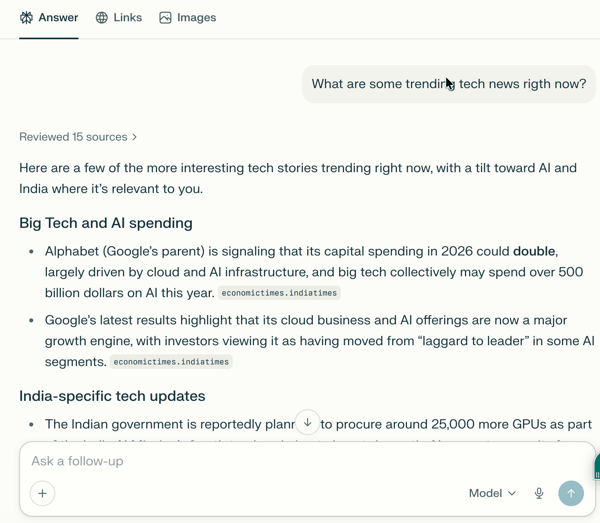
The difference became night and day when I tried it for product research. For example, when I searched for branded non-marking shoes for badminton, the contrast with my old workflow was stark.
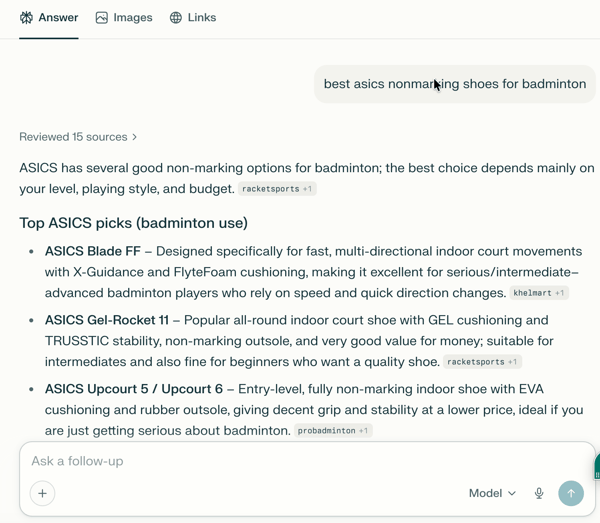
Perplexity gave me a concise summary of top-rated models, explaining exactly why they were good based on grip and breathability. The best part was the total absence of ads — no sponsored placements masquerading as advice, just a clean summary with clickable citations I could verify if I wanted to. In contrast, a Google search bombards me with a row of sponsored shopping ads, forcing me to scroll past endless life stories just to find a list.
I found the ad-free experience of Perplexity useful for early-stage product research, where I want informed options and reasoning before diving into individual reviews.
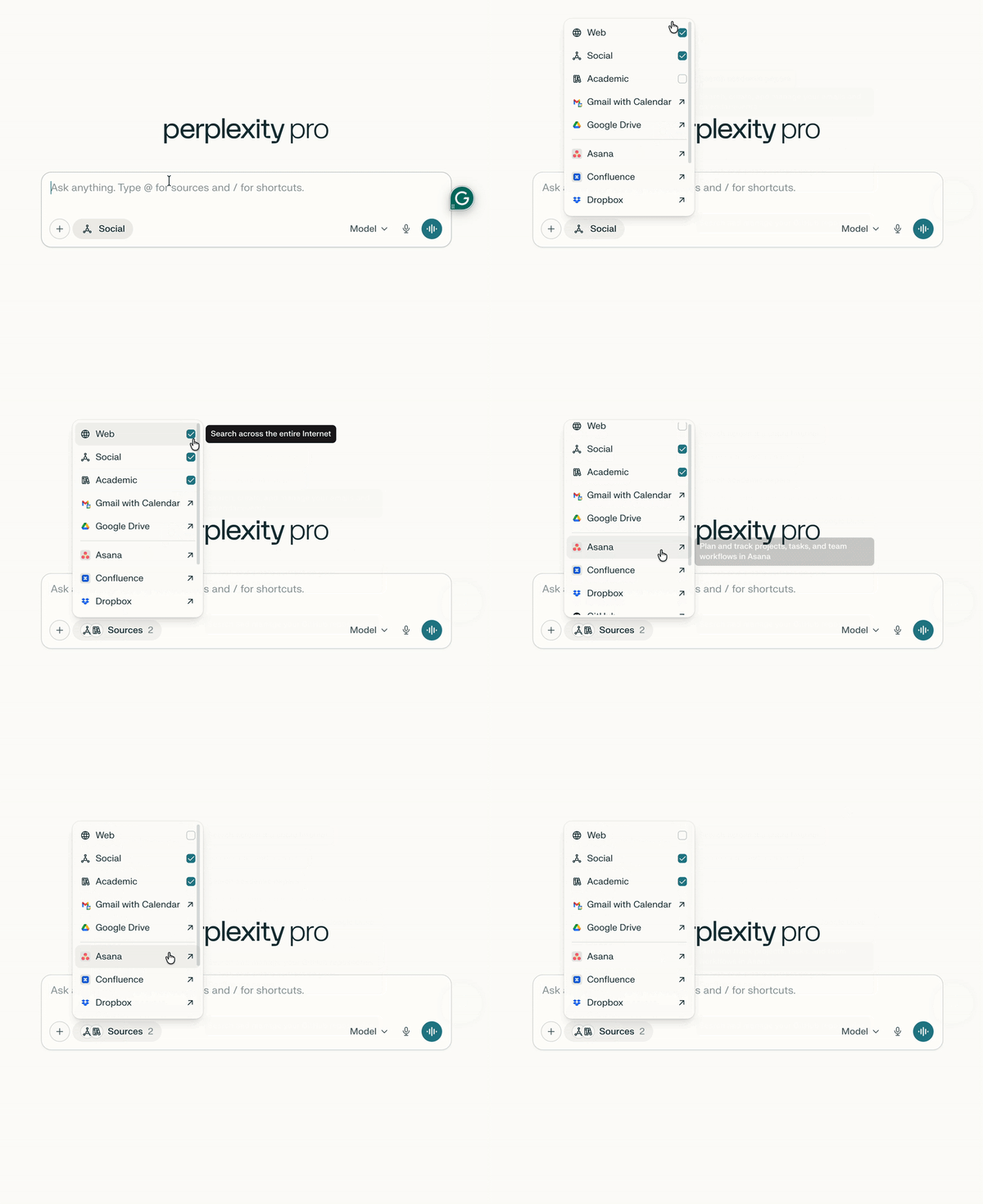
What truly stops me from going back to Google, however, is the ability to pre-filter sources. It feels like an advanced search engine, because I can decide where it looks before I even hit enter. If I want real human opinions, I select the “Social” filter to scour Reddit and ignore generic tech blogs. If I need information from peer-reviewed papers, I switch to “Academic” to bypass marketing hype and only see published papers.
Sure, Google has pretty much caught up with AI Overviews, and both Gemini and ChatGPT now search the web to back up their answers. But Perplexity? It just feels like it was made for this. You get your answer first, the sources second, and the ads…well, not yet.
2. Deep research
If everyday search is about speed, deep research is where Perplexity flexes its true muscles. As a marketer, a huge chunk of my week is spent conducting research, basically, trying to sound like an expert on a niche topic I have only just heard about. The specific use case has convinced many to keep their subscription.
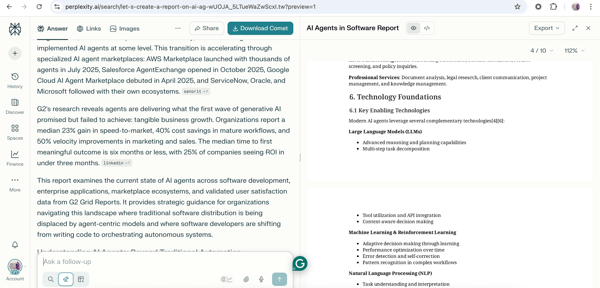
In my old workflow, this part has been a nightmare. I’d be analyzing 30+ blogs, reports, our own data, copying, and pasting stats into a Word doc and excel sheets, constantly terrified I was citing a hallucinated number or an outdated trend. It was a slow, manual game of “connect the dots” that usually took an entire afternoon. With Perplexity, that entire grind collapses into a single, well-structured prompt using the Research mode.
But the most critical part for me as a marketer? The citations. Every claim about a feature or a market trend had a clickable footnote leading to the source, whether it was our own G2 report, a TechCrunch article, or a direct report.
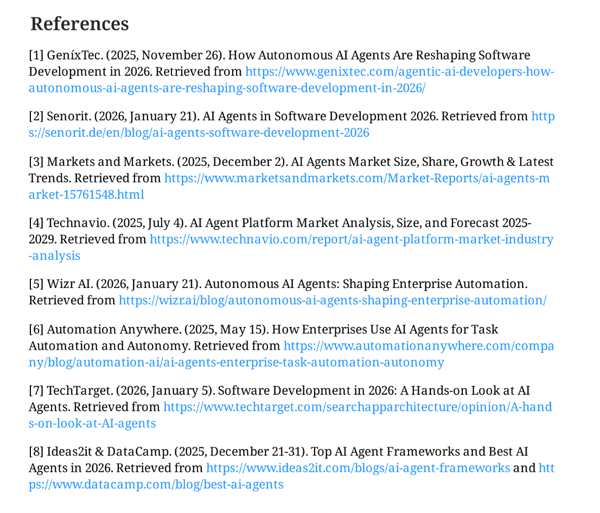
I could drop those stats into my slide deck with total confidence, knowing I wasn’t presenting a hallucination. What used to be an hour-long research block was finished in twenty minutes, leaving me time to actually work on the strategy.
Research mode is slower than a quick search, but in cases where accuracy matters, the extra depth is usually worth the wait.
3. Organization and sharing
Spaces make Perplexity a legitimate project management tool for information rather than just a standard search engine. I treat a Space like a customized container that holds specific context for different parts of my life.
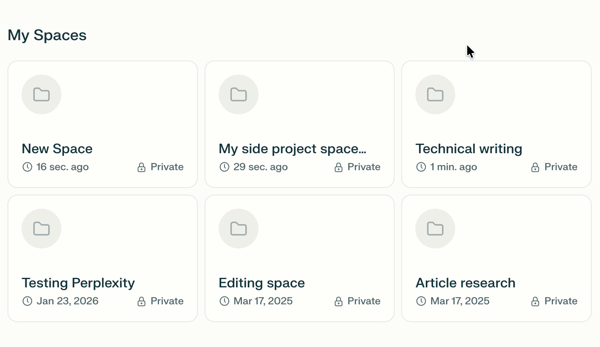
For example, I created one specifically for “Technical Writing.” In the settings, I gave it specific instructions to always write in the active voice, use concise bullet points, and avoid marketing fluff. Now, every time I start a thread in that Space, it automatically adopts that persona. I don’t have to prompt-engineer it anymore because it just knows the assignment.
It acts like a mini-brain because I can upload files, PDFs, spreadsheets, and earlier drafts that stay there permanently. There are some limitations, such as caps on file uploads, and the fact that the specific AI model and source we select when we create a Space applies to every thread that follows in that particular environment.
However, if you are working on a thesis, conducting market research, or planning a trip where you want everything organized in one place, having the source and model control to suit your needs does make sense. It feels very similar to ChatGPT Projects, which also allows for custom instructions and persistent files, but applied to a live search engine.
4. Creative writing and editing
When it comes to creative writing, Perplexity’s DNA as an answer engine becomes a limitation. Of course, we can use it to write about the most recent and trending news. When you ask the default model to draft a story, a LinkedIn post, or a marketing email, the output tends to be incredibly accurate but may come across as dry. It struggles with voice, wit, and emotional nuance.
Editing follows a similar pattern. Perplexity is solid at tightening copy, fixing grammar, and improving clarity, but it’s less reliable when I want it to punch up a hook, inject brand voice, or make something feel more human.
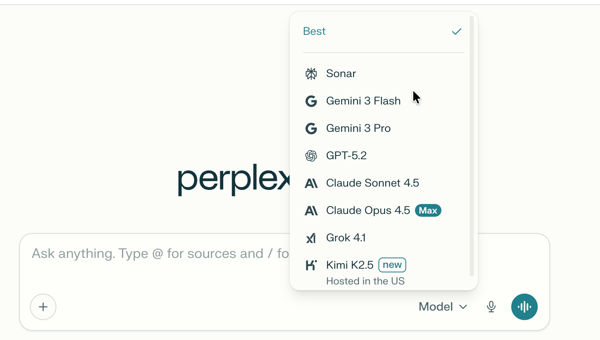
However, this is where the model-switching feature helps. I can simply toggle to other models like Claude or Grok to bypass stiffness. This flexibility makes Perplexity more usable for creative tasks, but it’s worth calling out that model switching is a paid feature.
5, File analysis
For a long time, I treated Perplexity strictly as a web search tool, ignoring the little “Attach” paperclip icon. That was a mistake.
The file analysis capability has quietly become one of my most used features, effectively turning the platform from a search engine into a personal analyst. I can drag and drop almost anything — a dense 50-page PDF whitepaper, a messy CSV of campaign data or a company filing to get information and insights I want.
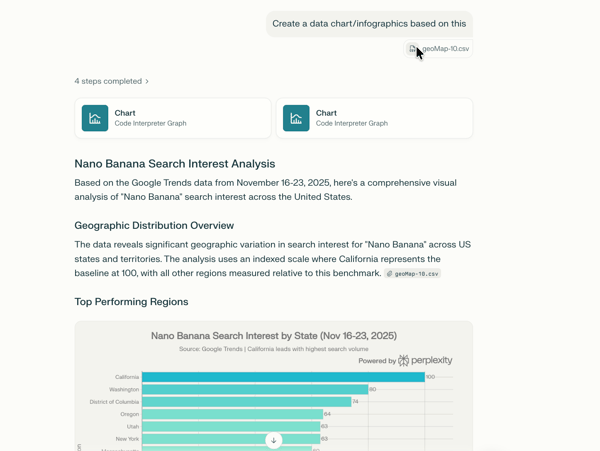
This extends seamlessly into data analysis. While I still use ChatGPT’s advanced data tools for cleaning dirty datasets or heavy statistical analysis, Perplexity is my go-to for quick visualization.
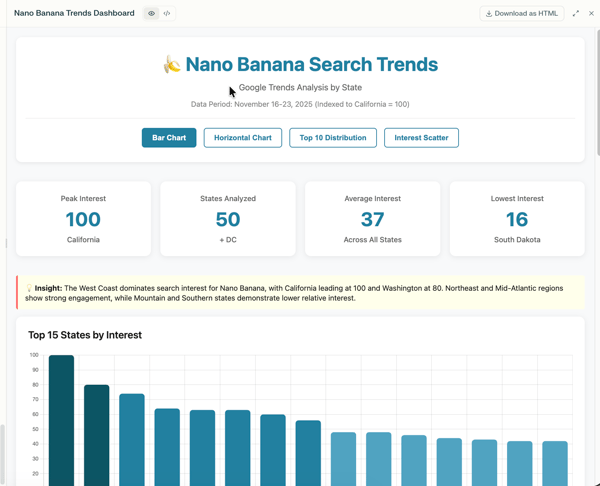
One feature I rely on most is Labs to create dashboards based on the data I have. I can upload a raw dataset, say, a CSV of quarterly traffic performance, or a trends data and ask it to “create a performance dashboard.” It doesn’t just give me a static image; it generates interactive charts and widgets I can share with others.
Other tasks I’ve tried with Perplexity AI
Beyond the heavy lifting of research, I’ve found Perplexity surprisingly capable as a general utility tool.
- Image generation: Perplexity’s image generation is nowhere near Midjourney’s, but it is what I’d call “utility-grade.” It’s useful for creating or searching for quick slide visuals or blog headers or simple images.
- Perplexity Finance: This is one of the most underrated features of Perplexity. It shows real-time stock charts, filings, news, has a screener, watchlist, and more; it explains why the market is moving by synthesizing earnings reports and news instantly, effectively acting as a personal investment analyst.
- Integrations: The ability to connect apps like Google Drive and Notion with paid plans turns the platform into a knowledge base that can be easily searched.
What are the pros and cons of Perplexity AI?
After using Perplexity AI regularly and comparing that experience with G2 review data, a few clear patterns emerge. My hands-on take lines up closely with how most users rate the platform: it’s widely praised for ease of use, setup, and research accuracy, but shows friction around integrations, flexibility, and support at scale. Below is how those themes break down.
Pros of Perplexity AI: What do G2 users like about Perplexity AI?
From both my experience and G2 reviews, Perplexity’s biggest strengths show up in how easy and reliable it feels for everyday research.
- Easy to use and quick to adopt: This aligns with G2 Data. Perplexity scores exceptionally high for ease of use (95%) and ease of setup (97%), which matches my experience of being productive almost immediately without tutorials or onboarding friction.
- Reliable, real-time answers with clear citations: In my day-to-day use, Perplexity consistently outperformed traditional LLMs on time-sensitive questions. G2 users frequently call out this real-time capability, and the clickable citations are repeatedly mentioned as a trust-builder. I found myself relying on it for stats and current info precisely because I could verify sources instantly.
- Strong at handling complex queries: Features like complex query handling and adaptive learning are among the highest-rated on G2 (around the high 80% range), reinforcing why it works so well for layered research and follow-up questions.
- Flexible research controls for advanced users: On the Pro plan, I appreciated being able to switch between models like GPT-4o and Claude, and to narrow searches using Academic, Socials or web modes. G2 users often describe this as a power feature that helps reduce noise, especially when you know exactly what kind of sources you want.
What G2 users like about Perplexity AI:
“A comparatively reliable AI chat tool with fewer hallucinations. Its functionality to be able to choose LLMs as per your requirement is quite useful. We can ask for the connotations and links for the research that make it trustworthy. It can be integrated with different workspaces.”
– Perplexity review, Vikas G.
Cons of Perplexity AI: What do G2 users dislike about Perplexity AI?
And interestingly, the limitations I ran into while using Perplexity are the same ones G2 users repeatedly call out in reviews.
- Native AI tools often feel stronger with their own models: Even though Perplexity offers access to top-tier models, I’ve found that GPT-4o and Claude still perform better in their native apps. G2 users frequently make the same observation — inside Perplexity, these models are clearly optimized for search and synthesis.
- Weak creative writing and tone control: When I tried using Perplexity for creative writing or marketing copy, the output felt flat. This mirrors G2 feedback, where users often note that it can’t match ChatGPT or Claude for tone, voice, or originality without switching models.
- Limited conversational depth: In longer conversations, both my experience and G2 user feedback suggest that its context understanding can fall short, often requiring extra follow-up questions or manual verification to clarify or refine outputs. This makes it feel more like a powerful search tool than a true back-and-forth chat experience.
- Not ideal for advanced math or coding: G2 feedback suggests that while Perplexity handles basic technical questions well, it lags behind ChatGPT or Claude for deep debugging, complex math, or advanced reasoning workflows.
What G2 users dislike about Perplexity AI:
“I feel the AI models like Gemini or ChatGPT 5.0 in Perplexity are not that great compared to their own platforms, and the quality of results varies a lot. For example, when I search for in-depth detail about a topic and ask it to act as a stock market IPO expert, the results are very mediocre compared to Grok with the same instructions and models. Maybe Grok has access to live feed on a platform that Perplexity doesn’t, so the results vary massively.”
– Perplexity review, Shashank S.
Perplexity AI pricing: Is Perplexity Pro worth it?
Perplexity sticks to this familiar script of commonly available AI pricing plans, but in my experience, the value you get for that standard $20 is quite different from its competitors.
Here’s how current Perplexity subscription plans compare:
| Plan | Price | Best for | What’s included |
| Free (Standard) | $0 | Casual users and light research | Basic searches with limited “Pro Searches,” search history, limited file uploads, and access to default AI models. |
| Perplexity Pro | $20/mo | Frequent researchers and power users | 300+ Pro Searches, advanced AI models, image and video generation, unlimited file uploads, priority support, up to 50 file uploads per space. |
| Education Pro | $5/mo | Students and educators | Pro features and 10× citations in answers, unlimited image uploads, study tools like flashcards and quizzes. |
| Perplexity Max | $200/mo | Deep research and advanced workflow users | All Pro features and unlimited access to a full suite of AI models, unlimited Labs queries, early access to new tools, priority support. |
| Enterprise Pro | $40/mo | Teams and organizations | All Pro features and strict data privacy, internal knowledge search and file repository, team Spaces, admin controls, dedicated support. |
| Enterprise Max | $325/mo | Large orgs requiring top-tier security and scale | Enterprise Pro features and unrestricted research and Labs, enhanced video generation, advanced models, expanded file capacity, premium security. |
Which plan should you choose?
In my experience, the value of the $20/month Pro tier is significantly higher than its competitors because it acts as a consolidated research hub with multiple models to pick from. Whether you need the $20 Pro plan or if another tier is more suitable depends on your research volume and privacy needs. Here is the bottom line:
- For casual users: Free (Standard) The perfect starting point for quick fact-checking. You get unlimited basic searches and 5 “Pro Searches” daily without any monthly commitment.
- For best value: Perplexity Pro ($20/mo) If you find yourself hitting your limits for Pro Search on the free plan, this is the logical next step. It offers 300+ Pro Searches daily and the ability to toggle between top models like Claude and GPTs.
- For students: Education Pro ($5/mo) The best deal in AI. If you have a .edu email, you get full Pro features and advanced citation tools for a fraction of the standard cost and is most useful for academic research.
- For power users: Perplexity Max ($200/mo). Built for high-volume researchers.
- For teams: Enterprise Pro ($40/mo). The go-to for knowledge-heavy industries like finance, legal, tech, and marketing. This plan prioritizes SOC2 security and allows you to search through your organization’s internal private files.
Who is Perplexity AI best for, based on G2 Data?
Is Perplexity right for you? Based on my experience and G2 Data, here’s who stands to gain the most from using it.
| User group | Why | Best for | G2 review insight |
| Researchers and analysts | Need fast, accurate answers with verifiable sources | Deep research, fact-checking, and synthesizing complex topics | G2 users consistently praise Perplexity for citation-backed answers and handling complex queries |
| Marketers and content teams | Need to regularly research markets, trends, and competitors | Market research, trend analysis, and validating stats for content | Reviewers highlight ease of use and time savings for research-heavy workflows |
| Students and academics | Require trustworthy sources and up-to-date information | Studying, summarizing topics, finding academic references | G2 feedback frequently mentions strong value for learning and research due to the built-in citations |
| Consultants and knowledge workers | Need to get up to speed quickly on unfamiliar topics | Rapid learning, competitive research, client prep | Users note that Perplexity meets requirements well for everyday research tasks |
| Users wanting Google search alternatives | Want cleaner answers without ads or tab overload | Everyday searches, quick explanations, and news updates | G2 reviewers appreciate the clutter-free, answer-first experience compared to traditional search |
Curious how other AI chatbots stack up against Perplexity AI?
Check out these head-to-head battles:
Frequently asked questions (FAQ): Is Perplexity AI worth using?
Got more questions? Here are the answers.
Q1. Is Perplexity AI free to use?
Yes, Perplexity AI has a free version. You can run unlimited searches, ask follow-up questions, and get AI-generated answers with source citations. However, the free plan limits access to Pro searches, and research mode, advanced AI models and features like higher-quality reasoning and file uploads.
Q2. Is Perplexity good?
Perplexity is especially good for research-heavy questions, fact-checking, and staying up to date on current topics. Its biggest strength is that it combines AI answers with live web results and citations, which makes it feel more like a smarter search engine than a traditional chatbot.
That said, it’s less suited for creative writing, storytelling, or long-form content compared to tools like ChatGPT.
Q3. Is Perplexity Pro worth it?
Perplexity Pro can be worth it if you:
- Do frequent research
- Need citations you can verify
- Want access to advanced AI models (like GPT-4-class models)
- Work in journalism, marketing, analysis, or academia
If you mostly use AI for brainstorming or casual Q&A, the free version is usually enough.
Q4. Is Perplexity AI trustworthy?
Perplexity is generally considered more trustworthy than many chatbots because it shows its sources. You can click through citations to verify where the information came from.
That said, it still relies on third-party web content and AI interpretation, so it’s best used as a research assistant, not a single source of truth—especially for legal, medical, or financial decisions.
Q5. What are the cons of Perplexity?
Some common drawbacks include:
- Less creative output than other AI models.
- Limited conversational memory
- Occasional shallow summaries for complex topics
- Advanced features locked behind the Pro plan
It’s optimized for accuracy and speed, not deep reasoning or long creative workflows.
Q6. How is Perplexity different from ChatGPT?
The biggest difference is how they approach answers:
- Perplexity acts like an AI-powered search engine with citations
- ChatGPT acts like a conversational AI that reasons, writes, and brainstorms
Perplexity is better for real-time research and fact-finding, while ChatGPT is stronger for writing, ideation, coding help, and detailed explanations.
Q7. Can Perplexity AI replace Google?
Perplexity can replace Google for many research queries, especially when you want quick summaries instead of scrolling through links. However, it doesn’t fully replace Google for:
- Local searches
- Shopping comparisons
- Maps, images, and videos
- Brand discovery
Most users treat Perplexity as a Google alternative for research, not a complete replacement.
Q8. Is Perplexity better than ChatGPT and Grok?
It depends on what you need:
- Perplexity is better for research and citations
- ChatGPT is better for writing, reasoning, and creative work
- Grok leans toward real-time commentary and social context
Perplexity wins when accuracy and sources matter more than personality or creativity.
Q9. Is Perplexity cheaper than ChatGPT?
No, both Perplexity and ChatGPT offer a free tier and a premium tier at $20 per month. The difference is in value:
- Perplexity focuses on research and citations and access to multiple AI models
- ChatGPT focuses on versatility and creativity
Which one feels “cheaper” depends on how you use AI day to day.
Q10. What are some of the best Perplexity alternatives?
Popular alternatives include:
- ChatGPT – best for writing, brainstorming, and coding
- Google Gemini – strong Google ecosystem integration
- Microsoft Copilot – useful for Microsoft 365 users
- Claude – great for long-form reasoning and summaries
Each alternative shines in different use cases.
My final verdict: Don’t get perplexed
Based on my experience, I can say that the question isn’t whether Perplexity is the best AI research tool or the best AI answer engine, but whether it makes you ever want to go back. And for me, the answer is clear.
For quick navigation or checking the weather, old habits stick. But for knowledge work, researching, learning, and synthesizing, Perplexity offers a noticeably different experience. It has fundamentally changed the way I research.
It is not perfect. The creative writing can be dry, and it won’t replace a dedicated coder or artist, but as a research assistant, it is unmatched. For students, marketers, and anyone whose job involves turning information into insight, I’d say Perplexity is worth it.
Still exploring your options? Check out G2’s breakdown of the best AI chatbots to compare Perplexity AI with other top tools based on real user reviews
(function(d, s, id) {
var js, fjs = d.getElementsByTagName(s)[0];
if (d.getElementById(id)) return;
js = d.createElement(s); js.id = id;
js.src = “//connect.facebook.net/en_GB/sdk.js#xfbml=1&version=v3.0”;
fjs.parentNode.insertBefore(js, fjs);
}(document, ‘script’, ‘facebook-jssdk’));